ESC/P-K Emulation
789
Appendix
16
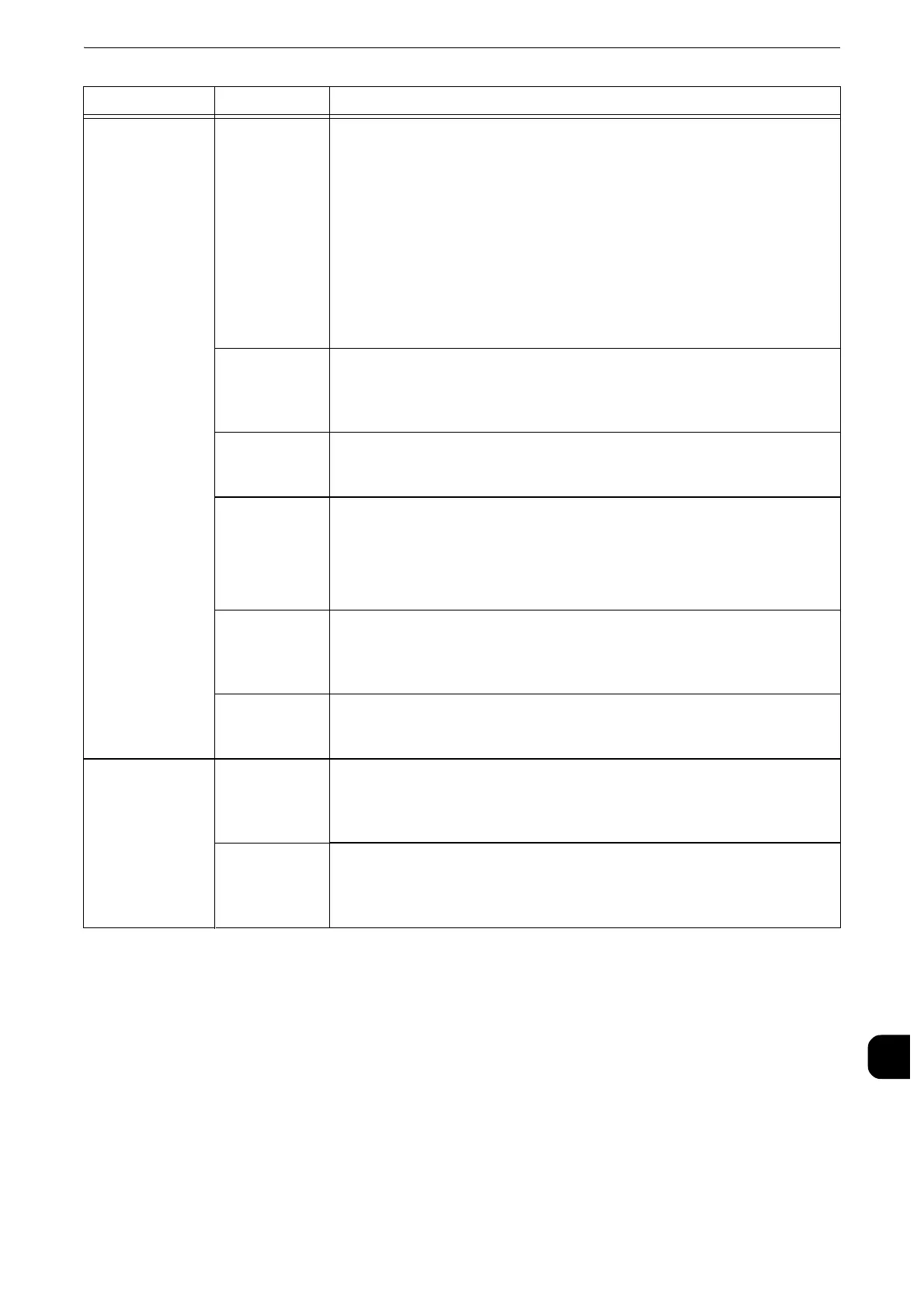
ESCP switch 55
(Text quality)
Sets the Text Quality mode to high quality or draft.
[0](Default): High Quality
[1]: Draft
z
Since the default value is selected for the [Text Quality], [Reduced Characters],
[Character Code Table], [Page Length], and [1-inch Perforation Skip] features, their
settings will not be affected when an extended command is received.
z
Changing settings does not change actual printing quality.
z
This setting affect the Text Quality selection commands. For more information on
the Text Quality selection commands, contact our Customer Support Center.
56
(Reduced
characters)
Reduces the size of single-byte alphanumeric characters when printing.Sets
whether to reduce their sizes or to print them at a scale of 100%.
[0](Default): Off
[1]: On
58
(Page length)
Sets the length of a page (printable area) to 11 inches or 12 inches.
[0](Default): 11 inches
[1]: 12 inches
59
(1-Inch
perforation
skip)
Sets whether or not to leave a 1-inch space between pages.
[0](Default): Off
[1]: On
z
This is effective only when CSF under [Paper Position] is set to [Off].
60
(Paper feed
position)
Sets the position to start printing at 8.5 mm or 22 mm below the top edge of
paper.
[0](Default): 8.5mm
[1]: 22mm
61
(CR feature)
Sets the action to be executed when a CR command is received.
[0](Default): Carriage return
[1]: Carriage return and linefeed
Position
adjustment
15
(Vertical
position
adjustment)
Adjusts the printing position vertically or horizontally, and changes the
positions of the margins.
[0](Default): Off
[1-500]: -250 to +250 mm
16
(Horizontal
position
adjustment)
z
Data outside the printable area is not printed regardless of the adjustment of the
print position. In addition, data moved outside the printable area as a result of
adjusting the print position is not printed.
Setting Item Item Number Value



 To Next Page
 Loading...


