7.7 Security Features 149
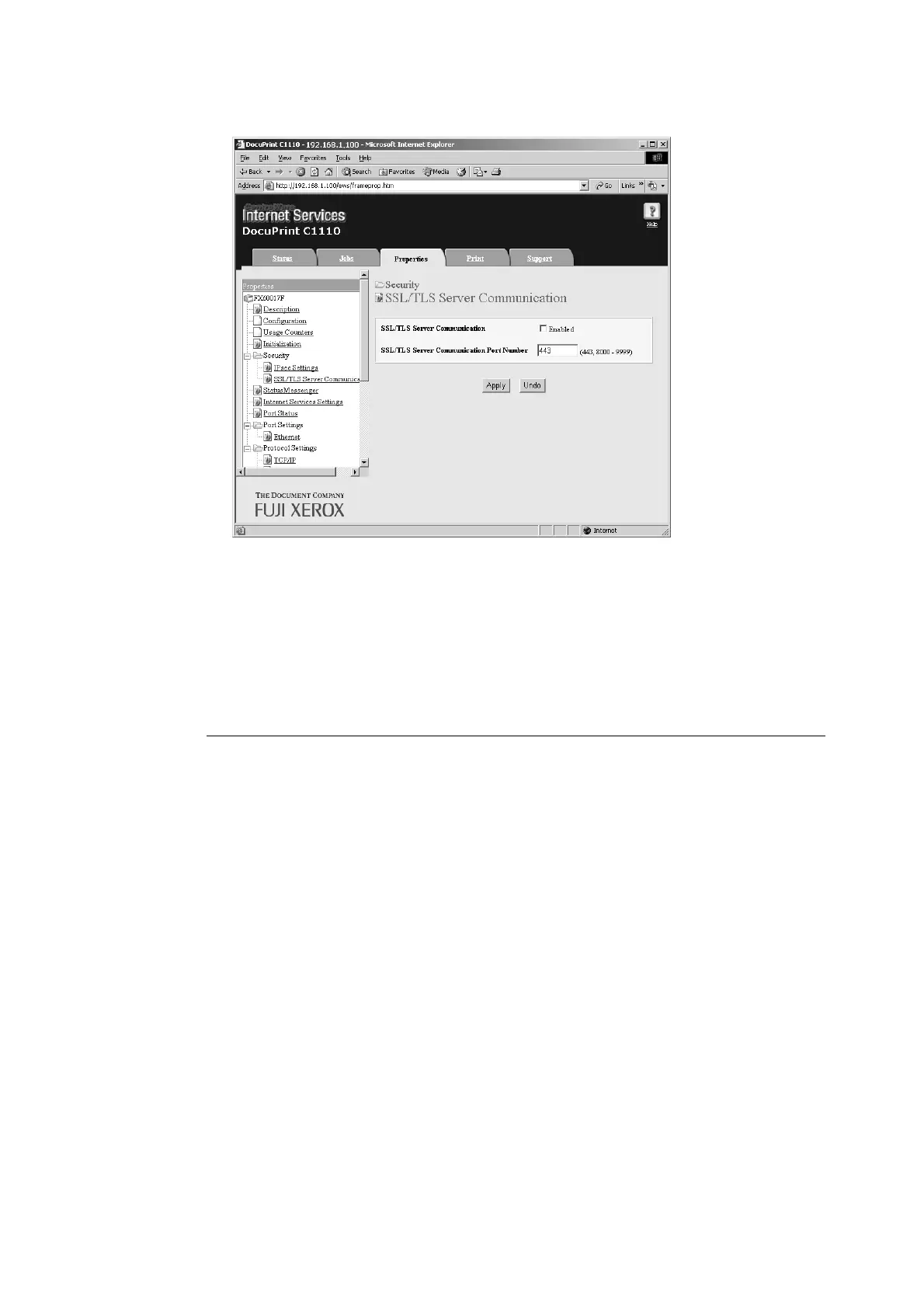
10. Select the [Enabled] check box for [SSL/TLS Server Communication].
11. Set [SSL/TLS Server Communication Port Number].
Note
• The SSL/TLS port number should not be the same as the HTTP port number.
12. Click the [Apply] button and reboot the printer.
Accessing CentreWare Internet Services when Data Encryption is
Enabled
When data encryption is enabled, enter "https" instead of "http" before the address when
accessing CentreWare Internet Services.
• Example of IP address
https://192.168.1.100/
• Example of internet address
https://xxx.yyyy.zz.vvv/
Note
• If you reboot CentreWare Internet Services, [Certificate Management] appears on the [Properties] tab.
On the [Certificate Management] page, you can verify or delete certificates.
• If you changed the port number, enter “:” (colon) and then the new port number after the address.
Example: https://printer’s IP address:port number/



 To Next Page
 Loading...