EasyManua.ls Logo

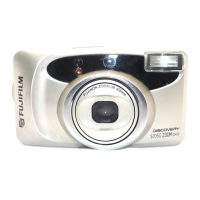
FujiFilm Discovery S1200 - User Manual

FujiFilm Discovery S1200
50 pages
Print Icon
To Next Page IconTo Next Page
Loading...
OWNER
,
S MANUAL
ENGLISH

Questions and Answers

  • K
    Kathleen JohnsonAug 13, 2025
    Why is my FujiFilm Discovery S1200 picture too dark?
    • I
      Isabella ParkerAug 13, 2025
      If your FujiFilm Digital Camera picture is too dark because the subject was too far for flash photography in a dark place, ensure you shoot within the specified coverage distance of the electronic flash. Also, avoid covering the flash with your finger. If the subject was backlit, turn on the backlight compensation flash mode and press the shutter release button.
  • A
    Arthur SchultzAug 17, 2025
    How to fix a blurry picture with my FujiFilm Discovery S1200?
    • D
      Diana StevensAug 17, 2025
      If your FujiFilm Digital Camera picture isn't sharp, make sure your finger isn't on the AF windows when shooting. Aim the subject properly within the AF frame, or use AF Lock. Clean the lens if it's dirty. Hold the camera firmly, press the shutter release button gently, or use a tripod for slow shutter speeds. Finally, select a mode other than mode if shooting at a close distance.
  • L
    Lindsay OconnorAug 20, 2025
    What to do if the shutter release won’t trip on my FujiFilm Discovery S1200?
    • M
      Michael AnthonyAug 20, 2025
      If the shutter release on your FujiFilm Digital Camera won’t trip, and the “ ” symbol is blinking, replace the battery with a new one. If the power switch is not on, press the POWER button. Alternatively, if “ ” is lit on the exposure counter, remove the film and load an unexposed roll.
  • S
    Stephanie CollinsAug 25, 2025
    Why is the date not printed on my FujiFilm Digital Camera photos?
    • R
      Roberto DunnAug 25, 2025
      If the date is not printed on the front of your FujiFilm Digital Camera pictures, and “- - - - - -” was selected before taking pictures, select a date mode other than “- - - - - -”. Also, try to arrange that there is nothing light-colored where the date appears.
  • B
    Blake DodsonAug 28, 2025
    Why are the numerals blinking on my FujiFilm Digital Camera exposure counter?
    • A
      Ashley DavisAug 28, 2025
      If the exposure counter numerals blink on your FujiFilm Digital Camera, and you removed the film without rewinding it after you began photographing, remove the battery momentarily, then reload it.
  • D
    david18Sep 1, 2025
    Why can't I set the self-timer on my FujiFilm Digital Camera?
    • T
      Tina AndrewsSep 1, 2025
      If the self-timer cannot be set on your FujiFilm Digital Camera, and the date correction mode is on, cancel the date correction mode.
  • J
    Joseph VincentSep 4, 2025
    What to do if the exposure counter doesn't advance on my FujiFilm Discovery S1200?
    • D
      Dawn BradleySep 4, 2025
      If, after loading the film and closing the back cover, the exposure counter does not advance on your FujiFilm Digital Camera, load the film correctly.
  • F
    Francisco SimmonsSep 8, 2025
    Why did the film rewind while photographing with my FujiFilm Discovery S1200?
    • C
      Charles MaySep 8, 2025
      If the film rewound during photographing with your FujiFilm Digital Camera, and you moved the camera back lock during photographing or prewinding, be sure not to move the camera back lock while film is loaded in the camera.

Summary

PRELIMINARY STEPS

ATTACHING THE STRAP

Instructions for attaching the camera's carrying strap securely to the strap lug.

LOADING THE BATTERY

Guide on how to insert the correct 3V lithium battery into the camera's compartment.

TURNING ON YOUR CAMERA

Steps to power the camera on, including lens cover opening and initial display.

CHECKING YOUR BATTERY

How to check the battery capacity indicator on the LCD panel for camera operation.

SETTING THE DATE

Procedure to set the camera's date and time for imprinting on photographs.

SELECTING THE DATE MODE

Choosing the format for date/time imprinting on pictures (YMD, MDY, DMY).

USING YOUR CAMERA

LOADING THE CAMERA

Detailed guide on loading 35mm film, understanding DX coding, and proper film handling.

USING YOUR FINDER

Explanation of viewfinder components like framing area, AF frame, and parallax correction.

USING YOUR CAMERA

Basic operational guidance: holding the camera, test shots, and avoiding lens obstruction.

USING THE AUTO-FOCUS LOCK

How to lock the autofocus on a subject for precise focusing, especially in challenging situations.

UNLOADING THE FILM OR REMOVING FILM IN MID-ROLL

Instructions for automatic film rewinding after the last frame or mid-roll removal.

ADVANCED TECHNIQUES

SELECTING THE EXPOSURE MODE

Overview of the camera's six exposure modes for various photographic scenarios.

USING THE SELF-TIMER

Guide to setting and using the self-timer for delayed or multiple shots.

USING THE REMOTE CONTROLLER

Instructions for operating the camera using an optional remote controller.

TROUBLE SHOOTING

During operation

Solutions for common operational issues like shutter not tripping or exposure counter blinking.

Printed pictures

Troubleshooting common problems affecting the quality of printed photographs.

COMMON SENSE CAMERA CARE

SPECIFICATIONS

FujiFilm Discovery S1200 Specifications

General IconGeneral
Megapixels12.2
TypeCompact
Screen Size2.7 inches
Shutter Speed1/2000 - 8 sec
Storage MediaSD/SDHC
Dimensions93.5 x 60.0 x 27.8 mm

Related product manuals