EasyManua.ls Logo

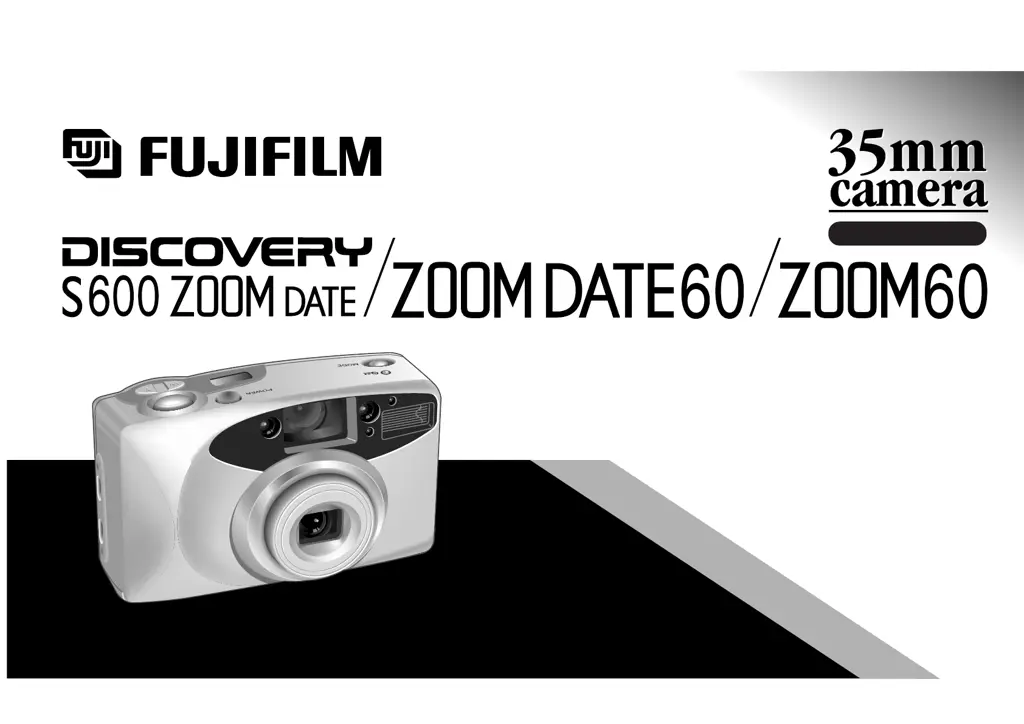
FujiFilm Discovery S600 ZOOM Date - User Manual

FujiFilm Discovery S600 ZOOM Date
44 pages
Print Icon
To Next Page IconTo Next Page
Loading...
OWNER
,
S MANUAL
Fujinon 35-60mm Auto Focus Zoom Lens
Automatic Flash
Easy Film Loading
Automatic Film Rewind
Full Information LED Operating Display
Date/Time Imprinting
(on the DISCOVERY S600 ZOOM DATE /
ZOOM DATE 60 only)
Red-Eye Reduction
ENGLISH

Questions and Answers

  • M
    Maurice SimonAug 12, 2025
    Why is my FujiFilm Discovery S600 ZOOM Date picture too dark?
    • F
      francisjosephAug 12, 2025
      Your FujiFilm Digital Camera picture might be too dark because the subject was too far for flash in a dark place, your finger was over the flash, or the subject was backlit. To fix this, shoot within the flash's specified range, avoid covering the flash, or use backlight compensation flash mode.
  • T
    tarahollowayAug 16, 2025
    Why is my FujiFilm Discovery S600 ZOOM Date picture not sharp?
    • R
      Robert StricklandAug 16, 2025
      Your FujiFilm Digital Camera picture might not be sharp because your finger was on the AF windows, you didn't aim the subject properly, the lens is dirty, the camera is moving, or the subject was too close. To resolve this, hold the camera correctly, compose the picture in the AF frame or use AF Lock, clean the lens, hold the camera firmly (use a tripod for slow speeds), and ensure the subject is at least W: 1.0 m (3.3 ft.), T: 1.6 m (5.2 ft.) away.
  • B
    brent89Aug 20, 2025
    What to do if the shutter release won’t trip on my FujiFilm Digital Camera?
    • A
      Amanda NguyenAug 20, 2025
      If the shutter release won’t trip on your FujiFilm Digital Camera, it could be due to a blinking “ ” symbol, the power switch not being on, or blinking “ ” and “ ” symbols on the display. Try replacing the battery, pressing the POWER button, or removing and reloading the film.
  • L
    Larry HessAug 23, 2025
    Why is the date not printed on the front of my FujiFilm Digital Camera?
    • D
      dmarshAug 23, 2025
      The date may not be printed on the front of your FujiFilm Digital Camera because “- - - - - -” was selected, or there is something light-colored where the date appears. Select a date mode other than “- - - - - -” and ensure the date area isn't obstructed by light colors.
  • M
    Melissa BennettAug 27, 2025
    How to correct the printed date/time on my FujiFilm Discovery S600 ZOOM Date?
    • W
      William DorseyAug 27, 2025
      If the printed date/time is incorrect on your FujiFilm Digital Camera, it's likely because you didn't set the correct date and time after replacing the battery. To fix this, set the date and time after replacing the battery.
  • V
    vancematthewAug 30, 2025
    What to do if the film rewound during photographing with my FujiFilm Digital Camera?
    • J
      Jordan LinAug 31, 2025
      If the film rewound during photographing with your FujiFilm Digital Camera, it's likely because the rewind button was accidentally pressed. Make sure not to move the rewind button while film is loaded in the camera.
  • J
    John DavisSep 4, 2025
    What to do if the camera back will not close on my FujiFilm Digital Camera?
    • T
      Thomas SloanSep 4, 2025
      If the camera back won't close on your FujiFilm Digital Camera, it's probably because the film cassette isn't positioned properly. Straighten the film cassette, and then try to close the camera back.
  • T
    Teresa GibsonSep 7, 2025
    What to do if the exposure counter does not advance after loading film on my FujiFilm Discovery S600 ZOOM Date?
    • B
      benjamindavenportSep 7, 2025
      If the exposure counter does not advance after loading film and closing the back cover on your FujiFilm Digital Camera, it might be because the end of the film wasn't pulled out to the FILM TIP mark or the battery was inserted after loading the film. Pull the film to the FILM TIP mark and reload correctly. If that doesn't work, open the camera back slightly and close it again.

Summary

PART NAMES

Liquid Crystal Display

Date;Time Display

PRELIMINARY STEPS

ATTACHING THE STRAP

Guide on securely attaching the carrying strap to the camera.

LOADING THE BATTERIES

Instructions for inserting and checking the camera's batteries.

TURNING ON YOUR CAMERA

How to turn the camera on and off for operation.

CHECKING YOUR BATTERY

Method to determine the remaining battery capacity indicator.

SETTING THE DATE

Procedure for configuring the camera's date and time settings.

SELECTING THE DATE MODE

How to choose the date format for photo imprinting.

USING YOUR CAMERA

LOADING THE CAMERA

Step-by-step guide for inserting 35mm film into the camera.

USING YOUR FINDER

Explains how to compose shots using the camera's viewfinder.

USING YOUR CAMERA

Instructions on holding and operating the camera for taking photos.

USING THE AUTO-FOCUS LOCK

Method to lock focus on a subject for precise shots.

UNLOADING THE FILM OR REMOVING FILM IN MID-ROLL

Procedure for rewinding and removing film from the camera.

ADVANCED TECHNIQUES

SELECTING THE EXPOSURE MODE

How to choose different flash and exposure settings for various lighting conditions.

USING THE SELF-TIMER

Guide for activating and using the self-timer function for delayed shots.

TROUBLE SHOOTING

Solutions for common problems encountered during camera operation.

COMMON SENSE CAMERA CARE

Best practices for maintaining and protecting the camera from damage and elements.

SPECIFICATIONS

Detailed technical information about the camera's features, performance, and dimensions.

FujiFilm Discovery S600 ZOOM Date Specifications

General IconGeneral
ModelFujiFilm Discovery S600 ZOOM Date
TypeDigital Camera
Megapixels6.0
Effective Pixels6.0
Optical Zoom3x
ApertureF2.8 - F4.9
Shutter Speed1/2 - 1/1000 sec
ISO SensitivityAuto, 100, 200, 400
FocusAuto
FlashAuto, Red-Eye Reduction, Forced Flash, Suppressed Flash, Slow Synchro
Date ImprintYes
Image FormatJPEG
Image SensorCCD
LensFujinon lens
Self-timer10 sec
StorageSmartMedia
Battery TypeAA
Battery2 x AA
Focus Range60cm - infinity (normal), 60cm - 80cm (macro)

Related product manuals