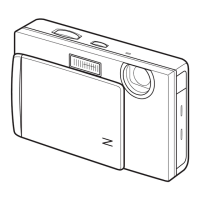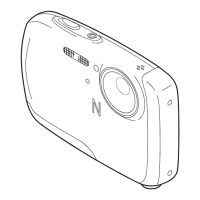
Why are pictures not displayed on my FujiFilm Digital Camera?
- MMichael RyanSep 10, 2025
If pictures are not displayed on your FujiFilm Digital Camera, the wrong option might be selected for PLAYBACK TYPE. Try selecting a different option.

Why are pictures not displayed on my FujiFilm Digital Camera?
If pictures are not displayed on your FujiFilm Digital Camera, the wrong option might be selected for PLAYBACK TYPE. Try selecting a different option.
What to do if my FujiFilm Digital Camera does not take pictures?
If your FujiFilm Digital Camera isn't taking pictures when you press the shutter button, consider these possibilities: * The memory might be full. Try inserting a new memory card or deleting existing pictures. * The memory card might not be formatted. Format the memory card or internal memory. * There might be dirt on the memory card contacts. Clean the contacts with a soft, dry cloth. * The memory card could be damaged. Insert a new memory card. * The battery might be exhausted. Charge it or insert a fully-charged spare. * The camera might have turned off automatically. Simply turn the camera back on.
Why does the flash not fire on my FujiFilm FinePix Z33WP Digital Camera?
If the flash on your FujiFilm Digital Camera isn't firing, here's what could be happening: * The camera might be in a shooting mode where the flash is disabled. Try selecting a different shooting mode. * The battery could be exhausted. Charge the battery or insert a fully-charged spare. * The camera might be in continuous mode. Turn off continuous shooting. * The flash might be off. Choose a different flash mode.
Why does the battery run down quickly on my FujiFilm Digital Camera?
If the battery of your FujiFilm Digital Camera is draining quickly, consider the following: * The battery might be cold. Warm it up by placing it in a pocket and re-insert it before taking a picture. * The battery terminals might be dirty. Clean them with a soft, dry cloth. * High-speed shooting might be enabled. Turn off HIGH SPEED SHOOTING to reduce battery drain. * The camera might be in G mode. Choose a different shooting mode. * The battery's charging life might be over. Purchase a new battery.
Why does my FujiFilm FinePix Z33WP Digital Camera turn off suddenly?
If your FujiFilm Digital Camera turns off suddenly, the battery is likely exhausted. Charge the battery or insert a fully-charged spare battery.
Why does my FujiFilm FinePix Z33WP Digital Camera accidentally turn off?
If your FujiFilm Digital Camera accidentally turns off, it might be because the memory card has been inserted or pulled out. Insert the memory card, close the battery-chamber cover, and then turn on the camera.
What to do if my FujiFilm FinePix Z33WP does not function as expected?
If your FujiFilm Digital Camera is not functioning as expected, there may be a temporary malfunction. Remove and reinsert the battery. If the problem persists, contact your FUJIFILM dealer.
Why are selected pictures not deleted on my FujiFilm FinePix Z33WP?
If selected pictures are not being deleted on your FujiFilm Digital Camera, some of them might be protected. Remove protection using the device with which it was originally applied.
Why is charging slow on my FujiFilm FinePix Z33WP Digital Camera?
If charging is slow on your FujiFilm Digital Camera, the temperature might be low. Charge the battery at room temperature.
Why is macro mode not available on my FujiFilm FinePix Z33WP Digital Camera?
Macro mode might not be available on your FujiFilm Digital Camera if the camera is in a shooting mode that doesn't support close-up mode. Try choosing a different shooting mode.
| Megapixel | 10 MP |
|---|---|
| Camera type | Compact camera |
| Sensor type | CCD |
| Image sensor size | 1/2.3 \ |
| Maximum image resolution | 3648 x 2736 pixels |
| Digital zoom | 5.7 x |
| Optical zoom | 3 x |
| Interface | USB 2.0 |
| Digital SLR | No |
| Video capability | Yes |
| Dimensions (WxDxH) | 92 x 20.6 x 59.6 mm |
| Camera shutter speed | 1/4 - 1/1000 s |
| Focal length (35mm film equivalent) | 35 - 105 mm |
| Focus adjustment | Auto |
| Macro focusing range (tele) | 0.6 - 3 m |
| Macro focusing range (wide) | 0.08 - 0.8 m |
| ISO sensitivity | 64, 100, 200, 400, 800, 1600 |
| Flash modes | auto, Red-eye reduction, Slow synchronization, suppressed |
| Flash range (tele) | 0.7 - 3.4 m |
| Flash range (wide) | 0.7 - 3.9 m |
| Internal memory | 50 MB |
| Compatible memory cards | sd, sdhc |
| Maximum video resolution | 640 x 480 pixels |
| Display diagonal | 2.7 \ |
| Display resolution (numeric) | 230000 pixels |
| Product color | Black |
| Battery type | NP-45 |
| Scene modes | beach, Documents, Fireworks, Museum, Night, Portrait, Sports, Sunset, Underwater, Landscape (scenery) |
| Photo effects | Black&White |
| White balance | auto, daylight, Fluorescent, Incandescent, Shade |
| Camera playback | Slide show |
| Depth | 20.6 mm |
|---|---|
| Width | 92 mm |
| Height | 59.6 mm |
| Weight | 110 g |
Explains how to take photos using the camera's automatic shooting mode for simple operation.
Instructs users on how to fully press the shutter button to take the picture.
Explains how the camera detects faces and removes red-eye for better portrait photography.
Describes the various self-timer modes for capturing group portraits, self-portraits, and reducing camera shake.
Guides users on selecting different shooting modes based on the scene or subject type.
Explains how the camera automatically analyzes scenes and selects appropriate settings for optimal shots.
Details the intelligent flash system, its modes, and when to use it for optimal lighting.
Provides instructions on how to delete unwanted still pictures and movies from the camera.
Guides users on how to record short movies, including framing and starting recording.
Allows joining a series of short movie clips into a single movie file.
Instructs on connecting the camera to a TV to view pictures and movies.
Guides users on connecting the camera to a computer via USB for transferring files.
Explains how to access and use the shooting menu to adjust various photography settings.
Details how to use exposure compensation to adjust brightness for better exposure in challenging lighting.
Explains how to access and use the playback menu to manage captured pictures and movies.
Explains how to copy pictures between the camera's internal memory and a memory card.
Enables capturing a series of pictures rapidly by holding down the shutter button.
Details how to remove red-eye effects from pictures, particularly those taken with flash.
Formats internal memory or memory cards, erasing all data to prepare them for use.
Addresses problems related to the camera not turning on, battery issues, and power supply.
Troubleshoots problems related to macro (close-up) mode or intelligent face detection unavailability.
Solves problems where the flash does not fire, is unavailable, or does not fully light the subject.
Solves common playback problems like grainy images, unavailable zoom, or no sound.
Solves problems related to no picture/sound or incorrect color when viewing on a television.
Covers miscellaneous problems like the camera not functioning as expected or turning off unexpectedly.
Solves problems encountered during shooting, such as memory full or camera not responding.
Addresses issues when the camera cannot detect faces or when the face is obscured.
Addresses problems with taking or recording movies, such as memory limitations or mode issues.
Addresses issues with deleting pictures, such as protected images not being deleted.
Addresses problems with PictBridge printing, such as inability to print or incorrect date printing.
Provides solutions for issues where the camera fails to focus correctly on the subject.
Provides solutions for blurred images, often related to lens condition or focus.
Offers solutions for mottled image appearance, often related to high sensitivity or lighting.
Explains the !AF warning, indicating the camera cannot focus, and provides solutions.
Explains CARD ERROR messages related to unformatted or damaged memory cards.
Addresses warnings related to aperture or shutter speed being too bright or too dark, indicating over/under-exposure.
Explains the NO CARD warning when no memory card is inserted and the camera needs one.
Details the CARD NOT INITIALIZED message, indicating memory card issues requiring cleaning or formatting.


Loading...