EasyManua.ls Logo

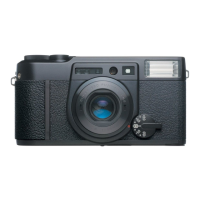
FujiFilm KLASSE S - User Manual

FujiFilm KLASSE S
88 pages
Print Icon
To Next Page IconTo Next Page
Loading...
Owner’s Manual
Read before using
this camera.
Preparation
Thank you for purchasing this product.
Please follow the instructions given in this manual carefully.
Basic
Advance
Mode

Questions and Answers

  • T
    Taylor WhiteAug 4, 2025
    Why are my FujiFilm Digital Camera prints blurred and how to fix it?
    • S
      Susan RamosAug 5, 2025
      If your FujiFilm Digital Camera prints are blurred, it could be due to several reasons. Ensure that the AF window isn't blocked during shooting. Use the AF frame or AF lock to ensure the subject is correctly focused. Clean the lens if it's smeared. Also, hold the camera firmly or use a tripod to avoid camera shake, and set the correct distance in manual-focus mode. Finally, use the AF lock or manual-focus mode if the focus mark in the viewfinder was blinking.
  • D
    Dale ObrienAug 9, 2025
    Why are my FujiFilm KLASSE S prints dark and how to fix it?
    • W
      William CrawfordAug 9, 2025
      If your FujiFilm Digital Camera prints are too dark, especially when the shutter speed in the viewfinder was blinking, try changing the aperture mode or turning the main dial to “?” in aperture AE mode. Also, ensure that subjects taken with flash are within the specified flash distance in low-light conditions.
  • B
    Brian TorresAug 13, 2025
    How to prevent dark prints with my FujiFilm Digital Camera?
    • B
      Brittany HaneyAug 13, 2025
      To prevent dark FujiFilm Digital Camera prints, avoid blocking the flash unit with your finger when taking a photo with flash. If shooting against backlight, use the ? mode. Also, cancel any exposure compensation that may be active.
  • M
    mark71Aug 17, 2025
    Why are my FujiFilm KLASSE S prints bright and how to fix it?
    • L
      Lisa FranklinAug 17, 2025
      If your FujiFilm Digital Camera prints are too bright and the shutter speed was blinking, try changing the aperture mode or turning the main dial to “?” in aperture AE mode. Also, cancel any exposure compensation that may be active.
  • F
    fhicksAug 22, 2025
    What to do if my FujiFilm Digital Camera is out of focus?
    • E
      Erica PollardAug 22, 2025
      If your FujiFilm Digital Camera is out of focus and the focus mark in the viewfinder is blinking, it could be because the subject is too close to the lens. Maintain a distance of at least 0.3m when using KLASSE W, or 0.4m or more for KLASSE S. If the subject isn't suitable for auto-focus, use AF lock or manual-focus mode.
  • C
    cwalkerAug 27, 2025
    How to fix a FujiFilm Digital Camera when unable to release the shutter?
    • K
      kthompsonAug 27, 2025
      If your FujiFilm Digital Camera shutter won't release, several factors could be at play. Try replacing the battery, ensuring the camera is powered on by turning the main dial. Other solutions include properly loading or replacing the film, canceling the self-timer by pressing the mode button, reducing the AEB compensation amount, adjusting the aperture mode, or canceling the AEB mode.
  • G
    gregory30Aug 30, 2025
    How to fix when the date is not imprinted or unclear on FujiFilm KLASSE S Digital Camera?
    • K
      Kelsey ScottAug 30, 2025
      To fix the problem of date not imprinted or unclear on your FujiFilm Digital Camera, select a date mode other than ““.” Avoid placing bright objects like white, yellow, or orange on the right-hand side of the frame where the date is imprinted.

Summary

Important Safety Notice

Preparation

Basic Operations

Start Photographing

Guide to basic auto-photography settings and operation.

Advanced Photography

AF Lock Photography

How to lock focus on a subject outside the AF frame.

AF Lock Using AFL;OK Button

Using the AFL/OK button to lock focus instead of the shutter button.

Aperture AE Photography

Explains aperture priority mode and its effects on depth of field.

Exposure Compensation

How to adjust exposure for bright or dark backgrounds.

Camera Modes

AEB Photography

How to take multiple shots with different exposures automatically.

Manual-Focus Photography

How to use manual focus when AF is not suitable.

Troubleshooting

Troubleshooting for operation

Solutions for common operational issues like unable to shutter.

Troubleshooting for printing

Solutions for print issues like blur or darkness.

Common Sense Camera Care

FujiFilm KLASSE S Specifications

General IconGeneral
BrandFujiFilm
ModelKLASSE S
CategoryDigital Camera
LanguageEnglish

Related product manuals