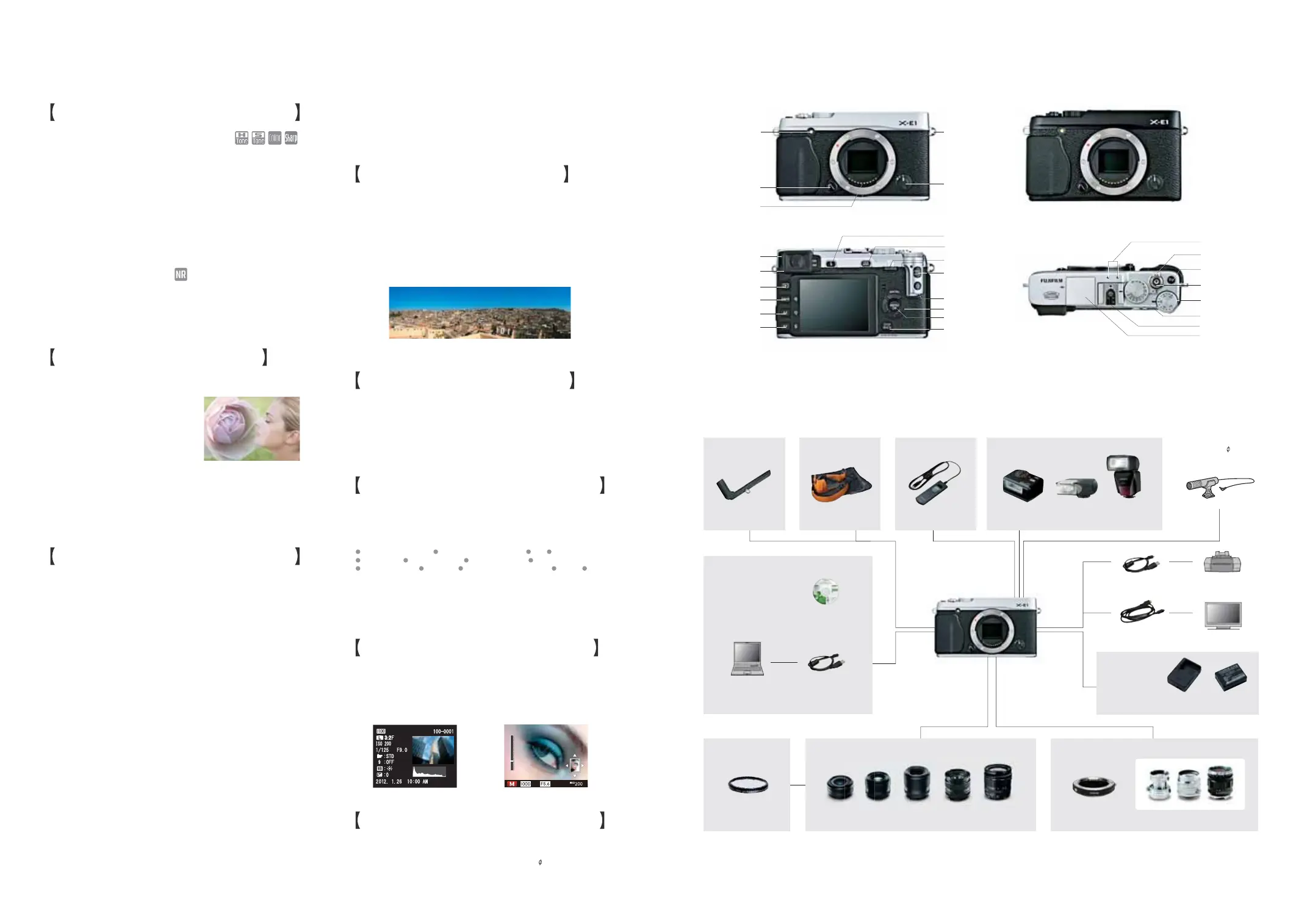
SHOE MOUNT FLASHES
EF-X20 EF-20 EF-42
HAND GRIP
INTERCHANGEABLE FUJINON XF LENS
FILTERS
PRF-39,PRF-52,
PRF-58
MOUNT ADAPTER
POWER
ACCESSORIES
M MOUNT LENSES
X MOUNT LENS LINEUP
IMAGE MANAGEMENT
AND PROCESSING
SOFTWARE
USB CABLE
(INCLUDED W/CAMERA)
MyFinePix Studio
RAW FILE CONVERTER EX
powered by SILKYPIX
(RAW IMAGE CONVERSION
APPLICATION)
PERSONAL
COMPUTER
XF18mmF2 R XF35mmF1.4 R
XF18-55mmF2.8-4 R LM OIS
XF14mmF2.8 R
XF60mmF2.4 R Macro
M MOUNT ADAPTER
LEATHER CASE
REMOTE RELEASE
BLC-XE1HG-XE1
BATTERY
NP-W126
BATTERY CHARGER
BC-W126
21 22
HDMI MINI CABLE
(COMMERCIALLY SOLD)
USB CABLE
(INCLUDED W/CAMERA)
TV MONITOR
PICTBRIDGE-COMPATIBLE
PRINTER
RR-80
X-E
1
SYSTEM
*
The photographed angle of view will vary depending on the mounted lens.
P21-22(24P)
Microphone( 2.5mm)
(COMMERCIALLY SOLD)
SILVER
Strap eyelet
Focus mode
selector
BLACK
Playback button
Q (quick menu) button
DISP (display)/BACK/
Silent mode button
AEL/AFL
(exposure/focus lock)
button
Electronic viewfinder (EVF)
AE (auto exposure)/
Playback zoom out button
DRIVE/
Playback zoom in button
AF (auto focus) /
Delete button
VIEW MODE button
Diopter
adjustment control
AF-assist illuminator
Self-timer lamp
Lens release button
Lens signal contacts
Selector
MENU/OK button
Command dial
Flash pop-up button
Exposure
compensation dial
Shutter speed dial
Shutter button
ON/OFF switch
Hot shoe
Flash
Microphone
Fn (Function)
button
IMAGE QUALITY CONTROL
Fine-tune image quality with “COLOR” for color saturation adjustment,
“HIGHLIGHT TONE” and “SHADOW TONE” for tweaking contrast in
highlights and shadows, and “SHARPNESS” to stress or soften image
outlines. With this built-in detailed image quality control, you can
produce an image that precisely matches your creative objectives.
Color, Tone & Sharpness Adjustment
QUICK START MODE
After turning OFF the power, the X-E1 enters a “sleep” mode (for a
maximum of 24 minutes). If the power is turned ON during this time, the
X-E1 “wakes up” instantly, reducing the normal startup time from 1.0
sec. to approx. 0.5 sec. ready for you to frame and capture the moment.
From SLEEP to ON in 0.5 sec.
CUSTOMISATION FUNCTIONS
Assign any one of the following frequently used functions to the Fn
(Function) button and enjoy smooth one-touch controls during shooting.
Assign Frequently Used Functions to the Fn Button
PLAYBACK FUNCTIONS
Display exposure and other
shooting information recorded
at the time the image was taken.
Shooting Data Display
Zoom in on the focus point of
the captured image to check
focal precision, blur, etc.
Focus Point Zoom
Create, save and instantly recall up to 7 sets of user-defined settings
covering all parameters from ISO sensitivity to white balance.
Save Custom Settings
MOTION PANORAMA
Just sweep the camera across the scene, and the X-E1 captures multiple
images and seamlessly stitches them together to form a single panorama
photo. Even when enlarged to an A3-size print, there is virtually no loss of
resolution. Holding the camera horizontally or vertically, Motion Panorama
lets you shoot the scene with an “M” or “L” angle of view.
Capture Panoramic Shots and Show Them
Off as Stunning Large-size Prints
CONTINUOUS SHOOTING / BRACKETING
Shoot up to 6 frames per second with high-speed continuous
shooting. Capture a series of exposures of moving subjects and other
challenging photographic scenes and later select the best shot.
6fps High Speed Continuous Shooting
Experience a range of photographic expression with a choice of 4
different auto bracketing functions (AE, ISO Sensitivity, Dynamic
Range and Film Simulation).
Array of Powerful Auto Bracketing Functions
One press of the shutter captures 3 shots of the same scene at different
exposures. AE bracketing can be set in 1/3, 2/3 and 1EVsteps.
AE Bracketing
Based on a single exposure, this bracketing function automatically
reproduces the scene as 3 images, each with a different ISO
sensitivity and without changing the shutter speed and aperture,
letting you capture the moment with varying degrees of brightness.
Setting is possible in 1/3, 2/3 and 1EVsteps.
ISO Sensitivity Bracketing
Press the shutter once and high-speed continuous shooting captures
3 exposures of the same scene, each at a different dynamic range
setting (100%, 200% & 400%).
Dynamic Range Bracketing
Just release the shutter once and produce 3 images of the scene
based on a single exposure, each image with a different Film
Simulation effect that you have freely selected and pre-set.
Film Simulation Bracketing
MULTIPLE EXPOSURE
In film cameras, multiple exposure is the
photographic technique of superimposing
one image on another by double
exposing a single frame of film. Through
advanced digital processing, X-E1 can
simulate this technique, expanding your
creative expression. Just select Multiple
Exposure mode and take your first shot
using either the EVF or LCD monitor. Next, while viewing the first image,
you can frame and shoot the second exposure. This ability to precisely
position and focus the second shot lets you not only “see” how the
finished Multiple Exposure image will look, but also explore other creative
photographic possibilities.
Add Artistry to Your Photographic Expression
Select either sRGB for a standard range of color reproduction on
general displays or Adobe RGB® for its broader color rendition
depending on how you intend to output and use the image.
2 Color Space Types
Choose from 5 different levels of noise reduction depending on whether
your priority is the crispness of resolution or keeping noise reduction to
a minimum, and explore the capability to tune sensitivity-related
textural quality when shooting high-sensitivity scenes.
Noise Reduction Control
MULTIPLE EXPOSURE PREVIEW DEPTH OF FIELD ISO SELF-TIMER
IMAGE SIZE IMAGE QUALITY DYNAMIC RANGE FILM SIMULATION
WHITE BALANCE AF MODE SELECT CUSTOM SETTING MOVIE RAW
ELECTRONIC REMOTE RELEASE TERMINAL
Attach a commercially sold remote release with 2.5mm-type jack
and enjoy interval shooting and wireless photography.
Interval and Wireless Photography



 To Next Page
 Loading...











