26
How to use
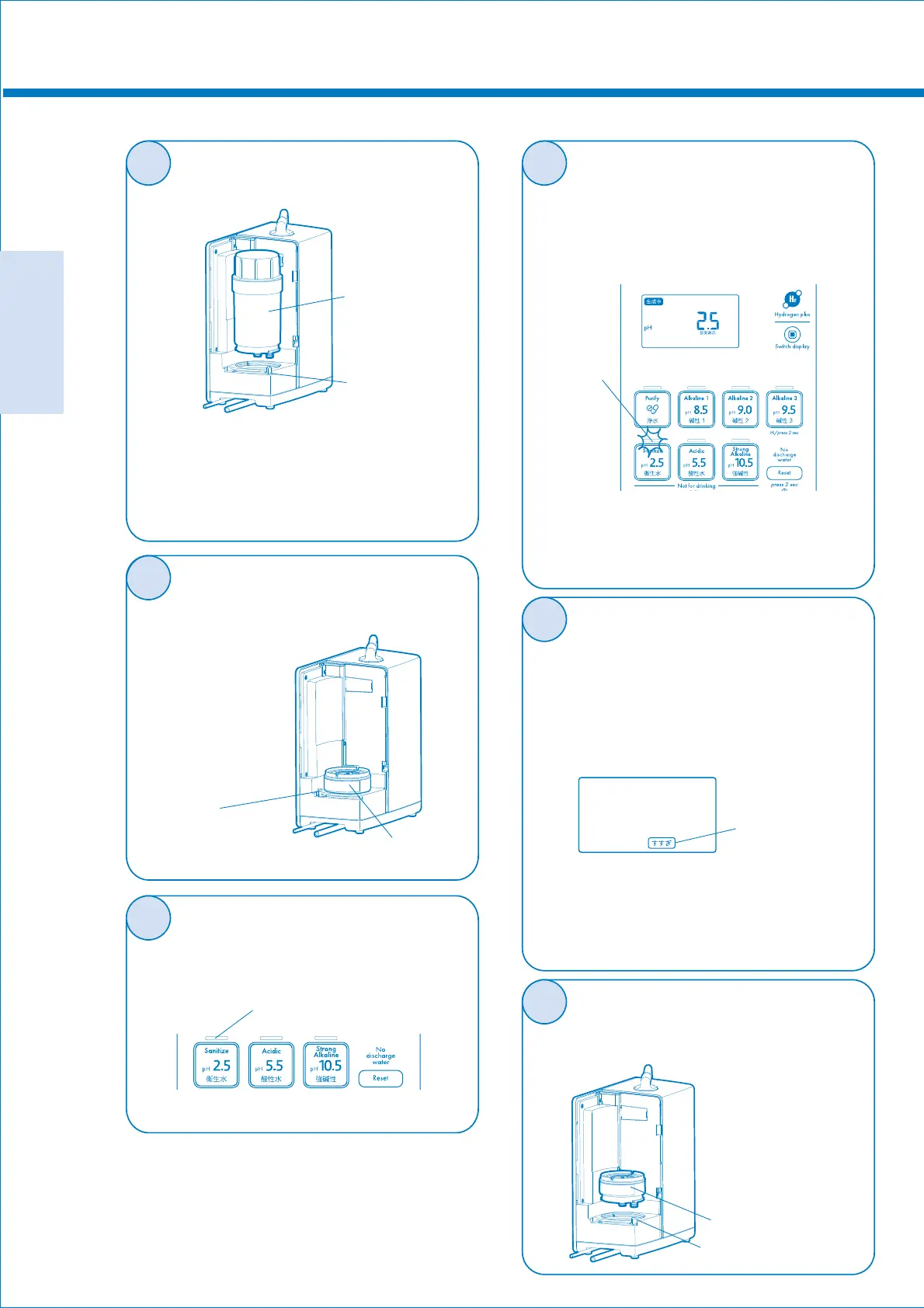
※When the filter is difficult to pull out,
hold the main body from above and
wiggle it back and forth to pull it out.
(Note that water comes out from
the bottom of the filter.)
Generation of sanitized water
If salt runs out after generation of the
“Sanitized water” rinsing is automatically
carried out for approximately 30 seconds.
Water during rinsing is not sanitized water.
Salt remaining in the water passage is
flowed out by rinsing. Do not tighten the
cock of the water tap until rinsing is
completed.
Ɣ$QDODUPVRXQGVGXULQJJHQHUDWLRQRIWKH
“Sanitized water” and rinsing.
Ɣ7KH³$ONDOLQH´³3XULI\´DQG³$FLGLF´PRGH
cannot be used while the sanitize lamp is
flashing.
5
7
8
6
Rinsing mark
(Flashing)
Sanitize lamp (Flashing)
<If the LCD monitor does not change to lit>
Ɣ7KHUHLVQRVDOWLQWKHVDOWFDVH
Add salt into the case.
Ɣ7KHVDOWLVVROLGLILHGDQGKDVQRWGLVVROYHG
Replace the salt.
Close the water tap and then remove
the salt case after completion of rinsing.
9
●
Attach the salt case to the main body,
and turn the fixing ring to the CLOSE
position.
Confirm that the sanitize lamp is
flashing, and attach the filter cover.
Open the cock of the water tap.
The LCD monitor flashes for
approximately 3 seconds, and then
the “Sanitized water” is generated.
The LCD monitor changes to
lit during generation.
4
Turn the fixing ring to the OPEN
position to remove the filter.
●
Filter
●
Fixing ring
OPEN position
(Align the hole on
the main body pipe
with the pipe of the
salt case, and firmly
insert into the deep
end.)
●
Fixing ring
CLOSE position
●
Sanitize lamp
(Flashing)
●
●
●
Salt case
Remove the filter cover,
and turn the fixing ring
to the OPEN position
to pull out the salt case
upward. If water comes
out from the salt case,
wipe the water off.
●
Salt case
Fixing ring
OPEN position



 To Next Page