EasyManua.ls Logo

Fujitsu AP-WH4E - User Manual

Fujitsu AP-WH4E
14 pages
Print Icon
To Next Page IconTo Next Page
Loading...
En-1
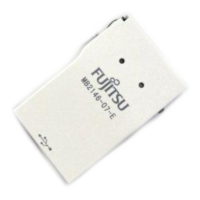
This product is a WLAN adapter to connect an air conditioner to the following web
service.
AIRSTAGE Mobile (For residential use)
You can operate air conditioners with your smartphone.
* Downloading the mobile app “AIRSTAGE Mobile“ is required
SETTING MANUAL (full)
With installation instructions
[Original instructions]
Wireless LAN adapter for air conditioner
Before using this product, read these instructions thoroughly.
Contents
1. SAFETY PRECAUTIONS ............................................................................................. 3
2. USAGE PRECAUTIONS ..............................................................................................4
3. WIRELESS LAN USAGE PRECAUTIONS ..................................................................5
3.1. Radio Wave Usage Precautions.........................................................................5
3.2. Personal Information (Security-related) Usage Precautions .............................6
3.3. Others .................................................................................................................6
4. WLAN ADAPTER SETTINGS (detailed procedure) ....................................................7
4.1. Installation work .................................................................................................. 9
5. TEMPORARY DEACTIVATION OF WIRELESS LAN .................................................11
6. INITIALIZATION (RESET) ............................................................................................ 11
7. OPERATION TIPS ........................................................................................................ 12
8. SPECIFICATIONS.........................................................................................................12
9. TROUBLESHOOTING ..................................................................................................13
UTY-TFSXH3 (AP-WH3E)
UTY-TFSXH4 (AP-WH4E)
PART No. 9383636066-02


Questions and Answers

Summary

1. Safety Precautions

2. Usage Precautions

3. Wireless LAN Usage Precautions

3.1. Radio Wave Usage Precautions

Precautions concerning radio wave emissions, compliance, and co-location of transmitters.

3.2. Personal Information (Security-related) Usage Precautions

Guidelines for protecting personal data and preventing unauthorized access during wireless LAN use.

3.3. Others

Other important usage restrictions, including environmental and equipment interference considerations.

4. WLAN Adapter Settings (detailed procedure)

4.1. Installation work

Detailed steps and essential safety warnings for installing the WLAN adapter.

5. Temporary Deactivation of Wireless LAN

6. Initialization (Reset)

7. Operation Tips

8. Specifications

9. Troubleshooting

Summary

1. Safety Precautions

2. Usage Precautions

3. Wireless LAN Usage Precautions

3.1. Radio Wave Usage Precautions

Precautions concerning radio wave emissions, compliance, and co-location of transmitters.

3.2. Personal Information (Security-related) Usage Precautions

Guidelines for protecting personal data and preventing unauthorized access during wireless LAN use.

3.3. Others

Other important usage restrictions, including environmental and equipment interference considerations.

4. WLAN Adapter Settings (detailed procedure)

4.1. Installation work

Detailed steps and essential safety warnings for installing the WLAN adapter.

5. Temporary Deactivation of Wireless LAN

6. Initialization (Reset)

7. Operation Tips

8. Specifications

9. Troubleshooting

Overview

This document is a comprehensive setting manual for the Fujitsu General Wireless LAN adapter for air conditioners, specifically models UTY-TFSXH3 (AP-WH3E) and UTY-TFSXH4 (AP-WH4E). It provides detailed installation instructions, usage precautions, and troubleshooting tips.

Function Description

The Wireless LAN adapter is a device designed to connect an air conditioner to a web service, primarily "AIRSTAGE Mobile" for residential use. This connectivity allows users to operate their air conditioners remotely using a smartphone. To utilize this feature, downloading the "AIRSTAGE Mobile" app is required. The adapter itself has no physical operation buttons or indicator lamps; all settings and status checks are performed via the air conditioner's remote controller and its indicator lamps.

Important Technical Specifications

The adapter supports the IEEE802.11b/g/n wireless LAN standard. It operates on the 2.4GHz frequency band, with channels 1-11 in the U.S. or Canada, and channels 1-13 in other regions. The maximum radio-frequency power is 40mW. For wireless LAN security, it supports Open, WEP, WPA (PSK), WPA2_Personal (PSK), and WPS for same-LAN Registration. The operating temperature range is 0 - 46 °C (32 - 114 °F). The device complies with Part 15 of FCC Rules and Industry Canada license-exempt RSS standard(s), and it meets FCC/IC radiation exposure limits, requiring installation at least 20 cm or more away from a person's body. For users in EU member states, the device complies with Directive 2014/53/EU.

Usage Features

Installation:

  1. Preparation: Before installation, ensure the indoor unit is disconnected from the power supply. The WLAN adapter is then plugged into the designated WLAN adapter slot on the indoor unit. The specific shape, installation method, and position of the slot may vary by model, so referring to the air conditioner's operation manual is crucial.
  2. Mobile App Installation: Users need to install the "AIRSTAGE Mobile" app on their smartphone, available on "Google Play" or "App Store."
  3. User Registration: After installing the app, users must register their information by following the in-app instructions.
  4. Air Conditioner Registration (Pairing): The procedure for pairing the WLAN adapter with the air conditioner varies by air conditioner model and requires consulting the air conditioner's operation manual. Before starting, wait at least 60 seconds after connecting the power supply to the air conditioner. The smartphone used for setup must be connected to the same access point as the air conditioner. For controlling multiple air conditioners with one smartphone, the setup process must be repeated for each unit.

Operation:

  • The air conditioner can be operated remotely via the "AIRSTAGE Mobile" app.
  • Settings made through the mobile app are not reflected on the wireless remote controller.
  • Remote operation and monitoring are not possible if the air conditioner's power supply is disconnected.
  • The room temperature displayed on the mobile app is for reference only and may not be perfectly accurate depending on room conditions or the air conditioner's operating status.
  • If settings from the mobile app and the remote controller differ, the air conditioner prioritizes the latest operation.
  • If timer settings are configured via both the mobile app and a remote controller, both timer settings will become active.

Prohibited Uses:

  • The WLAN adapter cannot be used with indoor units that are part of a group connection with a wired remote controller (both 3-wire and 2-wire types).
  • It is also prohibited for group connections of indoor units without a wired remote controller (both 3-wire and 2-wire types).
  • Do not use this product in hospitals, near medical equipment, within aircraft, or near electronic equipment handling high-precision control or weak signals (e.g., hearing aids, pacemakers, fire alarms, automatic doors).
  • Avoid locations with high humidity, extreme temperatures, near microwave ovens, within 1 meter of a TV or radio, within reach of children, near automatic control devices, with oil, vapor, or flammable gases, near medical equipment, or where the adapter could get wet.
  • Do not install in locations where wireless equipment is prohibited.

Maintenance Features

Safety Precautions:

  • Only authorized service personnel should repair the product.
  • In case of malfunction (e.g., burning smell), immediately stop air conditioner operation, disconnect power, and contact service personnel.
  • Do not repair, disassemble, or remodel the product.
  • Keep the product dry and do not operate with wet hands.
  • Ensure dust does not accumulate around the WLAN adapter slot to prevent heating or fire.
  • When cleaning the air conditioner, always stop operation and turn off the power.
  • Discharge static electricity from your body before working on the device to prevent damage to board parts.
  • Connect connectors securely to avoid trouble, heating, fire, or electric shock.
  • Do not insert fingers, sticks, or other objects into the connection part of the product or the air conditioner's insertion slot.
  • This product is not a USB device; connect only to specified equipment.

Temporary Deactivation: The wireless LAN can be temporarily deactivated. The procedure for this depends on the indoor unit and is detailed in the air conditioner's operation manual.

Initialization (Reset): The product should be initialized (reset) in situations such as changing the access point, disposing of the product, or transferring it to a third party.

  1. Unregister from Mobile App: First, unregister the air conditioner from the "AIRSTAGE Mobile" app, referring to the app's operation manual for details.
  2. Initialize WLAN Adapter: The procedure for initializing the WLAN adapter depends on the air conditioner model and is found in its operation manual. Note: Initializing the WLAN adapter deletes all saved information.

Troubleshooting: The manual provides a troubleshooting guide for common issues:

  • Downloading/Registration Issues: If the mobile app cannot be downloaded or registered, check the smartphone's OS version and ensure domain permissions are set to avoid spam rejection.
  • Wireless LAN Setup Issues: If setup is not possible, confirm the access point supports IEEE802.11b/g/n and WPS function (button mode). Also, ensure the indoor unit is powered and check for any previous wireless LAN control by contacting service personnel if necessary.
  • WLAN Adapter Registration Issues: If the WLAN adapter cannot be registered to the mobile app, confirm the WLAN indicator lamp on the indoor unit is on (reconnect if blinking or off).
  • Operation Issues from Mobile App: If the air conditioner cannot be operated from the mobile app, confirm the indoor unit and access point are powered, the smartphone is not in flight mode, and both the smartphone and WLAN adapter are connected to the access point. If issues persist, disconnect and reconnect the air conditioner's power supply, wait about 15 minutes, and retry.

For specific details regarding indicator lamps and responses, refer to the air conditioner's operation manual. If problems persist after these checks, consult authorized service personnel.

Fujitsu AP-WH4E Specifications

General IconGeneral
Product TypeAC Adapter
Output Voltage19 V
Input Voltage100-240V
Input Frequency50/60Hz
Connector Size5.5 x 2.5 mm
Connector TypeUSB Type-A

Related product manuals