En-5
PREPARATORY OPERATION
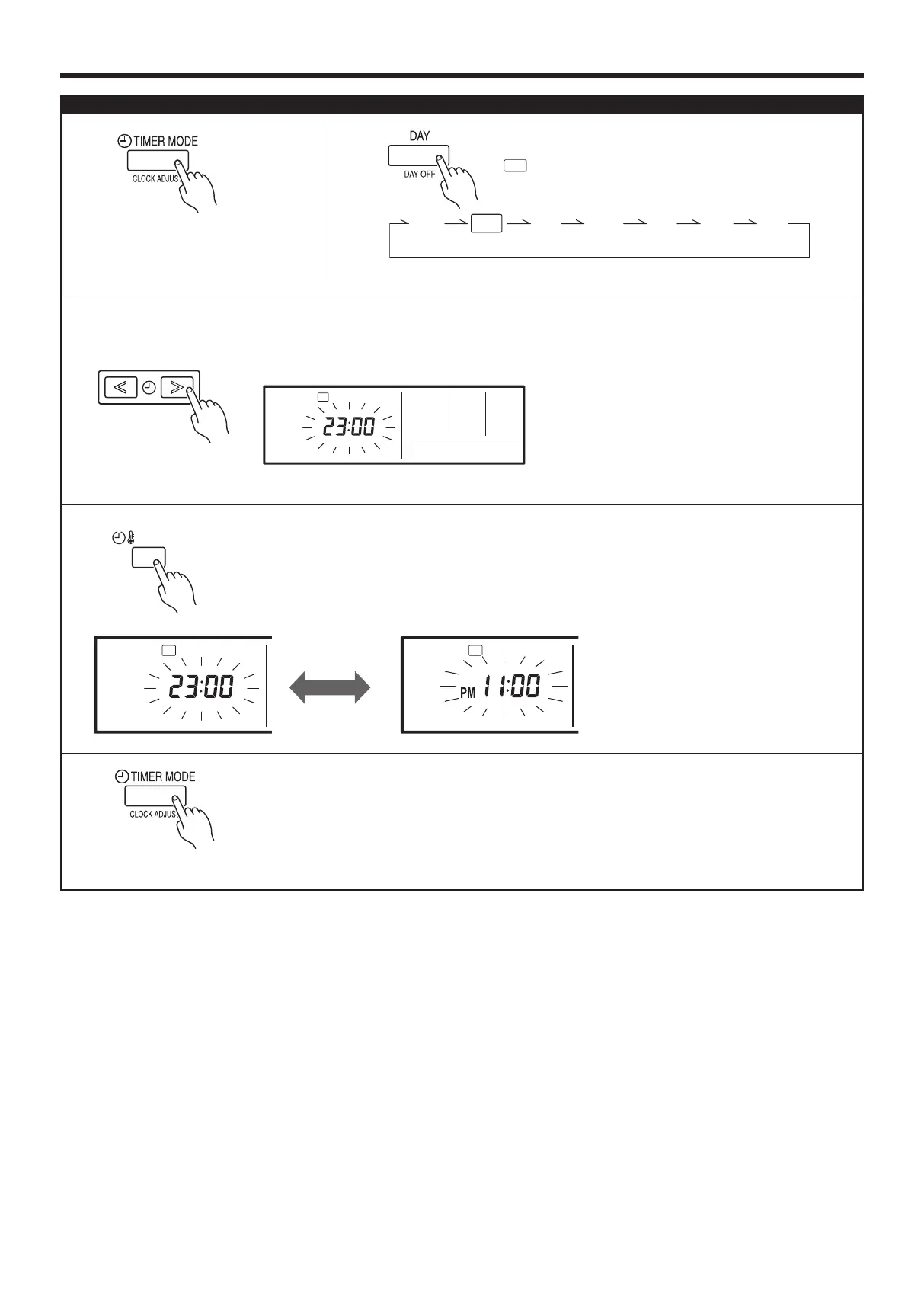
Press the TIMER MODE (CLOCK
ADJUST) button for 2 seconds
or more. The time display on the
remote controller will ash.
2
Press the DAY button and select the current day.
A
appears around the selected day.
Press the SET TIME (< >) buttons to set the current time.
Press repeatedly to adjust the current time in 1-minute incre-
ments. Press and hold to adjust the current time in 10-minute
increments.
ex. Monday 23:00
Press again to end.
1
3
5
Press the SET BACK button to switch between the
12- and 24-hour time displays.
3
4
SU
MO
TU
WE
TH FR
SA
SU
MO
TU
WE
TH FR
SA
Set the current day and time
9374379460_ARTG30LHTA.indd 6 2010/11/26 19:36:50






 To Next Page