34 Technical Manual D2759 (TX150 S7)
Connectors and indicators Features
LAN connectors
The system board is equipped with a Gigabit Ethernet Controller of the type
Intel 82574L. The LAN controller supports transmission rates of 10 Mbit/s, 100
Mbit/s and 1 Gbit/s.
The LAN controller also supports WOL functionality by means of Magic
Packet™. It is also possible to start a system via a LAN without a separate boot
hard disk drive. PXE is supported here.
The separate service LAN connector is used as a management interface (iRMC
S2) and is prepared for operation with the Remote Management. Optionally
LAN connector 1 can also be used for iRMC S2 server management.
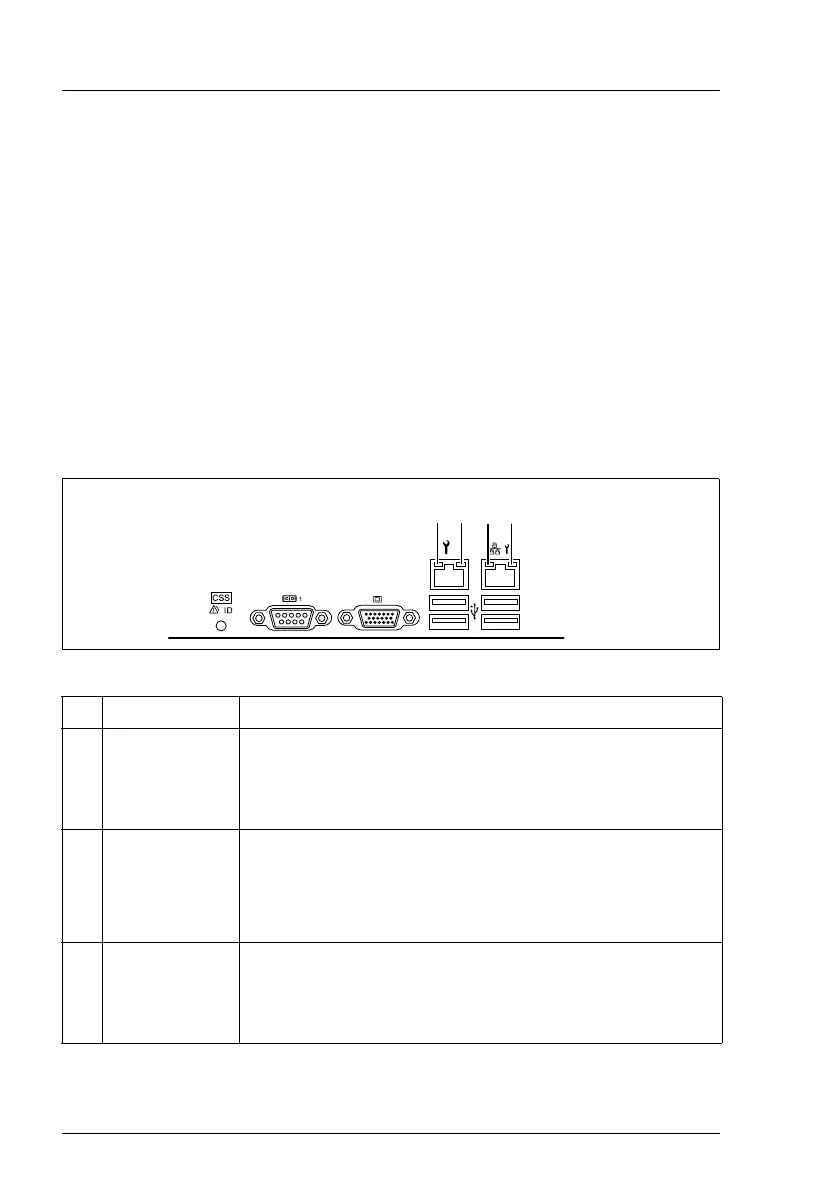
Each LAN connector has two LEDs which display the speed of the connection
and its status:
Figure 8: LAN LEDs
No Indicator Description
1LAN
link/transfer
(service LAN)
Steady green signal when a LAN connection exists.
Remains dark when no LAN connection exists.
Flashes green when LAN transfer takes place.
2 LAN speed
(service LAN)
Steady green signal in the event of a LAN transfer rate
of 100 Mbit/s.
Remains dark in the event of a LAN transfer rate of
10 Mbit/s.
3LAN
link/transfer
(system LAN)
Steady green signal when a LAN connection exists.
Remains dark when no LAN connection exists.
Flashes green when LAN transfer takes place.
2/0
1


 To Next Page