4
3. Mounting Mass-produced MCUs
To mount a mass-produced MCU on the user system without connecting an emulator, use the socket
cover (HQPACK048SD) that is supplied with the probe cable.
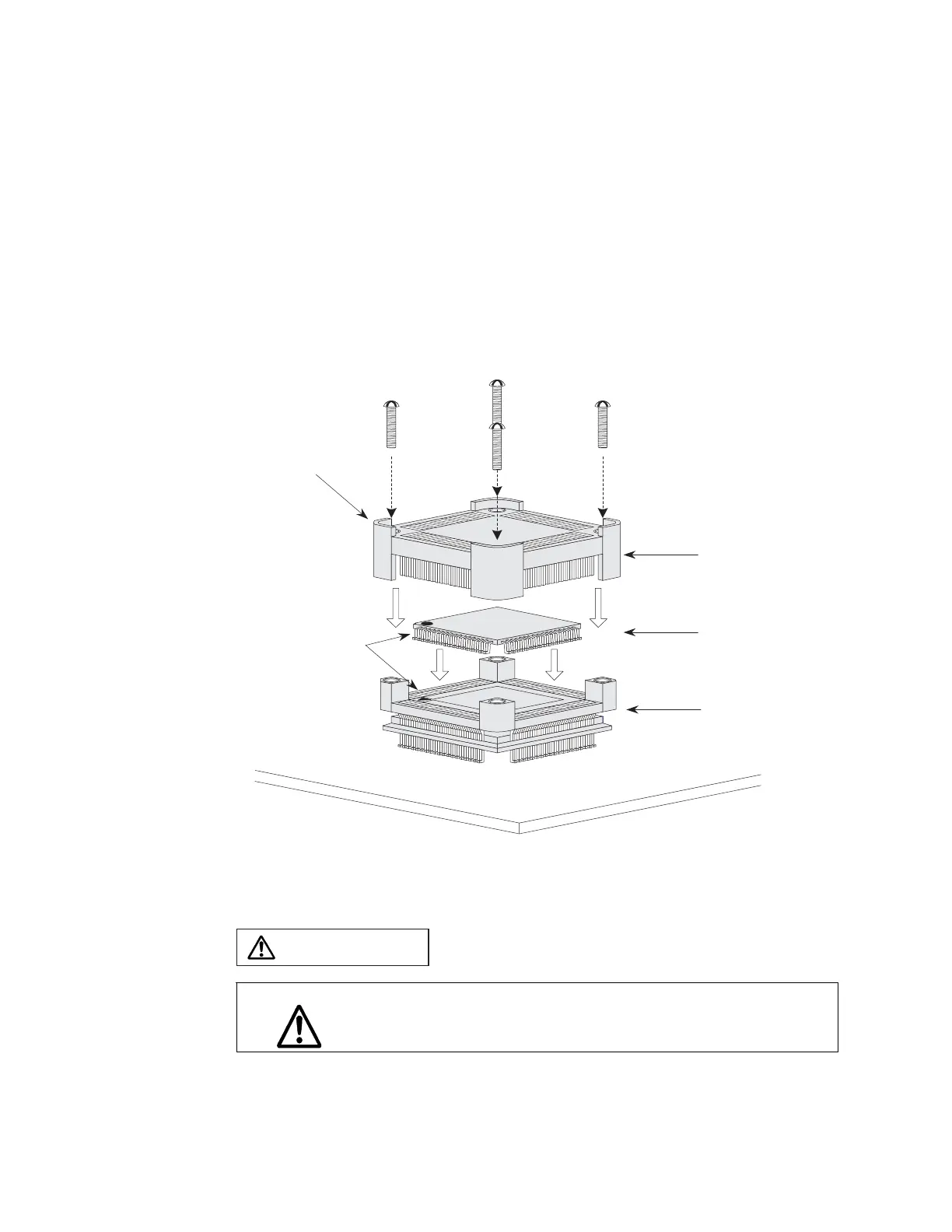
To mount a mass-produced MCU on the user system, place the mass-produced MCU on the user
system by aligning the first pin (▲) of the NQPACK mounted on the user system with the first pin
(●) of the pass-produced MCU as shown in Figure 3-1. Make sure that the mass-produced MCU is
properly placed on the NQPACK. Then, align the first pin of the NQPACK and HQPACK (one
corner of the HQPACK is clipped) in the correct direction as shown in Figure 3-1, and secure them
with four screws. Do not over tighten these screws.
4 screws for securing HQPACK
(Supplied with HQPACK)
First pin
User system board
HQPACK048SD
Mass-produced MCU
The corner is clipped.
NQPACK048SD
Figure 3-1 Mounting a mass-produced MCU
CAUTION
Caution
Align the first pin on the mass-produced MCU so that its orientation is correct.
Otherwise, the mass-produced MCU or the user system may be damaged.


 To Next Page