En-2
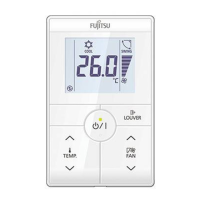
Press the “ ” button or “ ” button to set
the room temperature while in operation. (The temperature
setting should be considered a standard value, and may differ
somewhat from the actual room temperature.)
Temperature setting range
COOL/DRY/
AUTO*
18 to 30 °C (64 to 88 °F) or
20 to 30 °C (68 to 88 °F)
HEAT
VRF system: 10 to 30 °C (48 to 88 °F)
Other system: 16 to 30 °C (60 to 88 °F)
*
The lower limit of the setting temperature is different depending on the place of use.
TEMPERATURE
OPERATION
(1) is displayed if there is an error.
Stop operation immediately and contact the administrator.
(2) When a button is pushed to change a restricted setting,
will fl ash.
When
is displayed, there are functions for which settings cannot be made.
(3) When is displayed, the air conditioner might not suffi ciently cool the room in cooling mode,
or suffi ciently heat the room in heating mode. If does not turn off after a while, contact the
administrator.
(4) The inoperative setting of indoor unit cannot be set.
(5) •
is displayed when operation of the air conditioner has stopped due to an emergency.
•
is displayed when the air conditioner is in test operation.
Press the “ ” or “ ” button to select the fan
speed while in operation. (The available fan speed differs depend-
ing on the type of indoor unit.)
FAN SPEED
Each press of the “ ” button alternates operation and stop.
When operating, LED lamp (green) will light up.
START / STOP
Instructions on heating are not applicable for the “Cooling-only” models.
Press the “ ” button to set the airfl ow direction or swing
mode.
AIRFLOW DIRECTION
Airfl ow direction indicator
(SWING) (UP) (DOWN)
* Select the fan speed automatically.
(AUTO)
*
(QUIET) (LOW) (HIGH)
Fan speed indicator
Operation mode indicator.
Notes:
• If the priority mode is set to “Priority on Administrative
indoor unit”, the operating mode of other indoor units except
Administrative indoor unit will be controlled by an Adminis-
trative indoor unit.
• If the operating mode of Administrative indoor unit is set to
“AUTO”, “AUTO” is displayed in addition to the display of
current operating mode on other wired remote controllers
except Administrative indoor unit. In this case, operation of
other indoor units is controlled by the Administrative indoor
unit.
Ex. : When operating mode of the Administrative indoor unit
is set to “AUTO” while air conditioning setting.
(The indication on other wired
remote controllers except
Administrative indoor unit)
.
When Administrative indoor
unit is set to “AUTO”.
(AUTO) (COOL) (DRY) (FAN) (HEAT)
Notes
9373329428-02_OM.indb 29373329428-02_OM.indb 2 7/20/2017 17:16:567/20/2017 17:16:56














 To Next Page