g) For safety, re-configure the function value [F20](Maximum duration of defrost (Refrigeration)). This
value depends on the type of defrost performed. Examples:
-Electrical defrost (by resistors) = 45 minutes maximum
-Hot gas defrost in plug-in systems = 20 minutes maximum
h) Re-configure the value of function [F12] (interval between defrosts (Refrigeration)), with the desired
value.
5.8 - Record of maximum and minimum temperatures and door
open counter
Press the key < (short touch), then the following messages will appear on the controller display:
[t-1][00.0] (minimum temperature in sensor S1) [00.0](maximum temperature in sensor S1)
[t-2][00.0](minimum temperature in sensor S2) [00.0](maximum temperature in sensor S2)
[Opn][00.0] (number of times the door was opened)*
* - The number of times the door was opened only appears if [F43]=2 or [F43]=6 (Digital input
operating mode: Door opening).
Note: To reset the records (maximum and minimum temperatures, and door open counter), just hold
down the < key during the visualization of minimum and maximum temperatures and the number of
times the door was opened until the message [rst] is shown on the display.
The record of the number of times the door was opened is not reset in the event of power failure.
5.9 - Turning on / off the nighttime Setpoint manually
If [F43]=2 or [F43]=6 (Digital input operating mode: Door opening):
-The controller will respect the time set in function [F46] (closed door time to activate nighttime
setpoint) before changing the setpoint.
-If the nighttime setpoint is active, and the door is open, the controller returns to daytime setpoint.
If [F43]=3 or [F43]=7 (Digital input operating mode: Nighttime setpoint):
-If the input is on, and the daytime mode is active, the nighttime mode is activated
-If the input is off, and the nighttime mode is active, the daytime mode is activated Regardless of being
in daytime or nighttime mode. It is possible to modify the operating setpoint through an easy access
key:
-To activate the nighttime setpoint via the easy access key, press < for 2 seconds until the message
[SP2] is shown on the display, then release the key, and finally the message[,On] is displayed
indicating that the controller started to work in nighttime mode.
-To deactivate the nighttime setpoint via the easy access key, press < for 2 seconds until the
message [SP2]is shown on the display, then release the key, and finally the message [Off] is
displayed indicating that the controller started to work in daytime mode.
5.10 - Turning on / off the lamp manually
This functionality is only available if [F44]=2 (AUX output operating mode: AUX output for lamp).
If [F43]=2 or [F43]=6 (Digital input operating mode: Door opening):
-If the lamp is off, and the door is open, the controller will turn on the lamp, and will remain on while the
door is open.
-If the lamp is on and the door is closed, the controller will respect the time specified in function [F45]
(closed door time to turn off lamp) before turning off the lamp.
-If the lamp is on and the nighttime mode is activated (either manually or due to function [F46] (Closed
door time to activate the nighttime setpoint)), function[F45] is ignored; then the lamp will be turned off
immediately after switching from daytime mode to nighttime mode.
Regardless of being in daytime or nighttime mode, it is possible to turn on/off the lamp through the easy
access key:
-To turn on the lamp manually, press the > key for 2 seconds until the message [LiT] is shown on the
display, then release the key, and finally the message [,On] is shown indicating that the lamp was
turned on.
-To turn off the lamp manually, press the > key for 2 seconds until the message [LiT] is shown on the
display, then release the key, and finally the message [Off] is shown indicating that the lamp was
turned off.
If the lamp is turned on manually, it will remain on until it is manually turned off, or if the door is opened and
then closed (in this situation, the lamp will remain on for the time specified in [F45] and/or [F46] ,
whatever happens first).
5.11 - Enable / inhibit audible signal (buzzer)
To inhibit the audible signal (buzzer), press the > and @ keys (short touch). By inhibiting the
audible signal (buzzer), the following messages will appear on the controller display: [,bu][OFF]. The
buzzer will be restored automatically when there is no longer any active alarm.
5.12 - Enable / inhibit alarms
To inhibit the alarm output in case an alarm is active and if [F44]=1 (AUX output operating mode: AUX
output for alarm), and press keys < and @ (short touch). By inhibiting the alarm output, the
following messages will appear on the controller display:[Alr][OFF] . The visual and audible signals
(buzzer) still remain active, even if the alarm output is inhibited. Sensor alarms disconnected ([er1],
[er2]), ) cannot be inhibited. The Sitrad software will still record the alarm, even if it has been manually
inhibited. The alarm output will be re-enabled automatically when there is no longer any active alarm.
Note 1: The alarms for high/low temperature are automatically inhibited during defrost and drainage
cycles, but they will not be inhibited if they have been detected before the instrument starts the
defrost/drainage cycle.
5.13 - Key Locking / Unlocking
The aim of key locking is to protect the controller against undue changes of its configuration parameters.
To perform the key lock it is necessary, initially, that parameter "F52 - Time for key locking" is set to the
value other than '14 -[,no]' (15 to 60 seconds). If F52 is set as [,no] key locking will not be not
allowed. To lock, press the > key for the time programmed in function F52, until the controller displays
the message [LOC] , then release the key, and finally the message [,On] appears indicating that the
key lock was turned on.
If the keys are locked, the user will only be able to visualize the current value of the setpoint and
parameters configured in the controller. In this condition, if the user attempts to change the configuration
of any of these parameters, the message [LOC] will appear on the display.
To unlock the keys, turn off the controller and reconnect it with the key > pressed. Hold down the >
key for 10s until the message [LOC] appears on the display, then release the key, and finally the
message [Off] is displayed indicating that the key lock was turned off.
5.14 - Activation / Deactivation of control functions
The activation/deactivation of functions allows to place the controller in a state of "Stand-by", where it
only performs the temperature readings of the sensors. All control functions are disabled (including the
alarms), and all outputs remain off. Communication with the Sitrad Software remains operative.
The shutdown of the compressor, if the control functions are disabled, will respect function [F47]
(Minimum time for compressor on), or [F49](Compressor on time in case of error in sensor S1).
The actuation of the compressor, in case the control functions are activated, will respect
function[F48] (Minimum time for compressor off), or [F50] (Compressor off time in case of
error in sensor S1).
If the control functions are turned off through the easy access key and the instrument is de-
energized, when energizing it again, it will operate again with control functions off.
If the control functions are turned off, when they are reconnected, the instrument will respect the
functions [F09] (Control delay at start) and [F18] (defrost at controller start), and the stage
timer is restarted.
Permission to activate/deactivate the control functions of the instrument through the easy access
key will depend on the value configured in function [F53] (Control functions shutdown), but the
activation/deactivation of the control functions via the digital input ([F43]=4 or [F43]=8) will not
depend on the value set in function[F53] .
To deactivate the control functions via the easy access key, the user must press the < key for
10 seconds until the message [CtL] is shown on the display, then release the button, and finally
the message [Off] is displayed, indicating that the control functions were deactivated.
While the control functions are off, the controller will alternate the following messages on the
display:[00.0] (Temperature in Sensor 1) and [OFF].
To reactivate the control functions in case they have been deactivated via the access key, the user
must press the same < key for 10 seconds until the message [CtL] is shown on the display,
then release the key, and finally the message [,On] is displayed, indicating that the control
functions were reactivated.
To reactivate the control functions in case they have been deactivated by the digital input
([F43]=4 or [F43]=8) and also by the easy access key <(pressing of for 10 s), it is
necessary that the control functions are re-enabled through the easy access key and by the digital
input; so that both methods of activation/deactivation of the system allow the control functions to
be activated.
If [F53]=1 or [F53]=2 (control functions shutdown allowed) and the control functions have
been switched off via the easy access key, when changing the function [F53] to '0'(control
functions shutdown not allowed), the instrument will switch the control functions and the control
functions deactivation through the easy access key.
5.15 - Signals
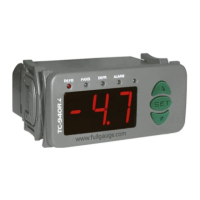
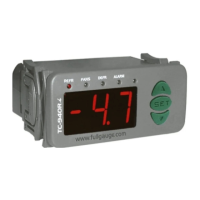
The light signals indicate the status of the control outputs:
COMP: Compressor or liquid gas solenoid
FANS: Evaporator fans
DEFR: Defrost (resistor or hot gas)
AUX: Auxiliary output
[Er1]: Ambient sensor disconnected or out of range
[Er2]: Evaporator sensor disconnected or out of range
[Alo]: Low ambient temperature alarm
[Ahi]: High ambient temperature alarm
[,,,*]:When defrost ends by time and not by temperature, a dot located in the lower right-
hand corner of the display will remain flashing until the next defrost. When defrost ends by time
and not by temperature, this indicates that one (or more) of the cases below is(are) happening:
- The interval between defrosts is too long
- There are burned resistors
- The hot gas is not circulating
- There is an inoperative or short-circuited fan
- The time set for maximum of defrost is too short
[PPP]: Invalid configuration parameters.
- In this situation, the outputs are automatically turned off.
- Check which parameter has invalid data and correct it to return to normal operation.
[Opn]:Door open alarm.
[Off](when shown in alternation with the temperature in S1): Control functions off.
A
A
B B
A
B
7. INTEGRATING CONTROLLERS, RS-485 SERIAL INTERFACE AND
COMPUTER
RS-485
Interface Serial RS-485
Device used to establish the
connection of Full Gauge Controls'
instruments with the Sitrad®.
®
External
Mesh
Grounded terminal
A
A
B B
A
B
A
A
B B
A
B
Interface serial
RS-485
Full Gauge
RS-485
Serial
communication
RS-485
SERIAL
Brown - A
Red - B
TC-940Ri plus
Serial
communication
RS-485
SERIAL
Brown - A
Red - B
TC-940Ri plus
Power supply
Loads supply
Over the specified current
use a breaker.
6. WIRING DIAGRAM
Sensor 2
gray cable
DEFR
FANS
COMMON
1
2
4
5
6
7
8
9
10
11
12
3
1
2
4
5
6
7
8
9
10
11
12
3
AUX
Sensor 1
black cable
12Vdc
To the terminal
of the distribution box
Serial communication
RS-485
B
A
Digital input
IN
GND
- The sensor S1 (black) must be in the ambient.
- The sensor S2 (gray) must be placed in the evaporator through metallic cramp.
AUXILIARY
3A / 240Vac
COMPRESSOR
12(8)A / 240Vac 1HP
DEFROST
5(3)A / 240Vac
FAN
5(3)A / 240Vac 1/8HP
COMP
COMMON
Connecting Block
Used to connect more than one instrument to the Interface.
The wires connections must be made in agreement with the
following rules: Terminal A of the instrument connects to
terminal A of the connecting block, which in turn must be
connected to terminal A of the Interface.
Repeat the procedure for terminals B and , being the cable
shield (optional ground). Terminal of connecting block must
be connected to the respective terminals of each
instrument.
Keep Sitrad updated in website:
http://www.sitrad.com
®


 To Next Page
 Loading...