VX-950 HMI
REMOTE INTERFACE
FOR VX-950 plus
VX950HMIV02-01T-16310
1. DESCRIPTION
VX-950 HMI is an interface to be used with a VX-950 plus controller to facilitate the configuration
and use of the controller.
It enables viewing of the temperatures and the status of the controller, changing the value of function
parameters, and sending commands to the VX-950 plus controller.
2. APPLICATIONS
Interface for use with the .VX-950 plus
VX-950 HMI
V
er.02
VX-950 HMI
VX-950 HMI
Functions
lock
Protection
level
Manual
defrost
IP 65
FRONT
6. RS-485 NETWORK
4. INDICAÇÕES E TECLAS
Temperature unit LED indicator
Increase key
Decrease key
Set key
Quick access
Menu key (Flatec)
FG-CAP in use LED indicator
Compressor output LED indicator
Defrost LED indicator
Fan LED indicator
Power-saving mode LED indicator
3. TECHNICAL ESPECIFICATIONS
Direct supply
Product dimensions
76 x 34 x 77 mm (LxAxP)
Dimensions of the clip for fixing
the instrument
71 ± 0,5 x 29 ± 0,5 mm (see item 5)
VX-950 HMI: 115 or 230 Vac ±10%(50/60 Hz)
5. INSTALLATION - PANEL AND ELECTRIC CONECTIONS
Panel (Front view)
Panel
(Side view)
Dimensions of the clip for
fixing the instrument
71 mm± 0,5
29 mm± 0,5
115 Vac
connection
230 Vac
connection
FOR INSTALLATIONS THAT REQUIRE WATER TIGHTNESS, THE
OPENING TO INSTALL THE CONTROLLER MUST BE 70,5x29mm
MAXIMUM. THE SIDE LATCHES MUST BE FIXED SO THAT THEY
PRESS THE SEALING GASKET TO PREVENT INFILTRATION
BETWEEN THE OPENING AND THE CONTROLLER.
WARNING
IMPORTANT
IT IS ESSENTIAL TO USE THE CORRECT TOOLS IN ORDER TO
AVOID DAMAGES TO THE INSTRUMENT'S CONNECTION
TERMINALS:
3/32''(2.4mm) SLOTTED SCREWDRIVER FOR ADJUSTMENTS
IN THE SIGNAL TERMINALS;
PHILLIPS SCREWDRIVER #1 FOR ADJUSTMENTS AT THE
POWER TERMINALS.
1
5
6
7
8
2
3
4
9
POWER
SUPPLY
10
11 12
13
14
15 16
17
115 Vac
A
B
1
5
6
7
8
2
3
4
9
POWER
SUPPLY
10
11 12
13
14
15
230 Vac
16
17
A
B
Operation temperature
0 to 50°C / 32 to 122°F
Have this manual in your hands
using the FG Finder app.
WARNING!
Different from version 01, only one VX-950 HMI must be
used for each VX-950 Plus.
Line
HMI
Sitrad
VEE
Power
HMI
2 | HMI (B)
1 | HMI (A)
SITRAD
11 |
SITRAD (A)
12 |
SITRAD (B)
RELAYS
13-14 | fans
15-16 | compressor
17-18 | defrost
Line
SENS. PRESS.
3 |
4~20mA (green)
4 |
12Vdc (brown)
|
Power Supply
12Vdc - 1.3A
vx-950 plus
SENS. TEMP. / DIG. IN
9-10 |
sens. ambient temp.
8-9 |
sens. evap. temp.
6-7 |
sens. suction temp.
5-6 | digital input (door)
A
A
B B
A B
®
B A B
A
A
B B
A B
A B
HMI
Sitrad
VEE
Power
HMI
2 | HMI (B)
1 | HMI (A)
SITRAD
11 |
SITRAD (A)
12 |
SITRAD (B)
RELAYS
13-14 | fans
15-16 | compressor
17-18 | defrost
Line
SENS. PRESS.
3 |
4~20mA (green)
4 |
12Vdc (brown)
|
Power Supply
12Vdc - 1.3A
vx-950 plus
SENS. TEMP. / DIG. IN
9-10 |
sens. ambient temp.
8-9 |
sens. evap. temp.
6-7 |
sens. suction temp.
5-6 | digital input (door)
Keep Sitrad up-to-date through the
site: http://www.sitrad.com.br
®
A
A B
CONV. 32,
CONV. 256
or TCP-485
VX-950 HMIVX-950 HMI
WARNING
ACCESSORIES:
Only use original accessories of Full Gauge Controls.
If you have any questions, please contact our technical support.
AUTHORIZED SERVICES:
The installation and maintenance of the product must only be performed by qualified personnel.
DUE TO CONSTANT EVOLUTION, FULL GAUGE CONTROLS RESERVES THE RIGHT TO CHANGE THE
INFORMATION CONTAINED IN THIS MANUAL.
BEFORE INSTALLING THE CONTROLLER WE RECOMMEND READING THE INSTRUCTION
MANUAL THOROUGHLY IN ORDER TO AVOID POSSIBLE DAMAGES TO THE PRODUCT.
PRECAUTIONS WHEN INSTALLING THE PRODUCT:
Before performing any procedure in this instrument, disconnect it from the mains; make sure the
instrument has proper ventilation, avoiding installation in panels containing devices that may force
it to work outside the specified temperature limits;
Install the product away from sources that can generate electromagnetic disturbances, such as:
motors, contactors, relays, solenoid valves, etc.

 Need help?
 General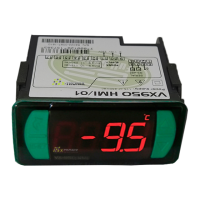

 To Next Page