NEVER leave your machine unattended while it is operating.
ALWAYS use the air assist and the exhaust system when operating the
PDFKLQH)DLOXUHWRGRVRFDQLQFUHDVHWKHÀUHULVNDQGFDXVHGDPDJH
WRWKHPDFKLQH·VSDUWVSDUWLFXODUO\WKHIRFXVOHQV
BE AWARE that removal of any portion of the cabinet will expose a
&ODVVODVHUV\VWHPDQGJUHDWO\LQFUHDVHWKHULVNRILQMXU\DQGRUÀUH
KEEP the area around the machine clean and free of clutter,
combustible materials, explosives, or volatile solvents such as acetone,
alcohol or gasoline.
KEEP YOUR LASER SYSTEM CLEAN – A build-up of cutting and
HQJUDYLQJUHVLGXHDQGGHEULVLVGDQJHURXVDQGFDQFUHDWHDÀUHKD]DUG
Keep your laser system clean and free of debris. Regularly remove the
FXWWLQJJULGWRFOHDQDQ\VPDOOSLHFHVWKDWKDYHJRWWHQVWXFNRUIDOOHQ
through.
ALWAYS NHHSDSURSHUO\PDLQWDLQHGDQGLQVSHFWHGOEVRUODUJHUÀUH
H[WLQJXLVKHURQKDQG)XOO6SHFWUXPUHFRPPHQGVD+DORWURQÀUH
H[WLQJXLVKHURUDPXOWLSXUSRVHGU\FKHPLFDOÀUHH[WLQJXLVKHU
NEVER engrave or cut any material containing PVC or vinyl as corrosive
gases will occur that can cause harm to the operator, as well as damage
the machine and void the warranty. Never engrave or cut any
XQNQRZQPDWHULDO
DO NOTORRNLQWRWKHEHDPRIWKH$OLJQPHQW/DVHUYLVLEOHUHGGLRGHODVHU
DO NOT operate the Alignment Laser without the focus lens in place.
7KHXQIRFXVHGEHDPFDQEHUHÁHFWHGRXWRIWKHFKDVVLV
NEVER operate the machine without a properly operating ventilation
V\VWHP0RVWPDWHULDOVSURGXFHDQLUULWDWLQJVPRNHZKHQHQJUDYHG6RPH
materials, including but not limited to paint, varnish, composition board and
plastics, produce compounds that can be harmful if concentrated.
POWER ON/OFF LVFRQWUROOHGE\WKHVZLWFKDWWKHEDFNRIWKHPDFKLQH
To power the machine on, press the (-) side down. To turn power off,
press the “o” side down. This is your emergency stop switch should you
ever need to cut power immediately.
DO NOT PDNHRUEUHDNDQ\HOHFWULFDOFRQQHFWLRQVWRWKHV\VWHPZKLOH
the unit is turned on.
DO NOT DFFHVVRUWDPSHUZLWKDQ\HOHFWURQLFVXQOHVVVSHFLÀFDOO\
directed to by support, as electronics have high voltage components.
NOTE: Your
7LWDQ
must be connected to the Internet to receive updates and run
the most current version of software. For best results, connect your
7LWDQ
to your
local network router via Ethernet cable. Internet connection is not required to
operate your
7LWDQ
.
Turn On: Turning on your 7LWDQ will automatically boot up your Touch
screen interface. Allow 30 seconds or so for the machine and touch screen
to boot up.
Go To Settings: On the Touch screen interface, push the gear icon to go
to Settings.
Choose Network: 3XVK´1HWZRUNµDWWKHWRSFHQWHURIWKHVFUHHQ
Type IP Into Browser: Type IP into browser: on the touch screen
To ensure the maximum output for your laser cutter, be aware of periodic
PDLQWHQDQFHUHTXLUHPHQWV%HIRUHHYHU\MREDOZD\VEHVXUH\RXUZDWHU
DLUDQGSRZHUDUHRSHUDWLRQDODVZHOODVFKHFNLQJWKDWWKHPDFKLQHDQG
ZRUNVSDFHDUHFOXWWHUIUHH)RUORQJWHUPFDUHUHODWLYHWRXVHIROORZ
these guidelines:
Weekly
Use optical grade lens wipes to clean both sides of the beam combiner, all
mirror surfaces, the focus lens, and the tube aperture. Optic surfaces may
need to be cleaned more often if cutting materials produce excessive
residue. Clean fallen debris from the catch tray of the machine. Less excess
PDWHULDOZLOOUHGXFHÀUHULVNDQGSURYLGHIRUEHWWHUH[KDXVWLQJ$OZD\VNHHS
rails, motors and moving parts free from excess material as it can obscure
movement and cause damage.
Monthly
&KHFNUDLOOXEULFDtion. When the laser arrives, you should be able to visibly
see the lubricant on the x and y rails. These rails will not need to be re-
OXEULFDWHGRIWHQEXWFKHFNPRQWKO\WREHVXUHWKDWWKHUDLOVDUHSURSHUO\
OXEULFDWHGDQGDUHQ·WJULQGLQJRUFDWFKLQJ&KHFN\RXUIXPHH[WUDFWRUÀOWHUV
Depending on your output and the materials being cut, your fume extractor
ÀOWHUVPD\QHHGWREHUHSODFHGDVRIWHQDVHYHU\PRQWK
Quarterly
Change watHULQFRROLQJV\VWHP7KLVZLOONHHS\RXUWXEHVDIHIURP
unwanted debris, mold or evaporation. A chiller system is enclosed and
ZLOOVWD\UHODWLYHO\FOHDQDQGXQGLVWXUEHGEXWLWLVJRRGSUDFWLFHWRFKHFN
and change the water as needed.
Safety Guidelines
General Safety
RetinaEngrave 3.0
There is no download required for RetinaEngrave 3.0. With a local
connection (achievable with the included Ethernet cable) your 7LWDQZLOO
OLQNZLWKWKHVRIWZDUH·V,3DGGUHVV
MaintenanceTouch Screen Interface
Fire Safety
Laser Safety
Electrical Safety
The following safety guidelines are meant to highlight the
most common safety violations. Use of controls or procedures
RWKHUWKDQWKRVHVSHFLÀHGPD\UHVXOWLQKD]DUGRXVUDGLDWLRQ
H[SRVXUHÀUHVRUHOHFWULFVKRFN3OHDVHUHIHUWR\RXUXVHU
manual for a complete listing of safety protocol.
Questions & Answers
What is the ideal browser to run the software on?
$OWKRXJKDQ\EURZVHUZLOOZRUNZHKLJKO\UHFRPPHQGXVLQJ*RRJOH&KURPH
as it is the most compatible with RetinaEngrave 3.0.
:KDWLVWKHLGHDOÀOHW\SHWRLPSRUW"
2XUVRIZDUHLVFRPSDWLEOHZLWKDYDULHW\RIÀOHW\SHV)RUEHVWUHVXWVZH
UHFRPPHQGFRQYHUWLQJSURMHFWÀOHVWRSGIÀOHVEHIRUHLPSRUWLQJ<RXFDQ
also print to .pdf which is particularly useful for Mac users.
:KDWLVWKHGLIIHUHQFHEHWZHHQDUDVWHUDQGYHFWRULPDJHÀOH"
9HFWRUÀOHVDUHJHRPHWULFEDVHGLPDJHVVXFKDVSGIÀOHFRPPRQO\XVHGIRU
FXWWLQJ5DVWHUÀOHVDUHSL[HOEDVHGLPDJHVVXFKDVMSHJFRPPRQO\XVHG
for engraving.
What is the difference between vector cutting and raster engraving?
Vector cutting is a “line” cut that cuts through the material, such as cutting out
shapes. Rastering is a pixel-based surface engraving mostly used to create
LPDJHVRQPDWHULDOV$Q\SURMHFWFDQXWLOL]HRQHRUERWKRIWKHVHPHWKRGV
GHSHQGLQJRQWKHUHVXOWV\RXDUHVHHNLQJ
Should I choose threshold or dither?
)RULPDJHVWKDWKDYHVKDGRZVDQGGHSWKVXFKDVSKRWRJUDSKVLW·VLGHDOWR
use dithering. Dithering creates a series of dots similar to newsprint. This is
effectively creates a grayscale that is ideal for photorealistic engravings. To
GLWKHUDQREMHFWVHOHFWWKHLPDJHDQGFOLFNWKHGLWKHULQJEXWWRQ
Why does the image image in the software appear low resolution?
Remember that the on-screen resolution is intentionally lowered for faster
processing. The true resolution of your design will be determined in the next
step.
What should my speed and power settings be?
6SHHGDQGSRZHUVHWWLQJYDU\RQ\RXUPDFKLQH·VODVHUWXEHSRZHUDQG
\RXUPDWHULDO,W·VUHFRPPHQGHGWRUXQDWHVWRQDQLQFRQVSLFXRXVSDUWRI
WKHPDWHULDOEHIRUHFUHDWL
QJ\RXUÀQDOSLHFH.HHSLQJDPDWHULDOORJLVYHU\
XVHIXOIRUUHPHPEHULQJ\RXULQGLYLGXDOSURMHFWVHWWLQJV,QJHQHUDO
+LJK3RZHU/RZ6SHHG&UHDWHVGHHSHUHQJUDYLQJVRUFXWVWKLFNHU
material. Low Power / High Speed : Best for rapid surface level engravings.
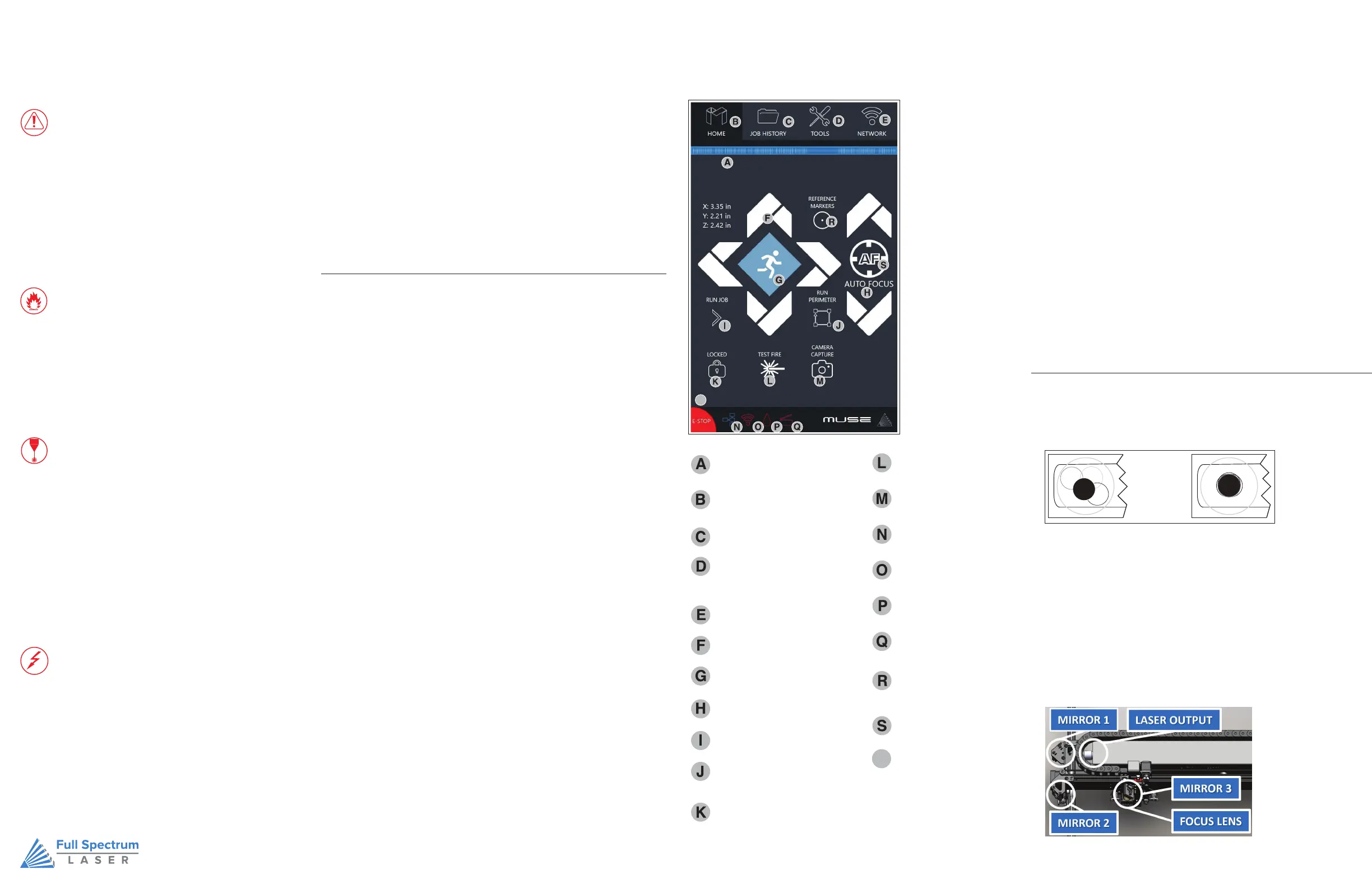
Home
Returns to the main Home Screen
from any sub-screen
Job History
Accesses Job History sub-screen
Tools
Accesses About Muse, Update Status,
Factory Reset, Device Settings, Camera
Calibration, and Home Laser
Network
WIFI settings, Static IP settings
Directional Jog
Jog gantry left, right, up or down
Jog Speed
6ZLWFKIURP6ORZMRJWRIDVWMRJ
Adjust Autofocus
0DQXDOO\DGMXVWIRFXVKHLJKW
Run Job
6WDUWFXUUHQWMRELQZRUNVSDFH
IP Address
0XVH·V,3$GGUHVV7\SHWKLVLQWR
address bar of web browser
Water Indicator
Indicates water system
is running properly
Lid Open / Close
Indicates lid is opened
or closed
Locked / Unlocked
/RFNRUXQORFNWKHJDQWU\
for auto or manual homing
Test Fire
7HVWÀUHWKHODVHU8VHGIRU
mirror alignment and testing,
Camera Capture
Captures the laser bed.
Wired Connection
Indicates connection status from
WKHPDFKLQHWRZLUHGQHWZRUN
WIFI Connection
Indicates connection status from
WKHPDFKLQHWRZLUHGQHWZRUN
Reference Marker
Used only in absolute mode,
WKLVLVDZD\WRDOLJQREMHFWV
without the camera
Auto Focus
Automatically focuses laser to
material
E-Stop
Instantly stop any action.
Opening the lid will also stop the
ODVHUÀULQJEXWQRWIURPPRYLQJ
FSLaser.com
Run Perimeter
/DVHUDXWRPDWLFDOO\-2*VWKHH[WHQWRI
WKHFXUUHQWSURMHFW
0XVH·VWRXFKSDQHODOORZV\RXWRFRQWUROWKHEDVLFIXQFWLRQVRI\RXUPDFKLQH
without needing to connect to a computer. This is very convenient during
DOLJQPHQWDQGWHVWLQJSURFHGXUHV7RDFWXDOO\UXQMREV\RXZLOOQHHGWRDFFHVV
the RetinaEngrave 3.0 software.
T
T
0
U
W
2SHQWKH6DIHW\/LG<RXZLOOQHHGWRDFFHVVWKHLQWHULRURIWKHPDFKLQH
3ODFH7KHUPDO3DSHU7DNHDVPDOOSLHFHRISDSHUDSSUR[PPVKRXOGEH
SHQW\DQGSODFHLWRYHUWKHIRFDOOHQVXQGHUPLUURU
3RVLWLRQ/DVHU+HDG0RYHWKHODVHUKHDGLQWRWKHOHIWVLGHRIWKHZRUNVSDFH
&ORVH6DIHW\/LG
7HVW)LUHWKH/DVHU3UHVVWKH)LUH/DVHU,FRQ%XWWRQRQWKHWRXFKVFUHHQ
5HSHDW7HVW)LUHLQ7ZR2WKHU3RVLWLRQV:LWKRXWUHPRYLQJWKHWKHUPDOWDSH
UHSHDWILULQJWKHODVHURQFHLQWKHFHQWHURIWKHJDQWU\DQGDQRWKHURQWKHIDUULJKW
RIWKHJDQWU\
&KHFN5HVXOWV:LWKWKHWKUHHSRVLWLRQWHVWILUHFRPSOHWHRSHQWKHOLGDQG
UHPRYHWKHWKHUPDOWDSH7KHWKUHHEXUQPDUNVVKRXOGRYHUODSHDFKRWKHU
SHUIHFWO\VHHLOOXVWUDWLRQ,IWKH\GRQRWRYHUODSSHUIHFWO\\RXZLOOQHHGDOLJQWKH
PLUURUV
1RW$OLJQHG $OLJQHG
7KH &2DQG$OLJQPHQW/DVHUEHDPVZHUHPDWFKHGWRIROORZWKHVDPHSDWK
WKURXJKWKHPLUURUV DQGILUHGRZQWKHFHQWHURIWKHIRFXVLQJKHDG%HIRUH
VWDUWLQJ \RXU ILUVW MRE FKHFN WR VHH WKDWWKHDOLJQPHQWKDVQRWEHHQDOWHUHGE\
WKH VKLSSLQJ SURFHVV


 To Previous Page
 Loading...



