11
How to Replace the Power Nozzle Belt
FB-HMP Model
The brushroll may need to be removed at times, to
cut threads that have become tangled around it or to
replace the belt�
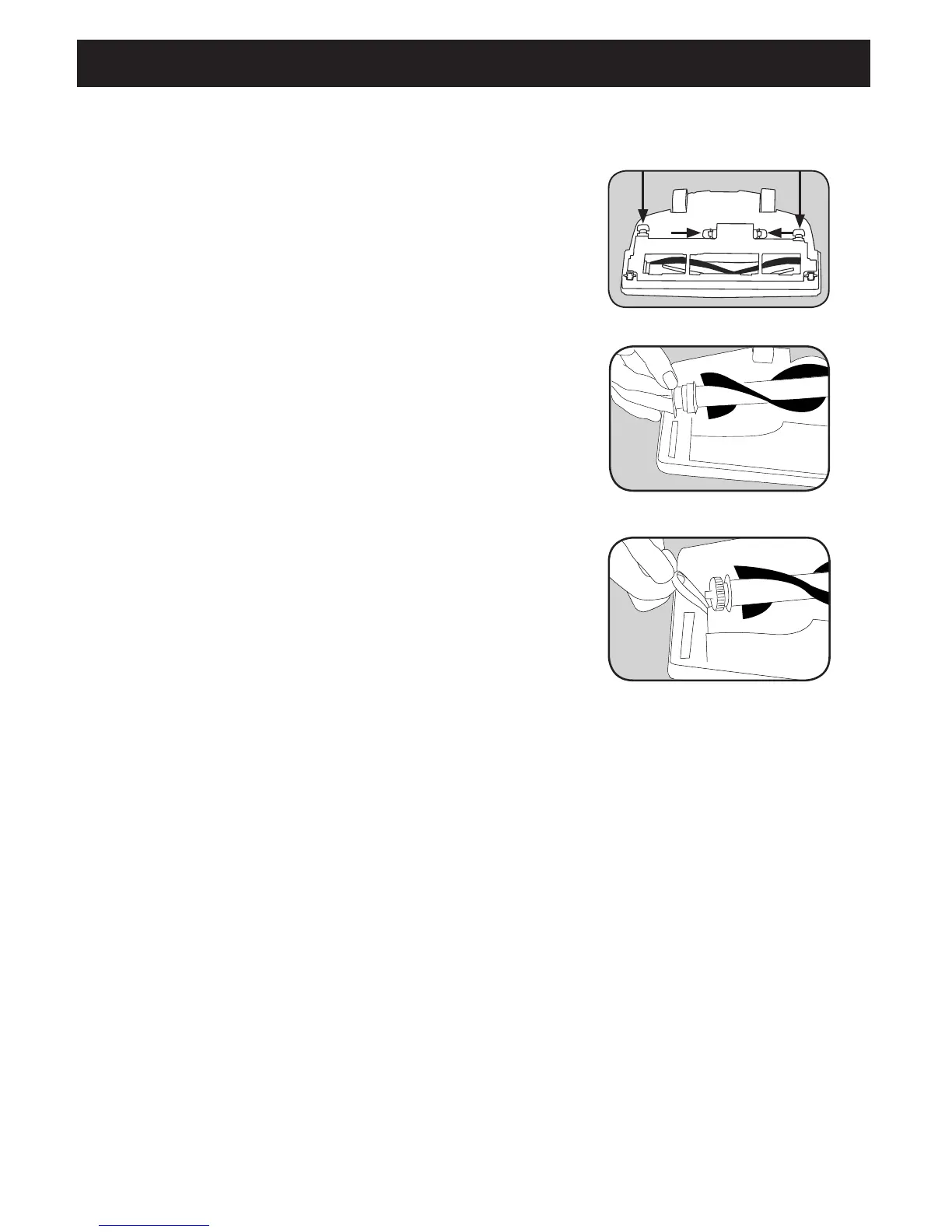
1� Turn the nozzle over and squeeze the tabs in the
middle toward each other� Then lift up on the tabs
on the outer edges� Lift off the baseplate (Fig� 1)�
2� Lift the non-belt end of the brushroll out of the
nozzle first� Remove the belt from the brushroll and
motor pulley (Fig� 2)�
3� To install a new belt, loop the belt around the
motor pulley and then around the brushroll (Fig� 3)�
4� Insert the belt end of the brushroll into the nozzle�
Then push the other end of the brushroll into the
nozzle� Turn the brushroll with your hand to ensure
it is installed correctly�
5� To replace the baseplate, insert the tabs on the
front of the baseplate into the grooves of the
nozzle� Push the baseplate onto the nozzle making
sure all four tabs lock into place�
Fig. 3
Fig. 2
Fig. 1


 To Next Page