English - 5 -
Inserting the Batteries into the Remote
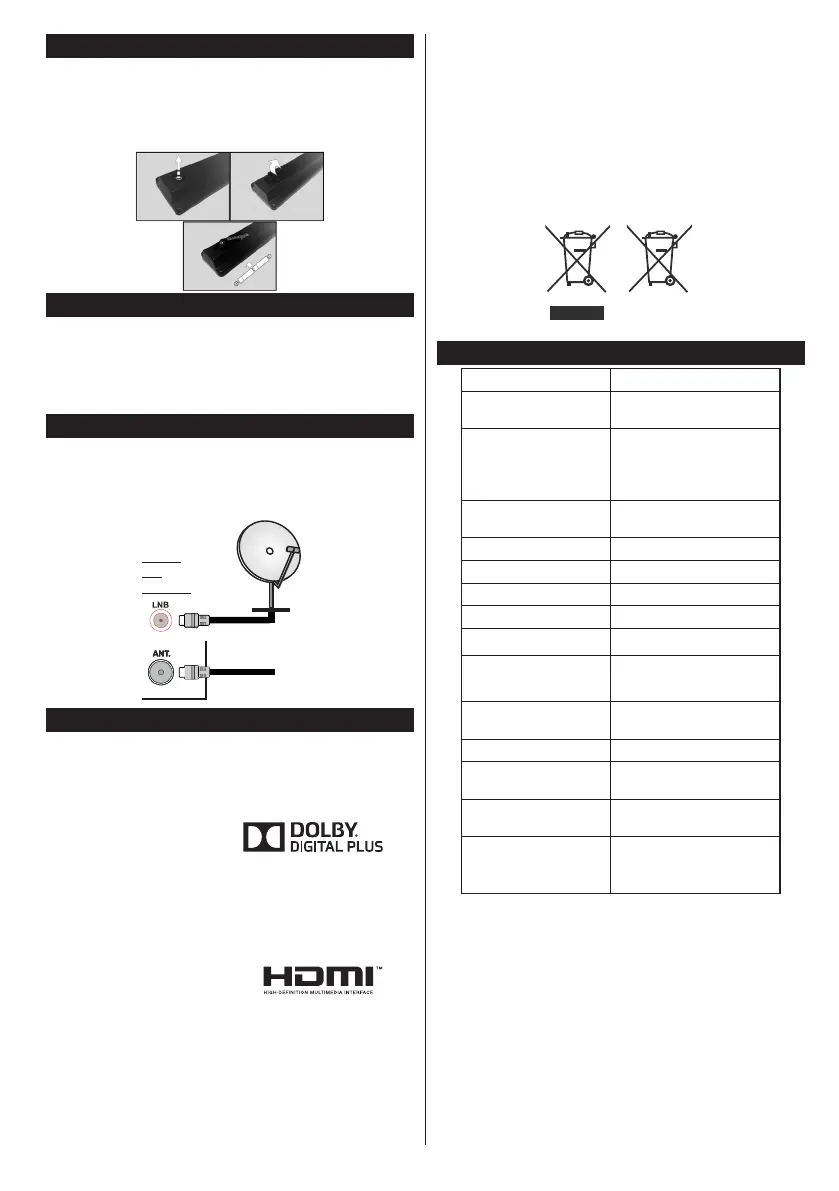
Remove the screw that secure the battery compartment
cover on the back side of the remote control rst. Lift the
cover gently. Insert two AAA batteries. Make sure the
(+) and (-) signs match (observe correct polarity). Place
the cover back on. Then screw the cover back on again.
Connect Power
IMPORTANT: The TV set is designed to operate on
220-240V AC, 50 Hz socket. After unpacking, allow
the TV set to reach the ambient room temperature
before you connect the set to the mains. Plug the
power cable to the mains socket outlet.
Antenna Connection
Connect the aerial or cable TV plug to the AERIAL
INPUT (ANT) socket or satellite plug to SATELLITE
INPUT (LNB) socket located on the back of the TV.
or
Notication
TRADEMARK ACKNOWLEDGMENT
Manufactured under license from Dolby Laboratories.
Dolby and the double-D symbol are trademarks of
Dolby Laboratories.
The terms HDMI and High-Definition Multimedia
Interface, and the HDMI Logo are trademarks or
registered trademarks of HDMI Licensing LLC in the
United States and other countries.
Dear Customer,
By connecting an HDMI cable to your Funai LCD
TV, you have to use only a certied HDMI cable to
guarantee a sufcient immunity against parasitic
frequency radiation.
A certied HDMI cable can be identied by the HDMI
logo on the cable or the cable package.
Information for Users on Disposal of Old
Equipment and Batteries
[European Union only]
These symbols indicate that equipment with these
symbols should not be disposed of as general
household waste. If you want to dispose of the product
or battery, please consider the collection systems or
facilities for appropriate recycling.
Notice: The sign Pb below the symbol for batteries indicates
that this battery contains lead.
Products
Battery
Specication
TV Broadcasting PAL B/G D/K
Receiving Channels
VHF (BAND I/III) - UHF
(BAND U) - HYPERBAND
Digital Reception
Fully integrated digital
terrestrial-cable-satellite
TV(DVB-T-C-S)
(DVB-S2 compliant)
Number of Preset
Channels
10 000
Channel Indicator On Screen Display
RF Aerial Input 75 Ohm (unbalanced)
LNB Input 75 Ohm (unbalanced)
Operating Voltage 220-240V AC, 50 Hz
Audio German+Nicam Stereo
Audio Output Power
(WRMS.) (10% THD)
2 x 6
Power Consumption
(Max)
65W
Weight 6,55 kg
TV Dimensions DxLxH
(with foot)
185 x 735 x 478 mm
TV Dimensions DxLxH
(without foot)
97 x 735 x 438 mm
Operation
temperature and
operation humidity:
0ºC up to 40ºC, 85%
humidity max


 To Next Page