20
EN
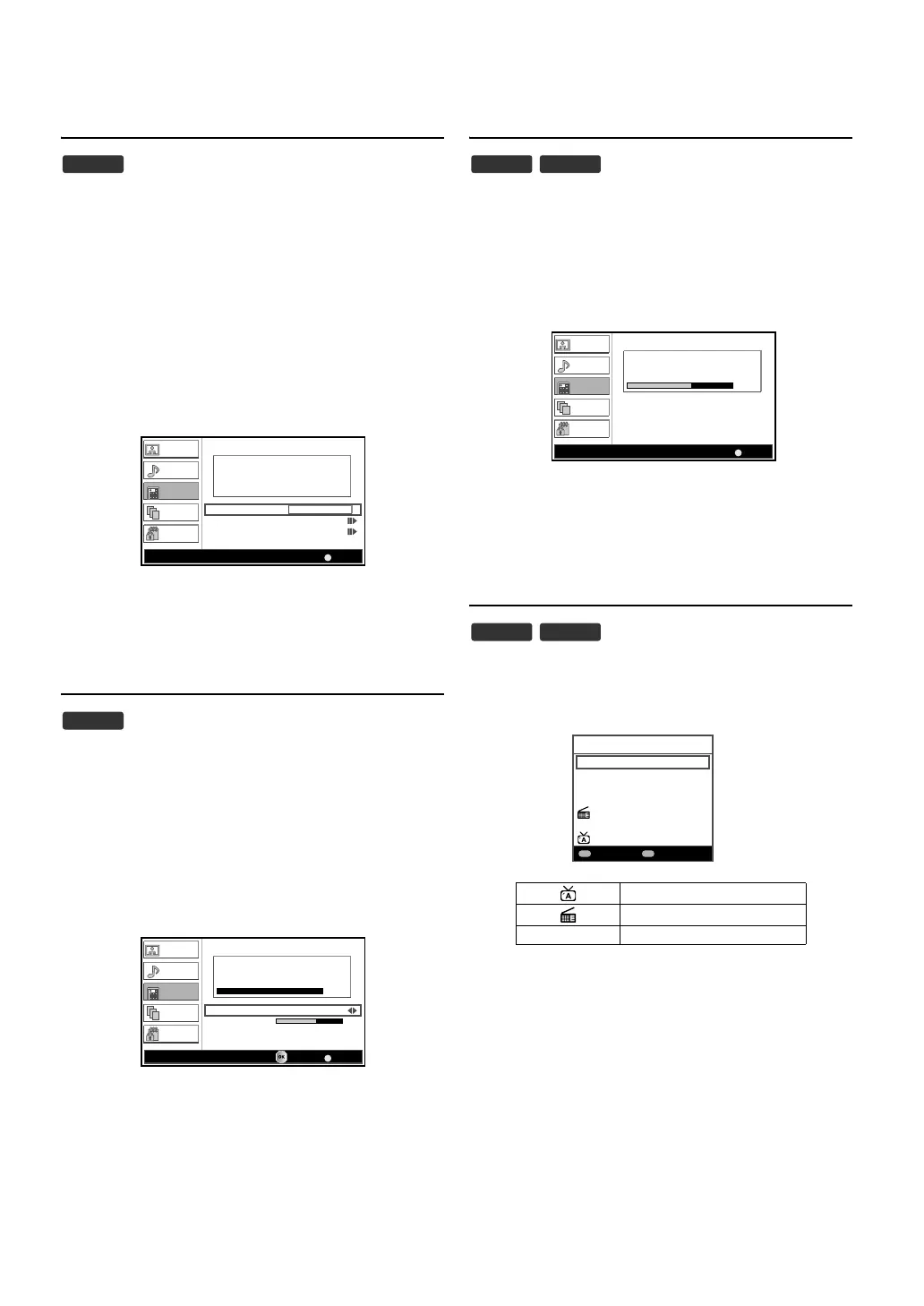
Analogue Manual Scan
You can adjust an analogue channel individually.
1) Press [MENU] to display the menu.
2) Press [K / L] to select “TV”, then press [OK].
3) Press [K / L] to select “Channel”, then press [OK].
4) Press [K / L] to select “Manual Scan (Analogue)”, then press
[OK].
5) Press [the Number buttons] to enter the frequency.
• To select 24, enter [0] first, then press [2] and [4].
6) Press [K / L] to select “Scan Up” or “Scan Down”, then press
[OK].
• Scanning will start automatically.
• When this scanning is completed, “Scan Completed”
message will appear.
7) Press [MENU] to exit.
Single RF Scan
You can adjust a digital channel individually.
1) Press [MENU] to display the menu.
2) Press [K / L] to select “TV”, then press [OK].
3) Press [K / L] to select “Channel”, then press [OK].
4) Press [K / L] to select “Single RF Scan”, then press [OK].
5) Press [s / B] to select the channel number you want to scan,
then press [OK].
• Scanning will start automatically.
• When this scanning is completed, “Scan Completed”
message will appear.
6) Press [MENU] to exit.
Update Scan
You can scan the updated channels automatically.
1) Press [MENU] to display the menu.
2) Press [K / L] to select “TV”, then press [OK].
3) Press [K / L] to select “Channel”, then press [OK].
4) Press [K / L] to select “Update Scan”, then press [OK].
• Scanning will start automatically.
• When this scanning is completed, “Scan Completed”
message will appear.
5) Press [MENU] to exit.
Channel List
You can easily find a channel you want.
1) Press [OK] while watching a programme.
• “Channel List” will appear.
2) Press [K / L] to select the channel you want to watch.
•Press [RED] or [GREEN] to move to the previous or next
page.
•Press [OK] to watch the selected programme if it is
currently available.
3) Press [BACK] to exit.
ATV
BACK
45.00
Picture
Sound
TV
Setup
Parental
Scanning (Analogue)
Start Frequency (MHz)
Scan Up
Scan Down
Manual Scan (Analogue) Back
DTV
BACK
0%
60
21
Picture
Sound
TV
Setup
Parental
Scanning (Digital)
Channel
Signal Strength
Single RF Scan BackSearch
ATV
Digital radio service
no icon
DTV
Note:
You can edit the channel list. Refer to page 21 to page
22.
DTV ATV
BACK
60%
1
8
Picture
Sound
TV
Setup
Parental
Scanning
Analogue:
Digital:
Update Scan Cancel
DTV ATV
18 ETV
19 Euro CH
20 Drama Now!
21 WNS
22 BCT
25 Starcast
38 Eurasia Station
Channel List
Page up Page down


 To Next Page