English
9
EN
[PC CONNECTION]
If you connect this unit and your PC, you can use this unit as a
computer monitor.
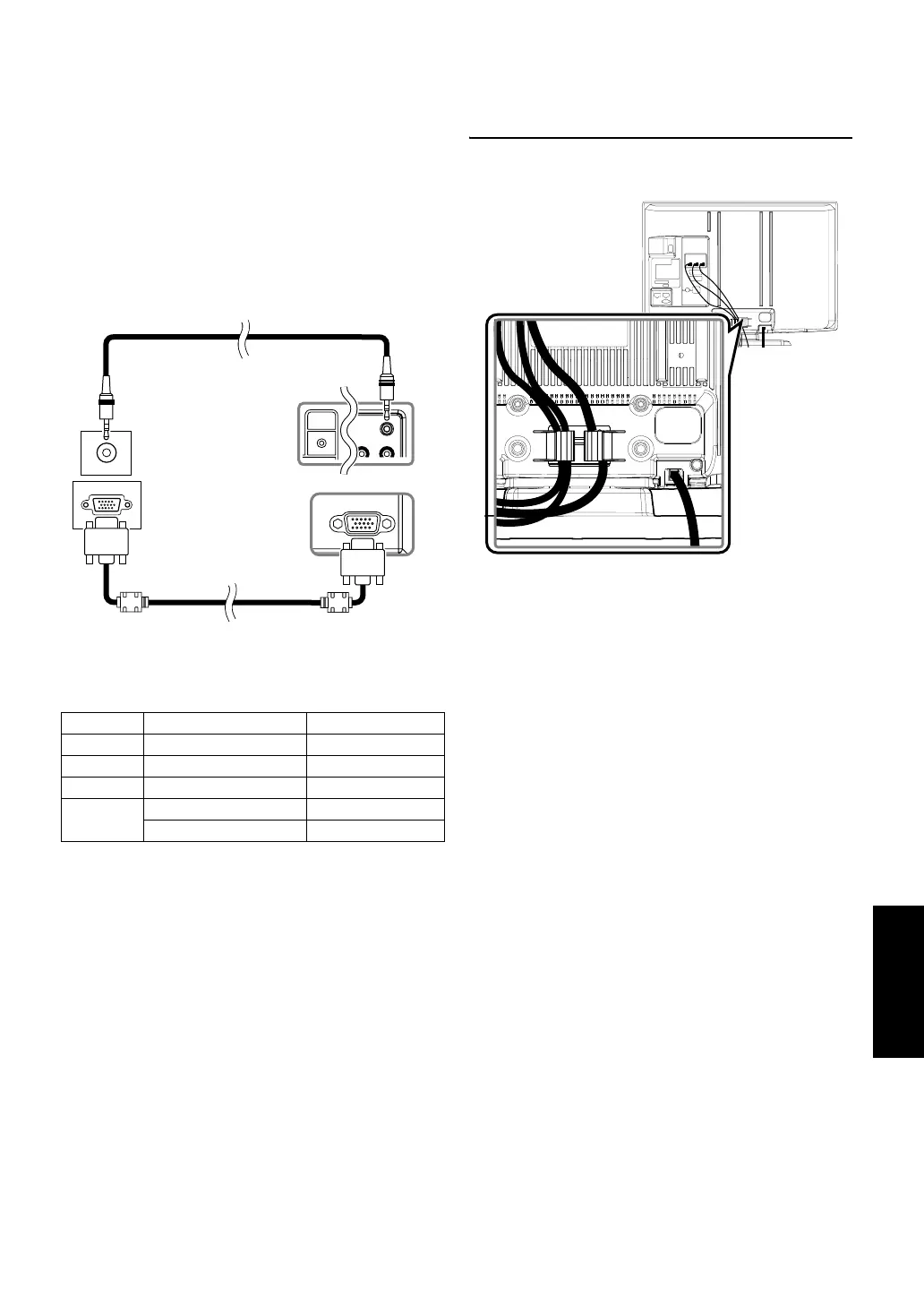
1) Connect the monitor jack of your PC and the PC-IN (RGB)
jack of this unit. Use a VGA cable with ferrite core (not
supplied).
2) Connect the audio line out jack of your PC and the PC-IN
(AUDIO) jack of this unit. Use a mini-plug audio cable (not
supplied).
Precautions for the connection to other devices:
• Please use the VGA cable that has a ferrite core.
The following signals can be displayed:
Cable Management
Keep the cables through this holder to avoid tangle them.
Format Resolution Refresh rate
VGA 640 x 480 60 Hz
SVGA 800 x 600 60 Hz
XGA 1,024 x 768 60 Hz
WXGA
1,280 x 768 60 Hz
1,360 x 768 60 Hz
Note:
Other formats or non-standard signals will not be
displayed correctly.
PC-IN
AUDIO
mini-plug audio cable
(not supplied)
To PC-IN jack
VGA cable with ferrite core
(not supplied)
To monitor jack
To audio line
out jack
Rear of this unit
Rear of this unit


 To Next Page