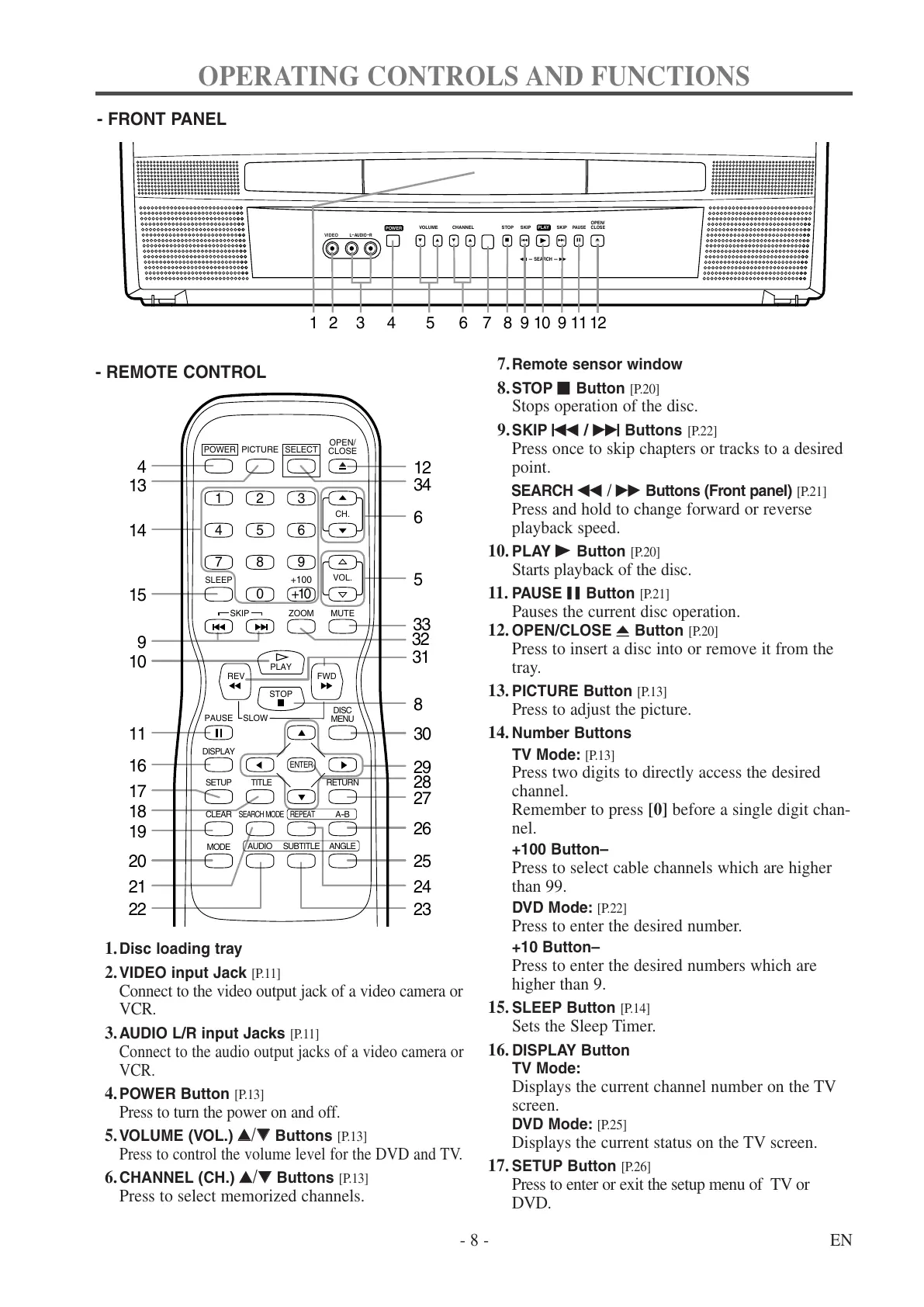
1.Disc loading tray
2.VIDEO input Jack
[P.11]
Connect to the video output jack of a video camera or
VCR.
3.AUDIO L/R input Jacks
[P.11]
Connect to the audio output jacks of a video camera or
VCR.
4.POWER Button
[P.13]
Press to turn the power on and off.
5.VOLUME (VOL.)
KK
/
LL
Buttons
[P.13]
Press to control the volume level for the DVD and TV.
6.CHANNEL (CH.)
KK
/
LL
Buttons
[P.13]
Press to select memorized channels.
7.Remote sensor window
8.STOP C Button
[P.20]
Stops operation of the disc.
9.SKIP H / G Buttons
[P.22]
Press once to skip chapters or tracks to a desired
point.
SEARCH E
/
D Buttons (Front panel) [P.21]
Press and hold to change forward or reverse
playback speed.
10. PLAY B Button
[P.20]
Starts playback of the disc.
11. PAUSE F Button
[P.21]
Pauses the current disc operation.
12. OPEN/CLOSE A Button
[P.20]
Press to insert a disc into or remove it from the
tray.
13. PICTURE Button
[P.13]
Press to adjust the picture.
14. Number Buttons
TV Mode:
[P.13]
Press two digits to directly access the desired
channel.
Remember to press [0] before a single digit chan-
nel.
+100 Button–
Press to select cable channels which are higher
than 99.
DVD Mode:
[P.22]
Press to enter the desired number.
+10 Button–
Press to enter the desired numbers which are
higher than 9.
15. SLEEP Button
[P.14]
Sets the Sleep Timer.
16. DISPLAY Button
TV Mode:
Displays the current channel number on the TV
screen.
DVD Mode:
[P.25]
Displays the current status on the TV screen.
17. SETUP Button
[P.26]
Press to enter or exit the setup menu of TV or
DVD.



 To Next Page