EasyManua.ls Logo

FUNNY AUTO LK960 - Installation; Connection Steps; 2.2 Indicator

FUNNY AUTO LK960
8 pages
Print Icon
To Next Page IconTo Next Page
To Previous Page IconTo Previous Page
Loading...
2.2 Indicator
Green Indicator:GSM
Status of indicator
Meaning
Flash
GSM conversation start
Continuously in bright status
No GSM signal
Green Led off
Power off or in sleep mode
Blue Indicator:GPS
Status of indicator
Meaning
Flash
GPS location successful
Continuously in bright status
GPS signal searching
Blue led off
Power off or in sleep mode
Red Indicator:Power Charge
Status of indicator
Meaning
Flash
Charging
Continuously in bright status
Power off or charged full
Red led off
Power off or charged full
3. Installation
3.1 Connection Steps
Locate the area shown below and open the top cover
Put in SIM card the support 4G signal
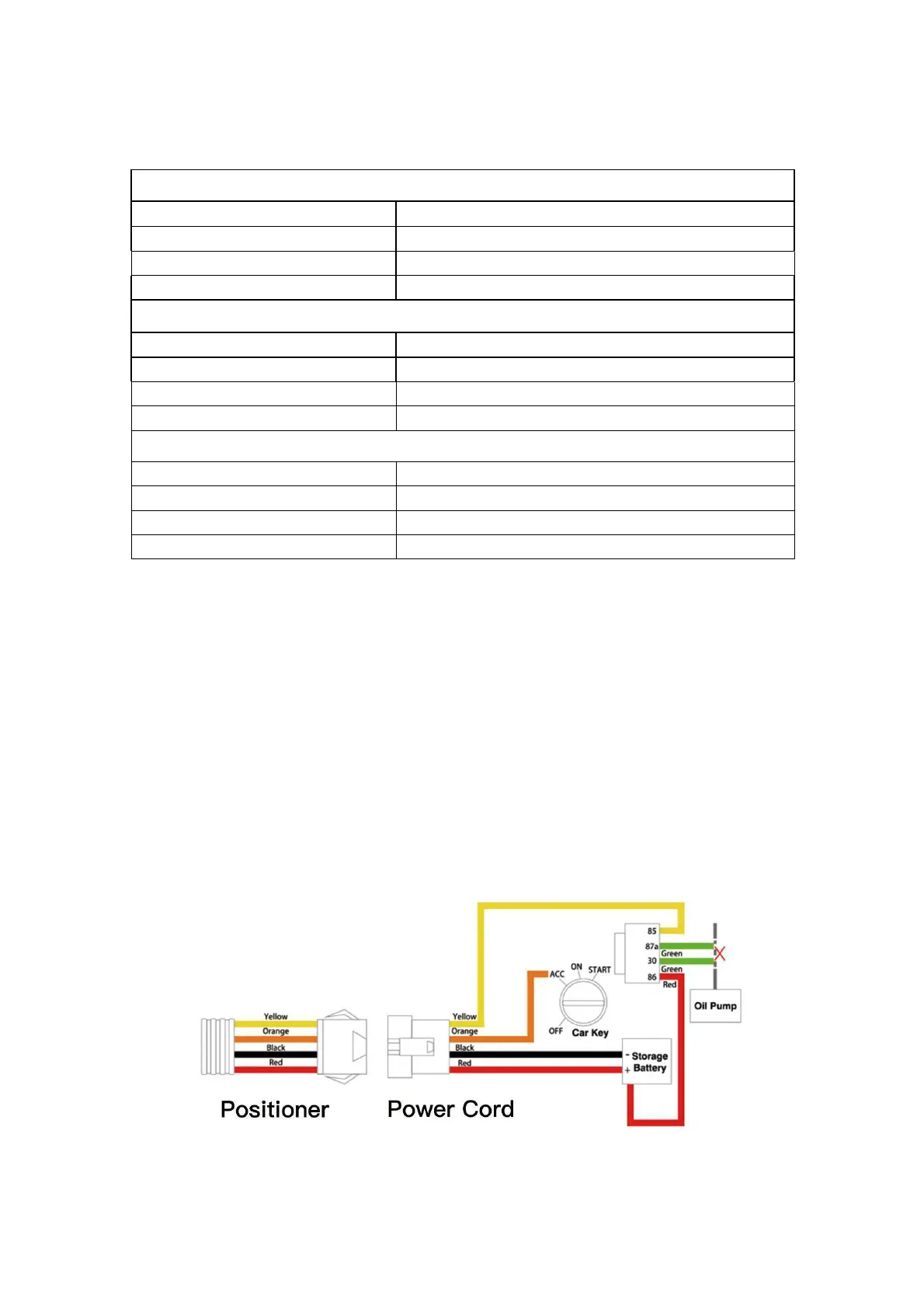
Schematic diagram of wiring principle