6
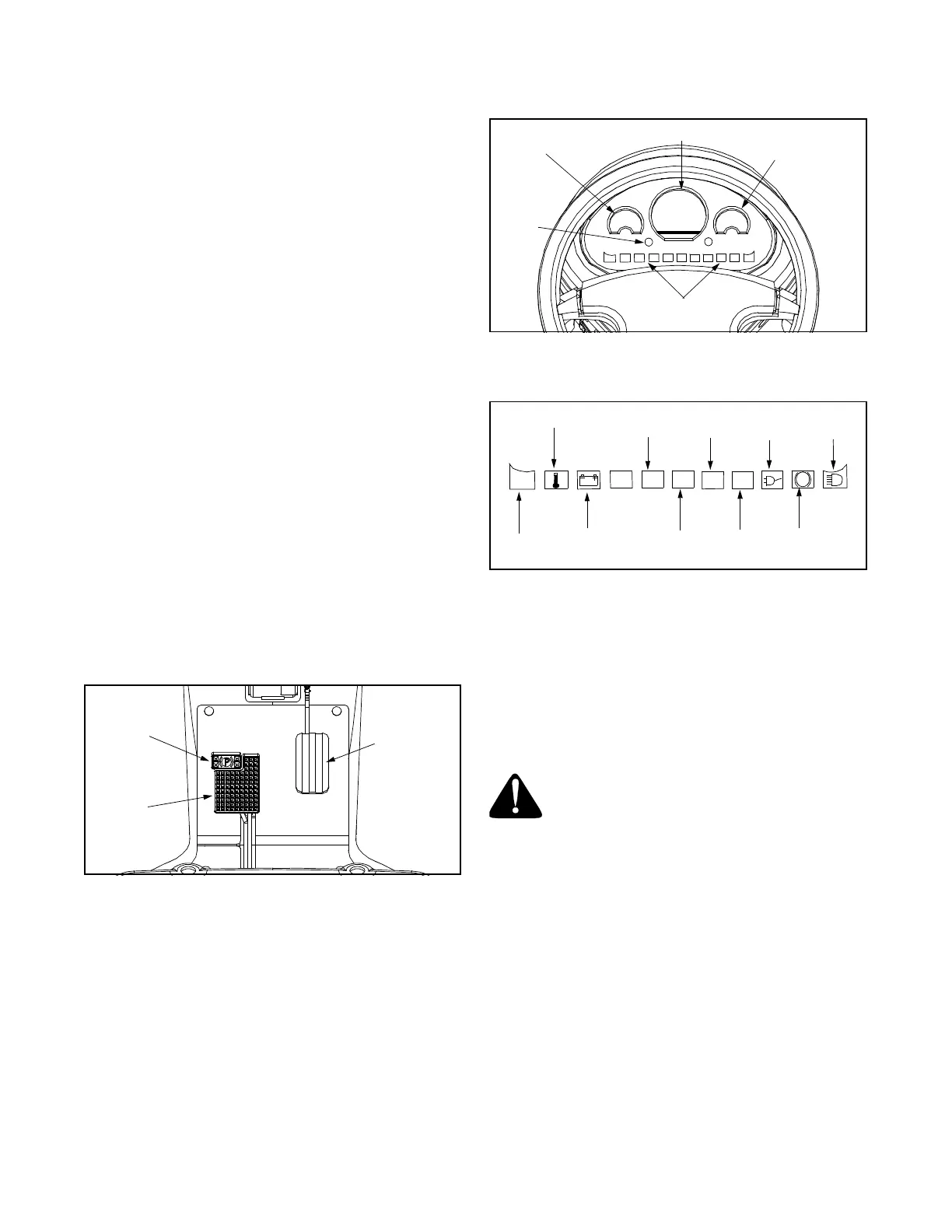
Brake and Parking Brake Pedal
The brake and parking brake pedal is located on the left
side of the floor beneath the dash panel. The pedal is
divided into two sections. By depressing the lower and
larger section, the pedal will activate the rear wheel
brakes to slow or stop the vehicle and it will also
activate the brake lights. The top left or small
rectangular section of the pedal is the parking brake
and it should be engaged when the unit is not in use.
See Figure 3.
• To engage the parking brake, depress the top left
(rectangular) of the pedal down to lock in position.
• To release parking brake, press down on the brake
portion (larger section) all the way to the floor and
release.
NOTE: The motor braking system will slow the vehicle
when the accelerator pedal is released, but the brake
pedal should be used to stop vehicle completely.
Accelerator Pedal
The accelerator pedal is located on the right side of the
floor beneath the dash panel. Depressing the
accelerator pedal will move the vehicle in the direction
selected on the ignition switch (Forward or Reverse).
As the pedal is depressed, speed will increase to the
maximum selected range. When the pedal is released
the vehicle will slow gradually to a stop. See Figure 3.
NOTE: This vehicle is equipped with a reverse beeper,
which will sound to warn the operator and others that
the vehicle is being operated in reverse.
Figure 3
Instrument Cluster
The instrument cluster is located near the top of the
dash panel. There are three indicator gauges: battery
gauge, speedometer with odometer, and temperature
gauge. The battery gauge will display the amount of
charge left in the battery. The temperature gauge will
display the temperature of the electric drive system. If it
shows to be high, park and turn off vehicle and let cool.
The speedometer will indicate the speed the vehicle is
traveling. Below these gauges are various indicators
and that will illuminate when the corresponding signal
or function is activated, i.e. Fault Light, Temp, Battery,
R (Reverse), ON, H (High Speed), L (Low Speed),
Charging, Parking Brake, and Lights. See Figure 4.
Figure 4
Indicator Lights
NOTE: The fault light flashes when there is a system
error. Refer to the troubleshooting guide when the fault
light flashes or when the vehicle is not operating
properly.
Cup Holder
The cup holder is located on the right side of the dash
panel. It is designed for the use of non-alcoholic
beverages.
WARNING: Never operate this vehicle
while under the influence of alcohol or
drugs. Doing so can result in serious
personal injury or death.
Hazard Light Switch
The hazard light switch is located on the dash panel
beneath the steering wheel. Push bottom/top of switch
to activate or turn off hazard lights. See Figure 5.
Horn Switch
The horn switch is located on the dash panel beneath
the steering wheel. Push bottom/top of switch to
activate or turn off horn. See Figure 5.
Headlights/Taillights Switch
The headlights/taillights switch is located on the dash
panel beneath the steering wheel. Push bottom/top of
switch to activate or turn off lights. See Figure 5.
Accelerator
Pedal
Parking
Brake
Brake
Battery
Gauge
Speedometer
Temperature
Gauge
Indicators
Direction
Arrow
Lights
Fault
Light
Temperature
Battery
Reverse
Vehicle
“ON”
High
Speed
Low
Speed
Charging
Parking
Brake
Lights
R
ON
HL
P
!


 To Next Page
 Loading...