7
Settings
Video:
Module auto-detects or you can select video format that corresponds to your
camera. The options are as follow: Auto/PAL/NTSC.
Recommend: It’s best to select your camera video format manually.
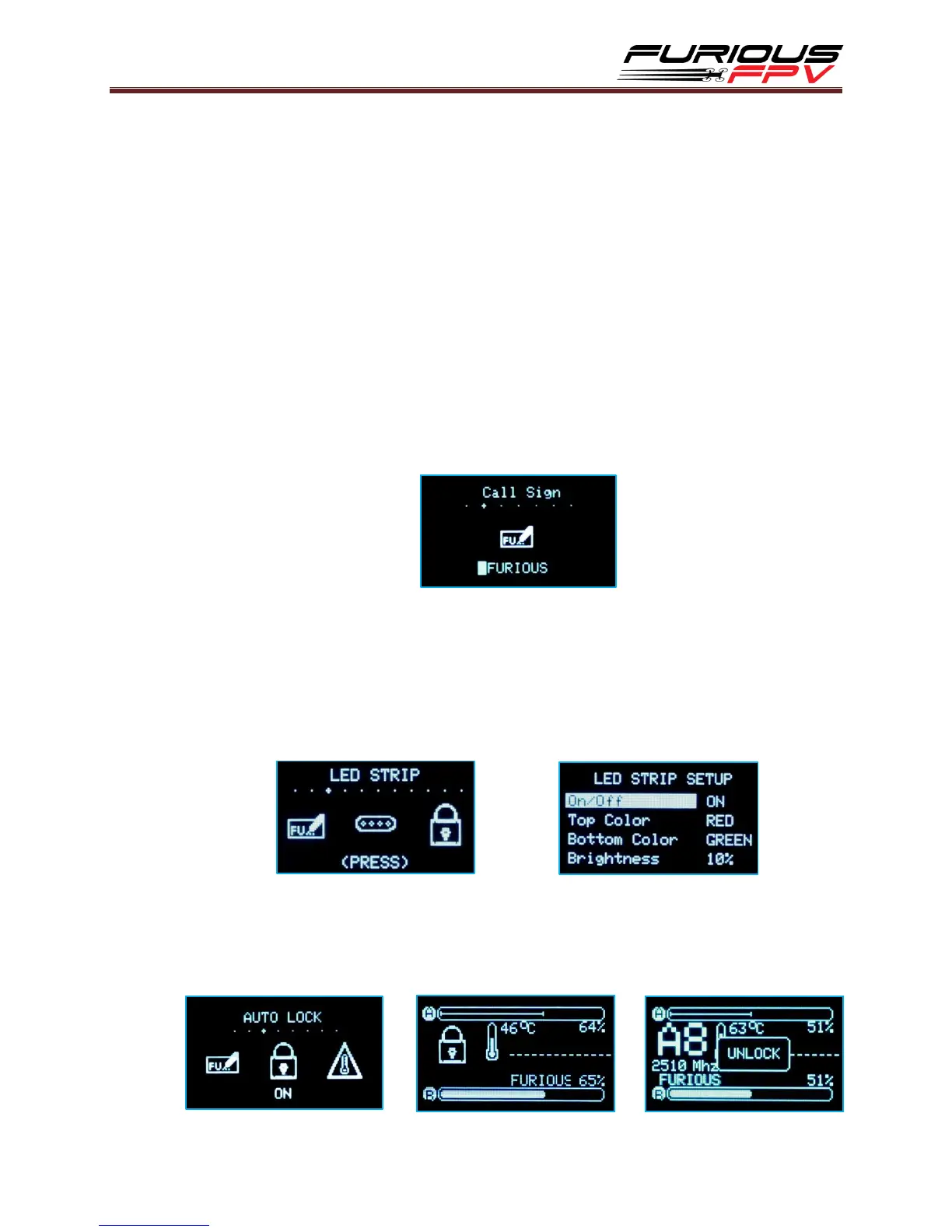
Call Sign:
Configure your call sign/pilot name or text to be displayed on your True-D.
Utilize up to 9 alphanumeric characters and symbols.
Press Select button to move through the characters and press Up/Down button
to change the characters and symbols.
Hold Select button to exit mode and save your call sign.
LED Strip:
(Note: Only when connected with Dock-King Ground Station)
The Led Strip will display RSSI levels. You can select color for TOP/BOT Antenna
Color and adjust brightness according to your preference.
The options are as follows: ON/OFF.
Auto Lock:
Auto lock Active Channel after 10s and doesn’t allow channel changes by buttons.
The options are as follows: ON/OFF.


 To Next Page
 Loading...