EasyManua.ls Logo

Furrion DV3300S-BL - User Manual

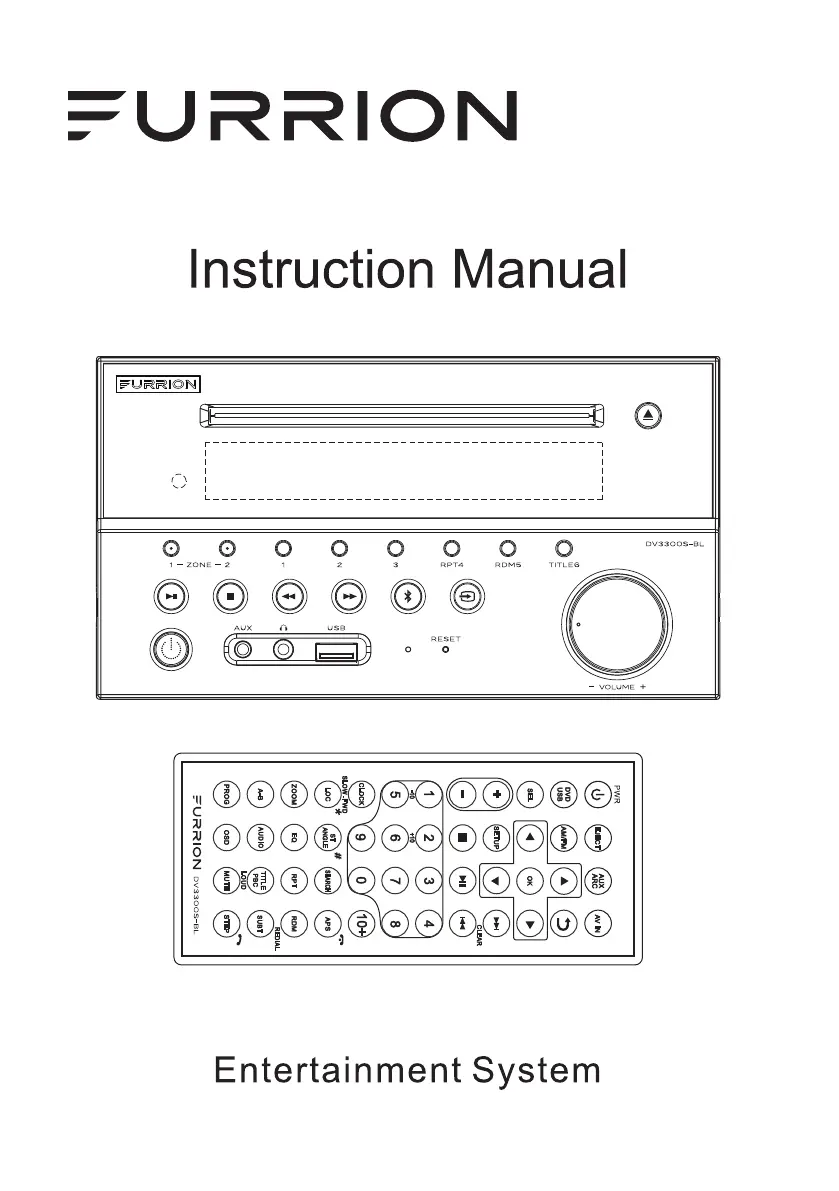
Furrion DV3300S-BL
41 pages
Print Icon
To Next Page IconTo Next Page
Loading...
DV3300S-BL

Questions and Answers

  • N
    Nicholas MontoyaAug 16, 2025
    What to do if my Furrion DV3300S-BL has no picture, sound, or indication?
    • V
      vcarterAug 16, 2025
      If your Furrion Home Theater System shows no picture, sound, or any indication of power, try the following: First, ensure that the power switch is turned on. Next, verify that the wall power outlet is working correctly. Also, check the power cord for any damage and ensure the fuse is not blown. Finally, make sure the power connection is properly connected.
  • J
    Jason CarrAug 19, 2025
    How to fix Furrion Home Theater System when there is no sound but the picture is OK?
    • M
      Michelle ContrerasAug 19, 2025
      If you're getting a picture but no sound from your Furrion Home Theater System, here's what you can check: First, ensure the audio output of the unit is properly connected to the TV's audio input. Check the audio connector for any damage. Make sure you haven't accidentally turned the volume down or muted the audio. Lastly, verify that the AUDIO settings of the unit are correctly configured.
  • J
    jasmine47Aug 21, 2025
    What to do if Furrion Home Theater System has no picture but sound is OK?
    • M
      Mark JohnsonAug 22, 2025
      If your Furrion Home Theater System has sound but no picture, try these steps: First, check that the video output of the unit is properly connected to your TV's video input. Ensure your TV is set to the correct AV input channel for the connection. Inspect the video connector for damage. Finally, verify that the VIDEO settings of the unit are correctly configured.
  • S
    Shannon BenderAug 25, 2025
    How to fix Furrion DV3300S-BL Home Theater System when the radio does not work?
    • M
      michael97Aug 26, 2025
      If the radio on your Furrion Home Theater System is not working, check whether the antenna cable is firmly connected. If it is, try manually tuning for a station.
  • I
    Ivan BrewerAug 28, 2025
    Why is my Furrion Home Theater System remote control not working?
    • J
      Jason CunninghamAug 28, 2025
      If the remote control for your Furrion Home Theater System isn't working, try these solutions: First, check the batteries in the remote and ensure they are not depleted. Then, make sure you are pointing the remote directly at the IR sensor on the unit. Also, check for any obstructions between the remote control and the IR sensor.
  • R
    Robert CarrollAug 30, 2025
    What to do if my Furrion DV3300S-BL Home Theater System says 'no disc' or 'bad disc'?
    • D
      Douglas MartinAug 31, 2025
      If your Furrion Home Theater System is displaying a 'no disc' or 'bad disc' error, consider the following: * Ensure the disc is correctly inserted into the disc slot. * Check that the disc isn't inserted upside down. * Inspect the disc for any visible distortions, stains, or severe scratches. * Confirm the disc format is compatible with the unit. * If in a car, ensure the unit hasn't overheated; allow it to cool if necessary. * Try inserting a different disc to see if the issue persists.
  • J
    Jared TurnerSep 3, 2025
    How to troubleshoot flaws in picture or sound on Furrion Home Theater System?
    • W
      Wanda WarnerSep 3, 2025
      If you're experiencing flaws in the picture or sound on your Furrion Home Theater System, try the following: Check that the AUDIO setup is correct. Inspect the disc for scratches or stains. Also, check the AV connector and output terminal for any stains. If there's condensation inside the lens, turn the unit off for about an hour and then try again. Finally, ensure the installation angle is less than 30 degrees.
  • M
    Mark TravisSep 6, 2025
    Why is my Furrion DV3300S-BL Home Theater System showing a black and white picture or screen rolling?
    • Y
      yjonesSep 6, 2025
      If your Furrion Home Theater System is displaying a black and white picture or the screen is rolling, ensure that the TV SYSTEM settings (e.g., PAL, NTSC) are correctly configured.
  • M
    Michael HardySep 9, 2025
    What to do if some function buttons do not work on Furrion DV3300S-BL Home Theater System?
    • M
      Mark HoffmanSep 9, 2025
      If some of the function buttons on your Furrion Home Theater System are not working, try these steps: First, turn the power off and then back on again. If that doesn't work, reset the unit and then turn it back on. As a final step, remove the front panel from the unit, then put it back, and turn the unit on again.
  • L
    Lisa MckeeSep 12, 2025
    What to do if Furrion Home Theater System functions are locked or Bluetooth is not responding?
    • J
      Jason OrtizSep 12, 2025
      If your Furrion Home Theater System's functions are locked or the Bluetooth function is unresponsive, press the RESET button using a sharp object, like a clip, to reset the unit and restore its factory default settings.

Summary

PRECAUTION

Electrical and Laser Safety

Covers warnings about electric shock, laser product, and battery hazards.

Before Operation

Features Overview

Lists the key features and specifications of the entertainment system.

Initial Precautions

Provides essential safety and operational guidelines before use.

Disc Maintenance and Cleaning

Guidelines for keeping discs clean and preventing damage.

Remote Control Battery Information

Instructions for replacing the remote control battery.

Remote Control Description

Detailed explanation of each button on the remote control.

Control Locations and Names

Identifies and names the controls on the main unit.

LCD Display Icon Descriptions

Quick Reference Guide

General Operation Overview

Summarizes essential operations like power, source, volume, and settings.

Radio Operation

Basic Disc and USB Operation

Wiring Diagram

Wiring Socket Details

Details pin assignments for connecting speakers and power to the unit.

Wiring Connection Steps

Step-by-step instructions for connecting power and speaker wires.

Mounting Installation

Common Operation

Power, Source, and Volume Control

Explains how to turn the unit on/off, select sources, and adjust volume.

Mute, Clock, EQ, Loudness, Zone, and Reset

Covers mute, clock setting, EQ modes, loudness, zone selection, and system reset.

Furrion DV3300S-BL Specifications

General IconGeneral
BrandFurrion
ModelDV3300S-BL
CategoryHome Theater System
TypeDVD Player
ColorBlack
Output Resolution1080p
HDMI OutputYes
USB PortYes
Remote ControlYes
Coaxial Digital Audio OutputYes
Auxiliary Audio InputYes
BluetoothYes
Playable FormatsDVD, CD, MP3
Power SourceAC 120V

Related product manuals