EasyManua.ls Logo

Furrion FOS05TADS - User Manual

Furrion FOS05TADS
32 pages
Print Icon
To Next Page IconTo Next Page
Loading...
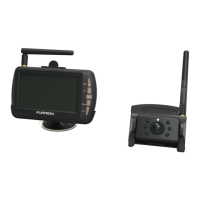
5“ and 7” Vision S Camera System
Système de caméra Vision S de 5 et 7 po
Sistema de cámara Vision S de 5” y 7”
Instruction Manual
Manuel d’instructions
Manual de instrucciones
* The packing contents may be different based on the kit you purchased.
Please take the actual product as standard.
* Le contenu de l’emballage peut être différent en fonction de la trousse
achetée. Veuillez prendre le produit réel en référence.
* Es posible que los contenidos del embalaje sean diferentes según el kit
que haya comprado. Tome el producto real como estándar.
Models: FOS07TASK/FOS07TASR/FOS07TASE/FOS07TASF
FOS07TADS/FOS07TAED/FOS07TAPK/FOS07TAPT
FOS05TASK/FOS05TASR/FOS05TASE/FOS05TASF
FOS05TAEK/FOS05TAED/FOS05TAPK/FOS05TADS

Questions and Answers

Summary

Installation

Whats in the Box

Lists all components included in the product packaging.

Monitor Installation

Provides instructions for securely mounting the monitor within the vehicle.

Wall-mount Installation

Details the process for installing the monitor using a wall-mount bracket.

Electrical Connections

Connecting the Monitor

Guide for routing and connecting the monitor's power cable to the vehicle's power source.

Connecting the Camera

Instructions and safety warnings for connecting the camera's power supply.

Connecting the Traffic Light

Explains how to wire the camera's traffic light for activation.

Getting Started

Activate the Monitor

Steps to power on the monitor and access its main menu settings.

Pairing the Camera and Monitor

Procedure for establishing a wireless connection between the cameras and the monitor.

Change Settings

Camera Setting

Accesses options for adjusting individual camera display and operational parameters.

AUTO DISPLAY SETTING

Configures camera display behavior based on vehicle status or chosen layout.

MIRROR SETTING

Allows adjustment of image orientation (mirror, flip) for cameras.

Operation

Operating the System

Covers the functional use of the camera system in various vehicle conditions.

Summary

Installation

Whats in the Box

Lists all components included in the product packaging.

Monitor Installation

Provides instructions for securely mounting the monitor within the vehicle.

Wall-mount Installation

Details the process for installing the monitor using a wall-mount bracket.

Electrical Connections

Connecting the Monitor

Guide for routing and connecting the monitor's power cable to the vehicle's power source.

Connecting the Camera

Instructions and safety warnings for connecting the camera's power supply.

Connecting the Traffic Light

Explains how to wire the camera's traffic light for activation.

Getting Started

Activate the Monitor

Steps to power on the monitor and access its main menu settings.

Pairing the Camera and Monitor

Procedure for establishing a wireless connection between the cameras and the monitor.

Change Settings

Camera Setting

Accesses options for adjusting individual camera display and operational parameters.

AUTO DISPLAY SETTING

Configures camera display behavior based on vehicle status or chosen layout.

MIRROR SETTING

Allows adjustment of image orientation (mirror, flip) for cameras.

Operation

Operating the System

Covers the functional use of the camera system in various vehicle conditions.

Furrion FOS05TADS Specifications

General IconGeneral
BrandFurrion
ModelFOS05TADS
CategoryAutomobile Electronics
LanguageEnglish

Related product manuals