EasyManua.ls Logo

Furrion FOS07TADS - User Manual

Furrion FOS07TADS
32 pages
Print Icon
To Next Page IconTo Next Page
Loading...
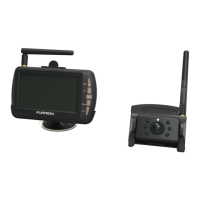
5“ and 7” Vision S Camera System
Système de caméra Vision S de 5 et 7 po
Sistema de cámara Vision S de 5” y 7”
Instruction Manual
Manuel d’instructions
Manual de instrucciones
* The packing contents may be different based on the kit you purchased.
Please take the actual product as standard.
* Le contenu de l’emballage peut être différent en fonction de la trousse
achetée. Veuillez prendre le produit réel en référence.
* Es posible que los contenidos del embalaje sean diferentes según el kit
que haya comprado. Tome el producto real como estándar.
Models: FOS07TASK/FOS07TASR/FOS07TASE/FOS07TASF
FOS07TADS/FOS07TAED/FOS07TAPK/FOS07TAPT
FOS05TASK/FOS05TASR/FOS05TASE/FOS05TASF
FOS05TAEK/FOS05TAED/FOS05TAPK/FOS05TADS

Questions and Answers

Summary

Important Safety Instructions

Electrical Safety and Precautions

Details on electrical safety, non-serviceable parts, external fuses, and general warnings.

Installation Safety

Guidance on professional installation, using recommended parts, and specific connection requirements.

Usage and Maintenance Safety

Instructions for safe operation, monitor placement, and cleaning procedures for the system.

Regulatory and RF Exposure Guidelines

Details on FCC/IC statements, interference, and RF exposure compliance requirements.

Product Overview

System Components Description

Overview of the Furrion Vision S Camera System's purpose, functionality, and components.

Camera Types Overview

Details and identification of the Left/Right and Front/Rear camera components.

Installation Guide

Package Contents and Monitor Mounting

List of included items and instructions for wall-mount monitor installation.

Monitor Tabletop and Windshield Mounting

Steps for securing the monitor using tabletop bracket and windshield suction cup.

Camera Installation and Testing

Guidance on camera mounting positions, testing, and signal strength checks.

Specific Camera Installation

Detailed steps for doorway and side/rear camera installations with traffic lights.

Electrical Wiring Guide

Instructions for connecting monitor, camera, and traffic light power sources.

Getting Started and Settings

Initial Monitor Activation

Steps to turn on the monitor and access the initial menu settings.

Camera and Monitor Pairing

Procedure for pairing cameras with the monitor, checking status, and repeating if necessary.

Configuration Options

Settings for auto display, mirror, rotation, volume, auto dim, LCD off, and motion detect.

Picture Adjustment and Software Version

Adjusting picture settings like brightness, contrast, color, and viewing software version.

Operation and Maintenance

System Operation Modes

Instructions for operating the system in quadrant and single channel modes.

Care and Cleaning Guide

Guidelines for maintaining the system's condition and performance through proper care.

Warranty Information

Summary

Important Safety Instructions

Electrical Safety and Precautions

Details on electrical safety, non-serviceable parts, external fuses, and general warnings.

Installation Safety

Guidance on professional installation, using recommended parts, and specific connection requirements.

Usage and Maintenance Safety

Instructions for safe operation, monitor placement, and cleaning procedures for the system.

Regulatory and RF Exposure Guidelines

Details on FCC/IC statements, interference, and RF exposure compliance requirements.

Product Overview

System Components Description

Overview of the Furrion Vision S Camera System's purpose, functionality, and components.

Camera Types Overview

Details and identification of the Left/Right and Front/Rear camera components.

Installation Guide

Package Contents and Monitor Mounting

List of included items and instructions for wall-mount monitor installation.

Monitor Tabletop and Windshield Mounting

Steps for securing the monitor using tabletop bracket and windshield suction cup.

Camera Installation and Testing

Guidance on camera mounting positions, testing, and signal strength checks.

Specific Camera Installation

Detailed steps for doorway and side/rear camera installations with traffic lights.

Electrical Wiring Guide

Instructions for connecting monitor, camera, and traffic light power sources.

Getting Started and Settings

Initial Monitor Activation

Steps to turn on the monitor and access the initial menu settings.

Camera and Monitor Pairing

Procedure for pairing cameras with the monitor, checking status, and repeating if necessary.

Configuration Options

Settings for auto display, mirror, rotation, volume, auto dim, LCD off, and motion detect.

Picture Adjustment and Software Version

Adjusting picture settings like brightness, contrast, color, and viewing software version.

Operation and Maintenance

System Operation Modes

Instructions for operating the system in quadrant and single channel modes.

Care and Cleaning Guide

Guidelines for maintaining the system's condition and performance through proper care.

Warranty Information

Furrion FOS07TADS Specifications

General IconGeneral
Display Size7 inches
Wi-FiYes
BluetoothYes
Camera InputYes
MicrophoneYes
SpeakerYes
Camera TypeRearview
Night VisionYes
TouchscreenYes
GPSNo
USB Ports1
HDMI InputNo
Rear View Camera InputYes
WaterproofYes
Viewing Angle120 degrees

Related product manuals