119
< Linkagemenu >
76=KDVDPHQXIRUHDFKRIWKHIROORZLQJ
System, Linkage, and Model. Also, you can
create a personalized User menu that can include
all of the menus that you use most often.
How to call a User menu
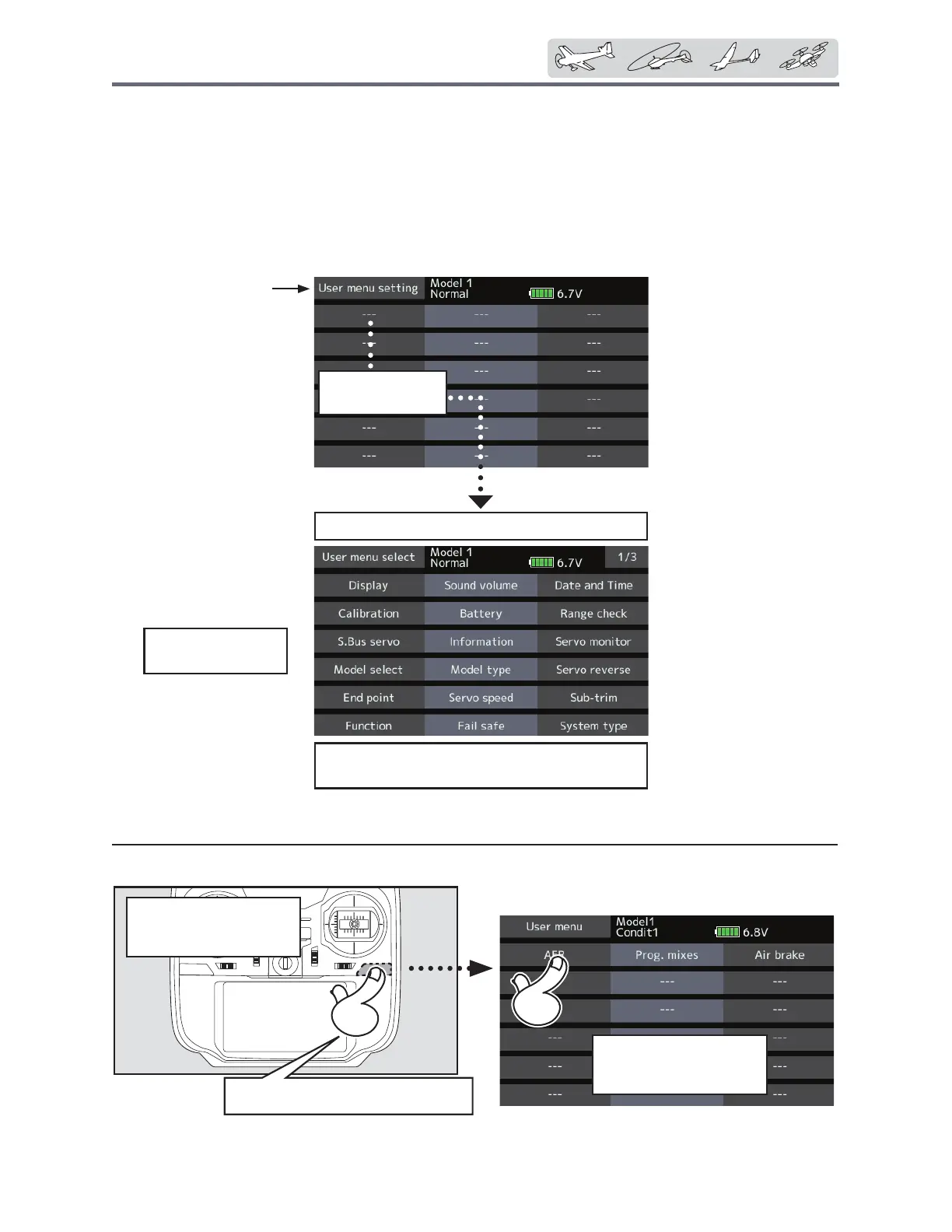
)URPWKHKRPHVFUHHQSUHVVWKH80(18021EXWWRQ
*Any change made to data entered from the User menu or
from the normal method of use are the same. Changes made
in either way are saved into the transmitter memory.
Usermenusetting
2ULJLQDOPHQXVFUHHQPDNLQJ
ŏ7DSWKH>8VHUPHQXVHWWLQJ@EXWWRQLQWKH
/LQNDJHPHQXWRFDOOWKHVHWXSVFUHHQ
VKRZQEHORZ
Tapheretoselect
yourfirstchoice.
Oncepressed,3pagesofchoiceswillbedisplayed.
Makeyourselection,pressyourchoiceandthe
firstofyour"Usermenu"willbeentered.
When"---"ischosen,
itcanbedeleted.
HOME
screen
PresstheU.MENU/MON.
Fromthehome
screen
Functioncanbe
calledbyatap
ŏ5HWXUQWR/LQNDJHPHQX


 To Next Page
 Loading...











