124
< Modelmenu(CommonFunctions) >
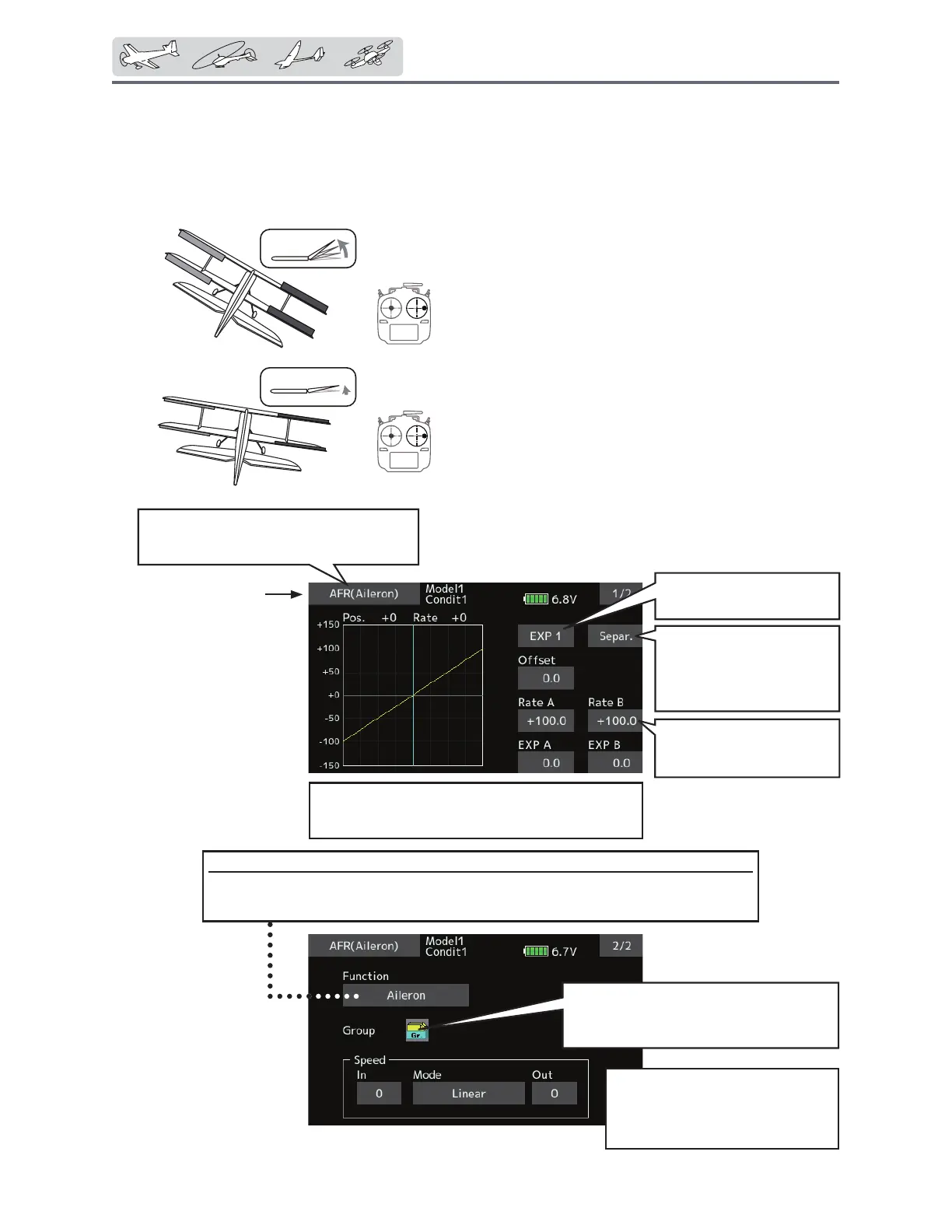
AFR
The angle and curve of each operation function can be set. [All model types]
AFR function is used to adjust the throw and
operation curve of the stick, lever, and switch
IXQFWLRQVIRUHDFKÀLJKWFRQGLWLRQ
7KLVLVQRUPDOO\XVHGDIWHU(QG3RLQWKDVGH¿QHG
the maximum throw. When mixing is applied from
one channel to another channel, both channels
can be adjusted at the same time by adjusting the
operation rate through the AFR function.
ŏ2SHUDWLRQFXUYHDGMXVWPHQW7KUHHW\SHV
of curves (EXP1, EXP2, and Point) can be
VHOHFWHG$PD[LPXPSRLQWVFXUYHFDQEH
used for the point curve type. (Initial setting:
9 points) The number of points can also be
increased and decreased and curves from
complex curves to simple curves can be
used.
ŏ2SHUDWLRQVSHHGDGMXVWPHQW7KHRSHUDWLRQ
speed of each function when the function
is operated (including at flight condition
VZLWFKLQJFDQEHDGMXVWHG7KHIXQFWLRQ
operates smoothly at a constant speed
corresponding to the set speed.
ŏ6HOHFW>$)5@DWWKHPRGHOPHQXDQGFDOO
the setup screen shown below.
)XQFWLRQVHOHFWLRQ
1. When the function select button is tapped, a selection screen appears.
2. Select the function you want to set at the selection screen.
WhenD/RisturnedON,thedisplaywill
show"D/R----",andtherudderangle(rate)
andEXPcanbesetwhenD/RisON.
● Operationcurvesetting
(Foradescriptionofthesettingmethod,seethe
descriptionatthebackofthismanual.)
● Servospeedsetting
(Foradescriptionofthesetting
method,seethedescriptionat
thebackofthismanual.)
● Group/singlemodeswitch(Gr./Sngl)
(Formoreinformation,seethe
descriptionatthebackofthismanual.)
ŏ5HWXUQWR0RGHOPHQX
Left/right,Up/down,overall
adjustmentatRateAand
RateB
Curveselect
Separately ⇔ Combination
(Leftandright
symmetrical
curve.)
Curveselect
EXP1,EXP2,Pointcurve
100%
40%
Rate
Rate


 To Next Page
 Loading...











