30
< BeforeUse >
CAUTION
Besuretoturnoffthepowerto
thetransmitterbeforeinsertingor
removingtheSDcard.
AstheSDcardisaprecisiondevice,do
notuseexcessiveforcewheninserting.
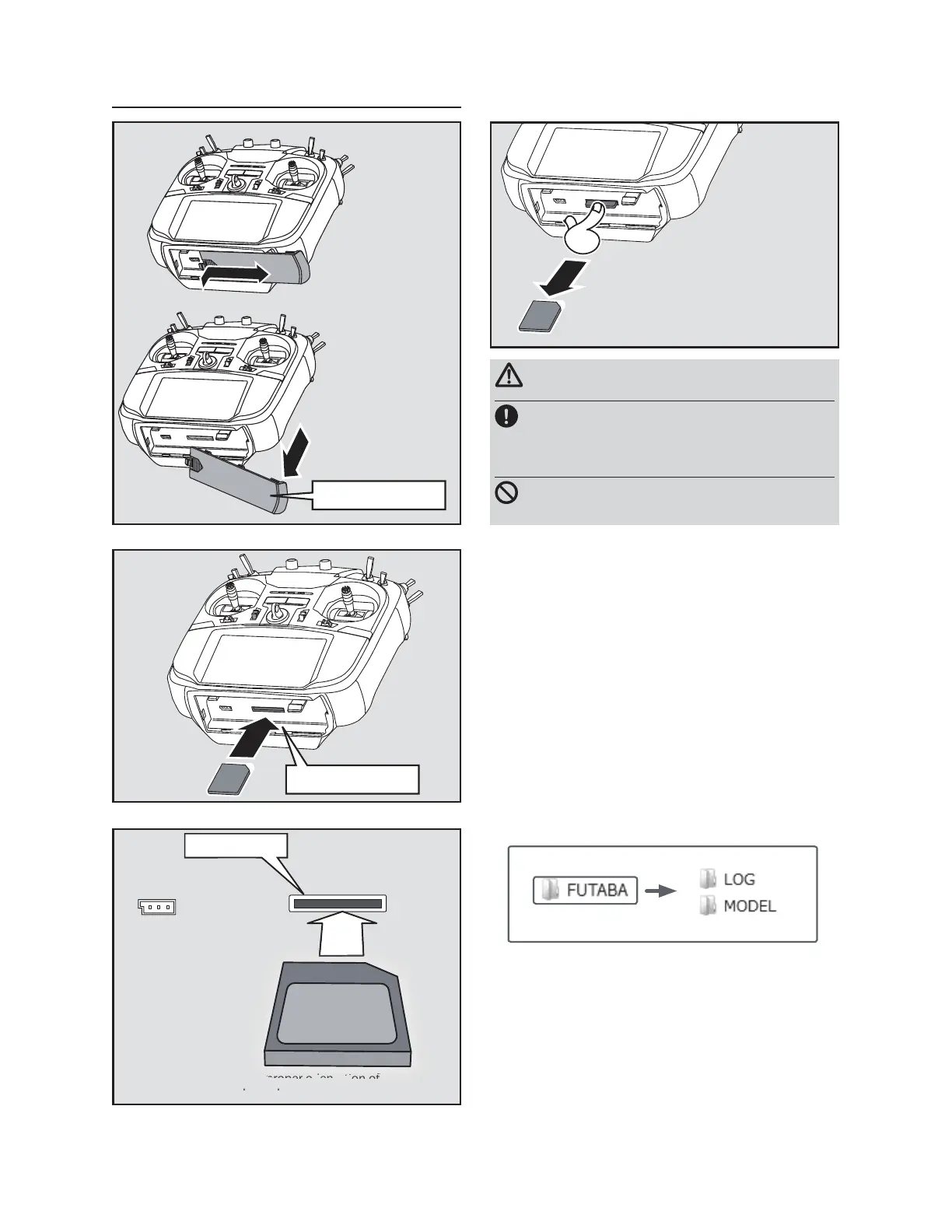
SD card slot
②TheSDcardslotis
shownhereinthe
figurebelow.
*Payattentiontotheproperorientationof
theSDcard,asshownhere.
in
SD card slot
Batterycover
①Thesidebatterycover
isremovable.
③ WhentheSDcard
ispressedinonce
again,thecardwill
bereleasedfromthe
cardslotandcanbe
removed.
ŬƑƖƈƕƗƌƑƊŒƕƈƐƒƙƌƑƊŃƗƋƈŃŶŧŃƆƄƕƇ
-When an SD card is installed in the T16SZ
transmitter, a folder called "Futaba" is cre-
DWHG)ROGHUVFDOOHG/2*DQG02'(/
DUH FUHDWHG LQ WKLV IROGHU7KH 02'(/
IROGHUVWRUHVWKHPRGHOGDWDDQGWKH/2*
folder stores the telemetry log data.
-The telemetry log data recorded on the SD
card can be converted to CSV format by
the telemeter log converter released on our
home page. When copying or moving a log
¿OHDOZD\VVHOHFWERWK)/,DQG)/'¿OH



 To Next Page