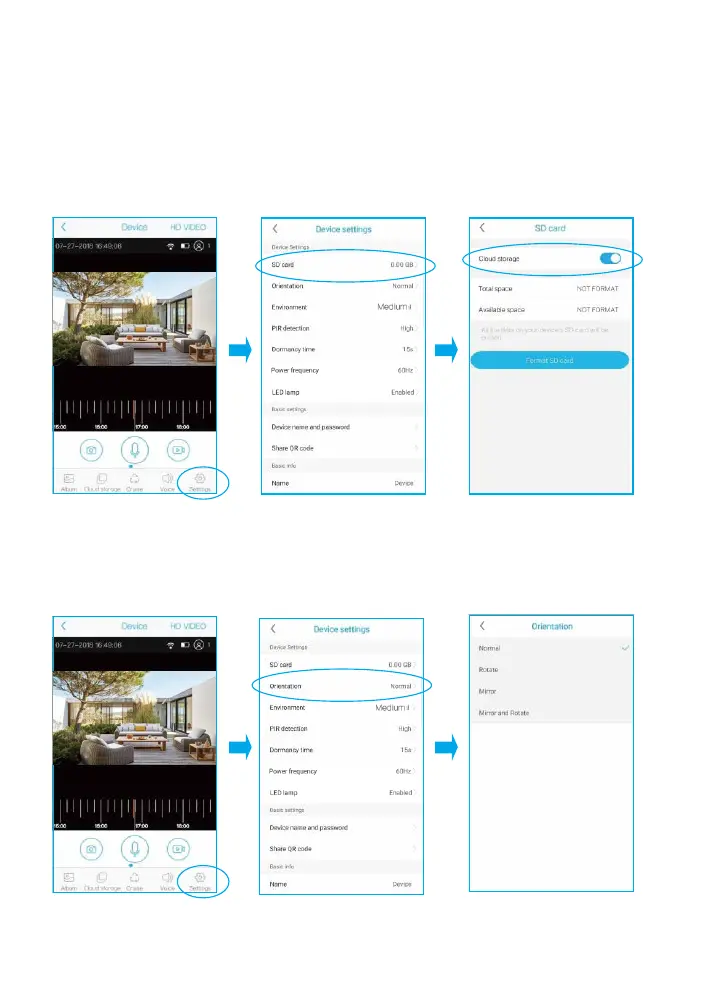
SD Card Setting
1) Please turn on the cloud storage so that you can sync the
camera time with your phone.
2) Please format the micro sd card before you installed it.The camera
doesn't support plug and play.So please make sure to power off
the camera and then install your card.
Orientation
You can choose Normal Rotate,Mirror or Mirror and rotate depends on
your hardware installation way. The default is Normal.
A lb u m Sw itch C ruise Vo ice Se ttin gs
A lb u m Sw itch C ruise Vo ice Se ttin gs


 To Next Page