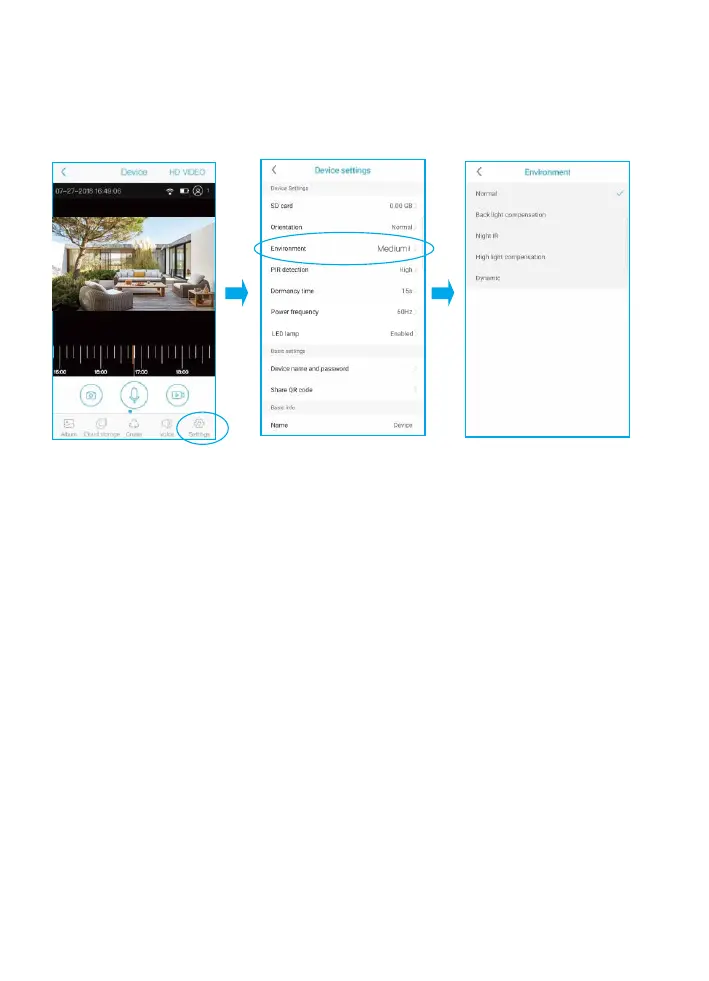
Environment
You can choose to set it as Normal, back light compensation, night IR,
High light compensation or Dynamic according to your actual light
environment of installation place.
PIR Detection
You can set the PIR sensitivity as Disabled,Low,Medium and High.
1) When you set the PIR as Disabled,you will not record and receive
any motion triggered events.
2) It is recommended to set the PIR Detection to High so that you
could capture as more as a motion triggered from the beginning
part of the event.
3) Try to capture more the beginning of the triggered event,please
adjust your camera angle a bit closer to your aimed spot
(Check page 13 diagram).
A lb u m Sw itch C ruise Vo ice Se ttin gs


 To Next Page