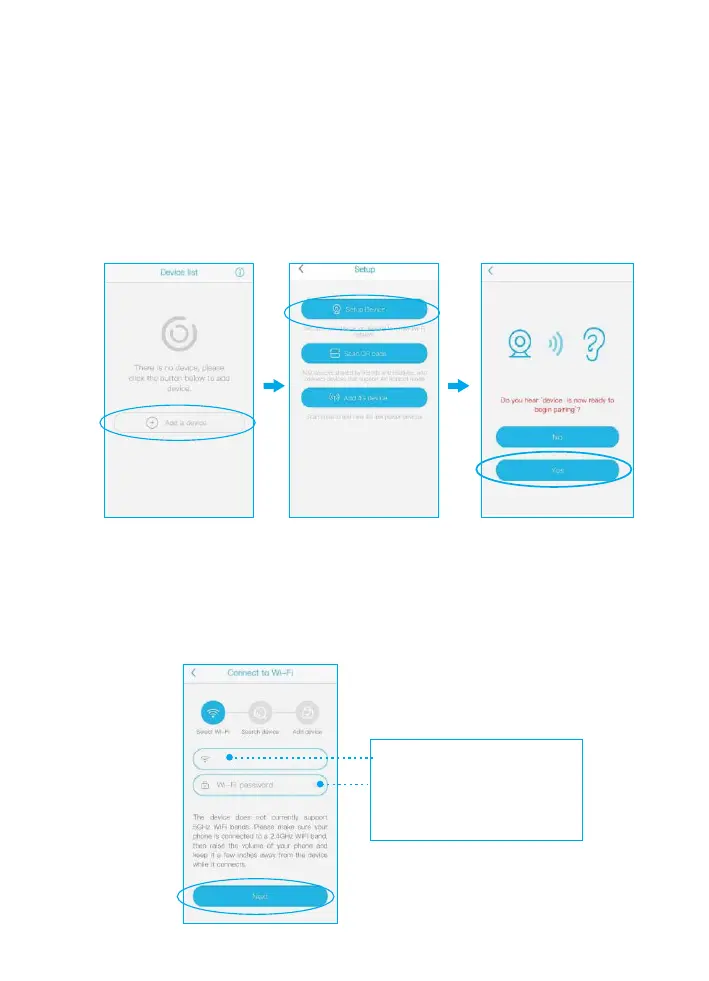
Please connect your phone to the 2.4Ghz wifi firstly
before you pair the camera, make sure your router
password in mind before you start the pairing process.
1) Click "Add a device" and then choose "Setup device",
click "Yes", when you hear the following voice “ The
camera is now ready to begin pairing”.
2) Input the CORRECT WiFi password of your router,
if you input a wrong password you will not be able to
connect it successfully. Click the eye icon to double
confirm the password you entered correct
3.Pairing the camera with the App
Click the icon to double
confirm the password you
entered is correct
Your own wifi name


 To Next Page