Information in this document can be modified without notice.
Edition 07.2020 ..
03
5
Trouble Shooting
Door Multi-point Locking System Automatic Smart Access Controlled
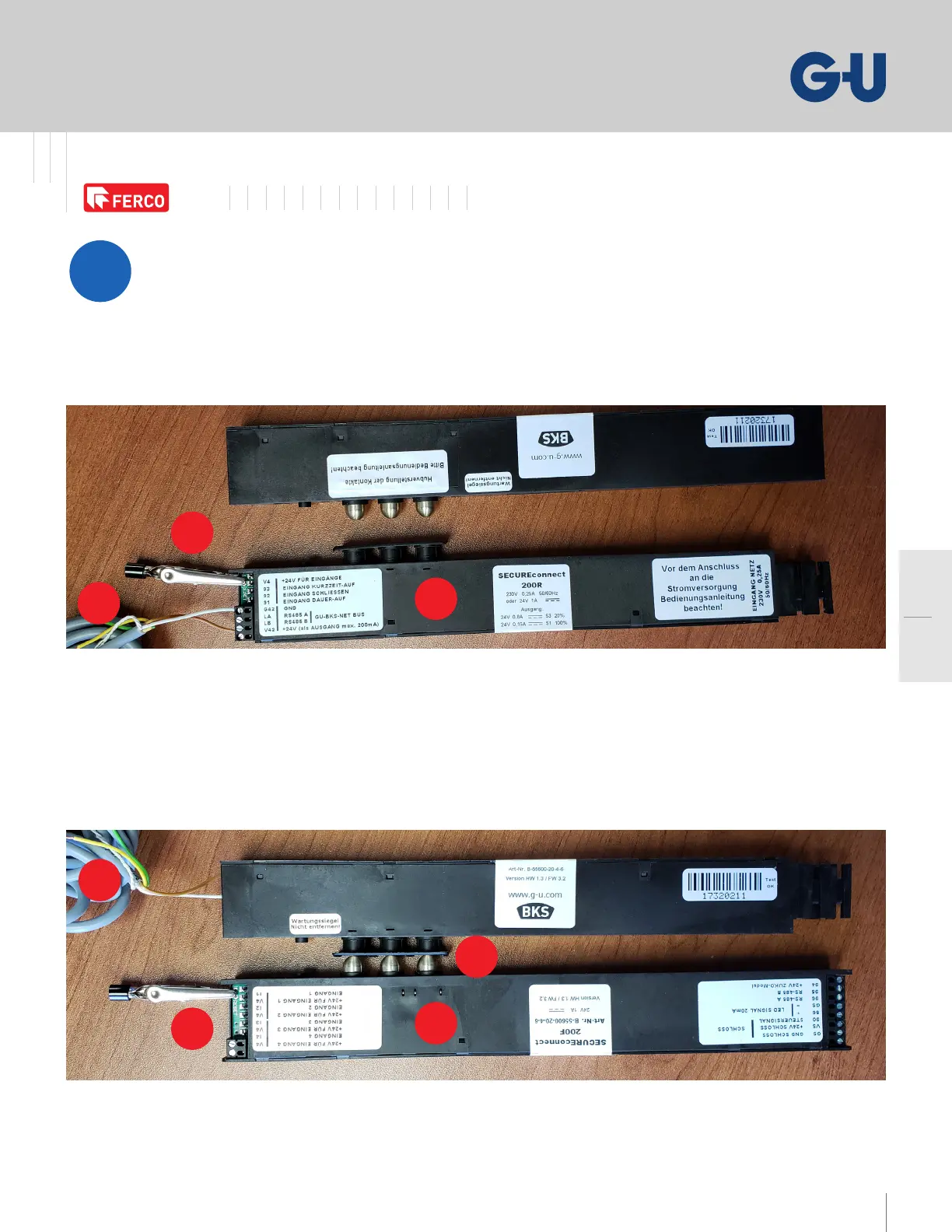
If using a SECURE connect , follow the steps below
to perform a reset of the system:
. Remove the plastic terminal block next to V///
on SCR to reveal reset terminals
. Bridge reset terminals with an aligator clip
. Turn the power supply o and on again, and leave the aligator clip
for seconds before removing it
If still not working, go to step
. Remove the plastic terminal block next to V/I/V/I
on SCF to reveal reset terminals
. Bridge reset terminals with an aligator clip
. Put the SCF tappet contacts in connexion with the SCR
. Turn the power supply o and on again, and leave the aligator clip
for seconds before removing it
* SECURE connect components will ash green/red to indicate a repairing process



 To Next Page