CUP HEATER PLATE
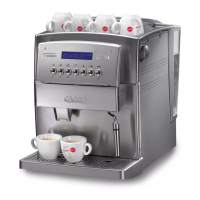
This function allows you to turn on the cup heater plate present in the
machine cover.
• In programming mode, select the function using the “∧” or “∨”
button, and confirm using the “MENU/OK” button.
• It will thus appear the indication to choose whether you wish to
select
using the “∧” or “∨” button, and confirm your choice using the
“MENU/OK” button.
TEMPERATURE
This function allows you to adjust the water temperature to obtain hotter
or less hot coffee (Minimum, low, medium, high and maximum).
• After accessing the programming mode press
“∧” or “∨” to select
the function:
then enable it by pressing “MENU/OK”.
The display will show, for example:
• Press “∧” or “∨” to select the desired temperature and memorise
it by pressing “MENU/OK”.
PRE-BREWING
In the pre-brewing process the coffee is slightly moistened before actual
brewing. This brings out the full aroma of the coffee, which thus acquires
a delicious flavour.
• Press
“∧” or “∨” to select the function:
then enable it by pressing “MENU/OK”.
The display will show:
• by pressing “∧” or “∨” you can choose to deactivate the func-
tion
or extend the pre-brewing phase
to enhance the flavour of your coffee.
• Memorise the choice by pressing
“MENU/OK”.
PRE-GRINDING
With the pre-grinding process the appliance grinds twice: the first
time for the type of coffee selected and the second time for the
next coffee (not yet selected).
This function is useful only if you have to make
several coffees at the same time (e.g. when en-
tertaining guests or during a party).
• After accessing the programming mode, press
“∧” or “∨” to select
the function:
enable it by pressing
“MENU/OK”.
• The display will show:
Press “∧” or “∨” to select the desired setting and memorise it by
pressing “MENU/OK”.


 To Next Page
 Loading...