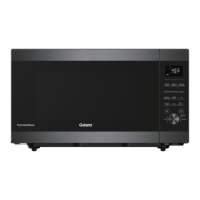
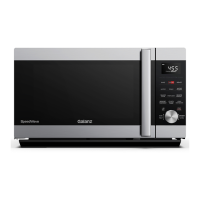
This document is a user manual for the Galanz ExpressWave Microwave Oven, model GEWWD22S1SV125. It provides essential information for safe operation, installation, usage, and maintenance of the appliance.
Function Description
The Galanz ExpressWave is a microwave oven designed for heating, cooking, and defrosting food. It incorporates Inverter Technology, indicating a more consistent and efficient power delivery compared to traditional microwave ovens. The oven features various cooking modes, including sensor cook programs, sensor reheat, time and weight defrost, and specific presets for common food items like popcorn, beverages, potatoes, frozen vegetables, dinner plates, and soup. It also includes a quick start microwave function and a child lock for safety.
Important Technical Specifications
- Model Number: GEWWD22S1SV125
- Power Supply: 120V/60Hz
- Power Consumption (Microwave): 1500W
- Rated Microwave Power Output: 1250W
- Operating Frequency: 2450MHz
- Outside Dimensions (W x H x D): 24 3/4 × 14 3/16 × 19 15/16 inches
- Oven Capacity: 2.2 Cu.Ft.
- Net Weight: Approx. 31.6 lbs
Usage Features
The microwave oven offers a range of features to enhance usability and cooking convenience:
Control Panel: The control panel includes a display screen, a Menu / Time / Portion / Level Selector Knob, and various dedicated buttons for different functions.
Setting the Clock: Users can set the clock in either 12-hour or 24-hour format by pressing and holding the CLOCK/TIMER button. The selector knob is used to adjust hours and minutes.
Timer Function: A standalone timer can be set for up to 95 minutes, useful for general kitchen timing. The timer countdown can be viewed by touching CLOCK/TIMER, and it can be canceled by pressing STOP/CANCEL.
Quick Start Microwave: This feature allows for immediate cooking at maximum microwave power (100%) by simply turning the selector knob to set the desired cooking time (up to 95 minutes) and pressing the knob to start.
Microwave Cooking: For more controlled cooking, users can select a specific power level (from 10% to 100%) and cooking time (up to 95 minutes). The power level is set by pressing the MICRO button and turning the selector knob, followed by setting the cooking time.
Weight Defrost: This program automatically sets defrosting time and power level based on the food category and weight. Categories include Meat (dEF1), Poultry (dEF2), and Seafood (dEF3), with maximum weights of 96oz for meat/poultry and 32oz for seafood. During defrosting, the system pauses and prompts the user to turn the food over.
Time Defrost: For defrosting based solely on time, the power level is adjusted automatically. The user sets the desired defrosting time (up to 95 minutes). Similar to weight defrost, the system pauses to prompt turning the food over.
Sensor Cook: This function automatically detects steam generated by food to determine the optimal cooking time. Programs include Oatmeal (SC-1), Fresh Vegetable (SC-2), Fish (SC-3), and Ground Meat (SC-4), each with specific weight ranges. The oven displays "Er60" if a sensor error occurs.
Sensor Reheat: Similar to sensor cook, this feature uses steam detection to reheat various food items. Programs include Chili (SH-1), Frozen Entrée (SH-2), Frozen Pizza (SH-3), Mac and Cheese (SH-4), Mashed Potatoes (SH-5), Pasta (SH-6), and Rice (SH-7), each with specific weight ranges.
Pre-set Cooking Programs:
- Popcorn: Default time of 1 minute 30 seconds for a 3.5 oz bag, adjustable up to 5 minutes.
- Beverage: Heats drinks based on selected weight (8, 10, 12, 14 oz).
- Potato: Cooks potatoes based on selected weight (8, 12, 16, 20, 24, 28 oz).
- Frozen Vegetable: Heats frozen vegetables based on selected weight (8, 12, 16, 20, 24 oz).
- Dinner Plate: Heats dinner plates based on selected weight (8, 12, 16, 20, 24, 28 oz).
- Soup: Heats soup based on selected weight (4, 8, 12, 16, 20, 24, 28 oz).
+30 Sec Function: This button allows for quick start of microwave cooking at full power or adding 30 seconds to an ongoing cooking program. The maximum cooking time is 95 minutes. Note that certain sensor and defrost programs do not support this function.
Child Lock: To prevent unsupervised operation, the child lock can be activated by pressing and holding the LOCK/TURNTABLE OFF button for 3 seconds. "LOCK" will appear on the display. Holding the button again for 3 seconds deactivates it.
Safety Interlocks: The oven is designed with safety interlocks to prevent operation when the door is open. Users are warned against tampering with these interlocks.
Utensil Guide: The manual provides a comprehensive guide on recommended, limited-use, and not-recommended utensils for microwave cooking, emphasizing safety and preventing damage to the oven.
Maintenance Features
Cleaning and Care:
- General Cleaning: The oven should be unplugged before cleaning. The inside of the oven, including walls and door seals, should be wiped with a damp cloth and mild, non-abrasive soaps. Harsh cleaners, sprays, or abrasive materials should be avoided to prevent staining or dulling surfaces.
- Glass Turntable: The glass turntable, baking, and roasting pan, and air fry kit should be removed and washed in warm sudsy water.
- Exterior: The outside of the oven should be cleaned with a damp cloth, ensuring water does not seep into ventilation openings.
- Control Panel: The control panel should be cleaned with a soft, damp cloth, keeping it dry and leaving the oven door open to prevent accidental activation.
- Steam Accumulation: If steam accumulates on or around the door, it should be wiped with a soft cloth.
- Light Bulb: If the light bulb burns out, customer service should be contacted for replacement.
- Food Deposits: Regular cleaning to remove food deposits is crucial to prevent deterioration of surfaces and potential hazards.
- Disposal: The appliance should be disposed of at a designated disposal center, not in domestic rubbish bins.
Troubleshooting: The manual includes a troubleshooting section for common error codes:
- Er30 (Inverter Malfunction): Suggests opening and closing the door and repeating the operation. If the error persists, contact customer service.
- Er60/Er61 (Humidity Sensor Malfunction): Suggests repeating sensor cook operation. If the error persists, allow the oven to cool with the door open to dry out steam, then try again after 30 minutes. If the error still occurs, contact customer service.
Warranty: Galanz Americas provides a one-year warranty for defects in material and workmanship. The warranty requires proof of purchase and covers replacement or repair at Galanz's discretion. It explicitly excludes damages from misuse, abuse, neglect, commercial use, voltage outside specified range, loss of parts, unauthorized attachments, accidents, or use in unintended manners. It also disclaims implied warranties except where prohibited by law. For warranty claims, customers are advised to call 1-800-562-0738 with model and serial numbers, and receipt ready.


 To Next Page
 General