5 6
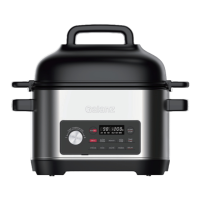
GETTING TO KNOW YOUR GALANZ MULTI-COOKER GETTING TO KNOW YOUR GALANZ MULTI-COOKER
GETTING TO KNOW YOUR GALANZ MULTI-COOKER
GETTING TO KNOW YOUR GALANZ MULTI-COOKER
CONTROL PANEL ADVANCED FUNCTIONS
Stop & Standby Mode
When the cooker is plugged in but not in operation, the display will
show the 4 lines inside the timer and 3 lines inside the temperature to
indicate that it is in Standby mode and ready.
Long press Start/Stop to stop a Smart Program at any time; the
cooker will go back to Standby mode.
Temperature / Time Adjustment
Press the TEMP/TIME button and then turn the Knob left or right to
set the desired cooking temperature and time.
1. For Temperature setting, turn the knob to select the desired
cooking temperature and the temperature will flash in the LED
display. Press the Knob once to confirm the Temperature setting.
2. For Time setting, press the TEMP/TIME button, then the LED will
be switched to Time setting mode. Turn the knob to the desired
cooking time and the time will flash in the LED display. Press the
knob or Start/Stop button once to confirm the Time setting.
3. To toggle between the Temperature setting and the Time setting,
press the TEMP/TIME button repeatedly.
Keep Warm
The Keep Warm setting will come on automatically for the slow cook,
roast, steam, and rice functions. Choose a Smart Program and set
your desired cook time and temperature.
NOTE:
The LED above the button will light up to indicate when the setting is ON.
Time/Temperature Knob
Use the knob to adjust the temperature.
Use the knob to adjust the cooking time up or down
Smart Programs
Refer to Smart Program Overview
section for information on each Smart Program
Control Buttons
Refer to Advanced Functions section for information
LED Display
*Temperature Display
Shown in units of °F or °C
*Time Display
Shown in hour-format 01:40=1hour and 40 minutes
Indicators
LOW / HIGH
Indicates when the slow cook function is set.
DELAY
Indicates when Delay function is ON
HEAT
Indicates when Smart Program is ON
WARM
Indicates when Warm function is ON
Smart Program
Slow Cook Max 08:00 hours Max 12:00 hours
Max 12:00 hoursMax 01:00 hour
Cannot be kept warm
Roast, Steam, Rice
Sauté, Sous Vide,
Air Fry, Grill
Max Time for Automatic
Keep Warm Setting
Max Time for Manual
Keep Warm Setting
If the Keep Warm function is ON after cooking has completed, the
display will show “WARM”, and count up to let you know how long
the cooker kept your meal warm.
If the Keep Warm function is OFF after cooking has finished, the
cooker will go into Standby mode.
You may use the Keep Warm function by selecting WARM when in
Standby Mode.
1. Press the TEMP/TIME button and the time will flash in the LED
display. Turn the TIME/TEMPERATURE knob to set the desired
time.
2. Once set, press the START/STOP button to begin the cooking
process. The display will count down.
NOTE:
The temperature setting on Warm is pre-set, and cannot be modified. Only time can
be adjusted.


 To Next Page
 Loading...