
 Need help?
Do you have a question about the Gallien-Krueger PLEX and is the answer not in the manual?
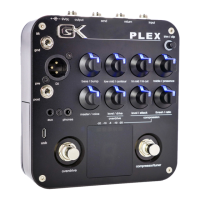
Input for supplied power supply. Requires negative center 9VDC/500mA.
1/4" analog input to receive the instrument signal.
Engages compressor or chromatic tuner (double tap).
Sets compressor threshold and ratio settings.
Sets compressor output volume and attack/release times.
Sets main output volume and EQ voicing.
Activating and adjusting the overdrive and compressor functions.
Activating and using the chromatic tuner function for tuning.
 General
| Channels | 1 |
|---|---|
| Bluetooth | No |
| Inputs | 1 x 1/4" |
| Outputs | 1 x XLR |
| Power Source | 9V DC power supply |
| Features | Overdrive, Compressor |
| Effects | Overdrive, Compressor |
| EQ Bands | Low, Lo-Mid, Hi-Mid, High |


 To Next Page