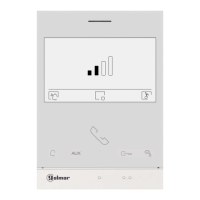
Description of the monitor when receiving a call and during communication.
4
*
( )
*
( )
Golmar se reserva el derecho a cualquier modificación sin previo aviso.
Golmar se réserve le droit de toute modification sans préavis .
Golmar reserves the right to make any modifications without prior notice.
golmar@golmar.es www.golmar.es
Sistemas de comunicación S.A.
For more information, see user manual“TART 4 X /G2+ .LITE
ART LITE/G2+4 X MONITOR
EN EN
Communication screen
Door panel call screen
The display : is shown when receiving a call or pressing the button on the standby monitor. In a call,
the push buttons with function will be illuminated in white and the push button will flash white. The
source of the image is displayed at the bottom right of the screen for 3 seconds. The call has a duration of 45
seconds.
The display : is shown during a communication process. During communication, the function buttons will
be illuminatedin white. The communication has a time of 90 seconds.
I Press the push-button to start communication with the displayed doorn call/ Auto switch-on:
panel.
In communication: Press the button to end communication with the displayed door panel. The
communication has a maximum duration of 90 seconds. Once the communication is finished,
the display will switch off.
Press the button below icon hange the source of the image as long as the system has moreto c
than one door panel or has an external camera connected and display has been activated (see
monitor manual and corresponding door panel manual). It is possible to make the change during
display, call and communication processes.
Press the button to a 1push- relayctivate the lock release (or device connected to the output of
the door panel) for 3 seconds (factory setting, programmable by the installer; see monitor
manual and corresponding door panel manual).
Press the button to activate the lock release (or device connected to the relay 2 output ofpush-
the door panel) for 3 seconds (factory setting, programmable by the installer; ees monitor
manual and corresponding door panel manual).
A
B
A
B
QUICK GUIDE
In call: End the tone on the monitor.call
In communication: Monitor volume settings.
TART 4 LITE/G2+ EN GRX REV.0224 V01
50126038
ART 4 XLITE/G2+ MONITORB
ART 4 XLITE/G2+ MONITOR
1
P1


 To Next Page
 Loading...