14
Instrucciones para conectar Trident PRO-S a la consola Switch
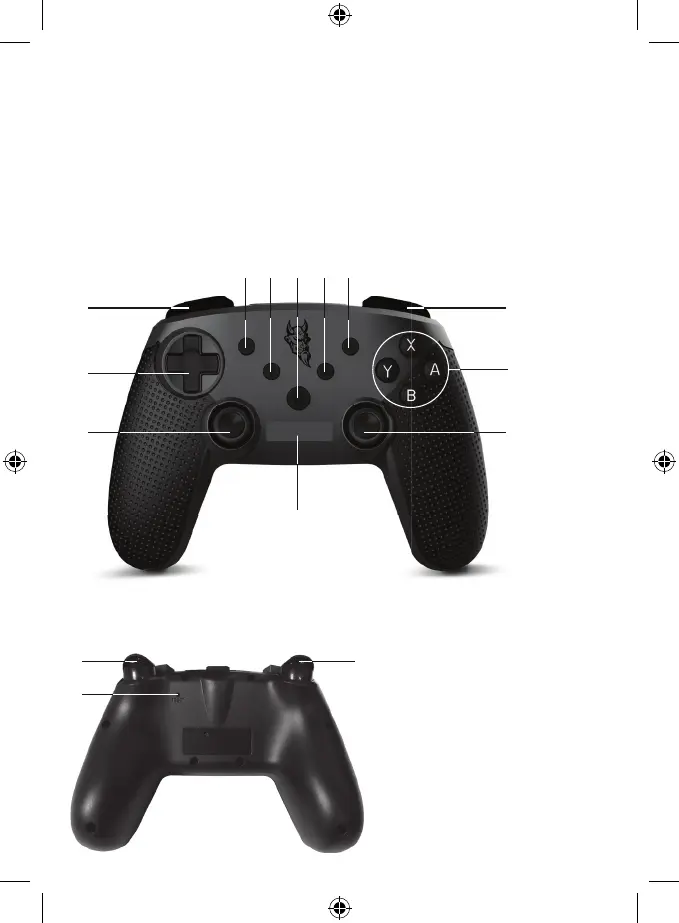
Botones en la parte frontal del mando:
Botones superiores y en la parte posterior del mando:
1. Pad direccional (cruceta intercambiable)
2. Botones de acción (Y, X, B, A)
3. Joystick derecho y botón R3
4. Right Analog Stick and R3 button
5. Botón INICIO
6. Indicador LED 1, 2, 3, 4
13. Botón RZ
14. Botón LZ
15. En la parte posterior del mando hay un
agujero para el botón de REINICIO
7. Botón Turbo: Activar y desactivar: presione y mantenga
presionado cualquier botón y presione Turbo
8. Captura de pantalla/COMPARTIR
9. Selección del menú
10. Selección del menú
11. Botón L
12. Botón R
1
11
6
3
2
12
4


 To Next Page