14
Instructions for connecting Trident PRO-S to the Switch Console
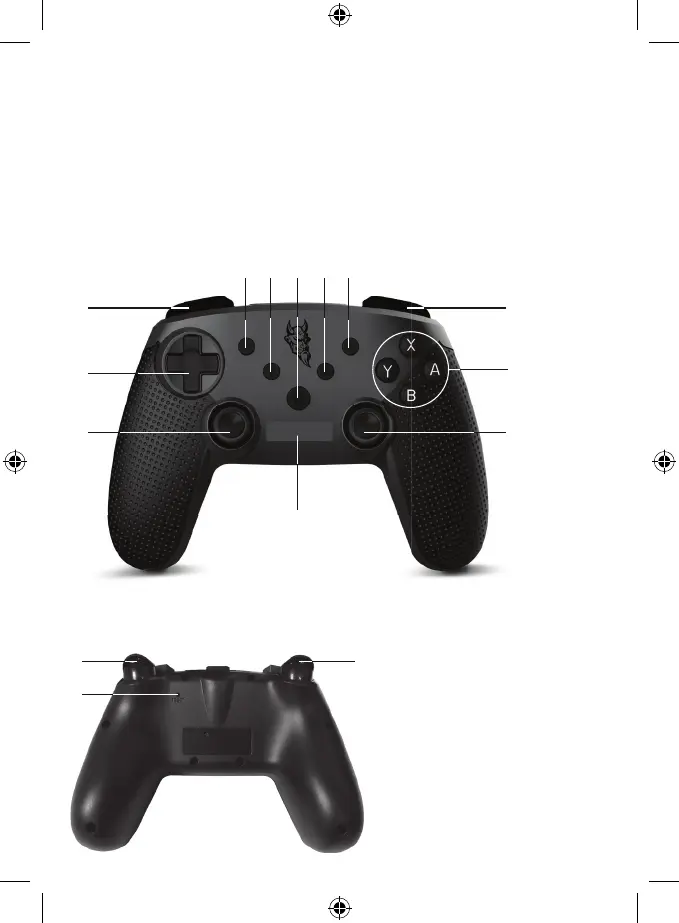
Buttons on the front of the controller
Buttons on the shoulder and the back of the controller
1. Directional Pad (changeable D-pad)
2. Action Buttons (Y, X, B, A)
3. Left Analog Stick and L3 button
4. Right Analog Stick and R3 button
5. HOME Button
6. LED Indicator 1, 2, 3, 4
13. RZ Trigger
14. LZ Trigger
15. There is a hole for the RESET button
at the back of the controller
7. Turbo Button: Activate & Deactivate: press and hold any
button and then press Turbo
8. Screenshot /SHARE
9. Menu selection
10. Menu selection
11. L Button
12. R Button
1
11
6
3
2
12
4


 To Next Page