EasyManua.ls Logo

GAME 4312 - User Manual

GAME 4312
8 pages
Print Icon
To Next Page IconTo Next Page
Loading...
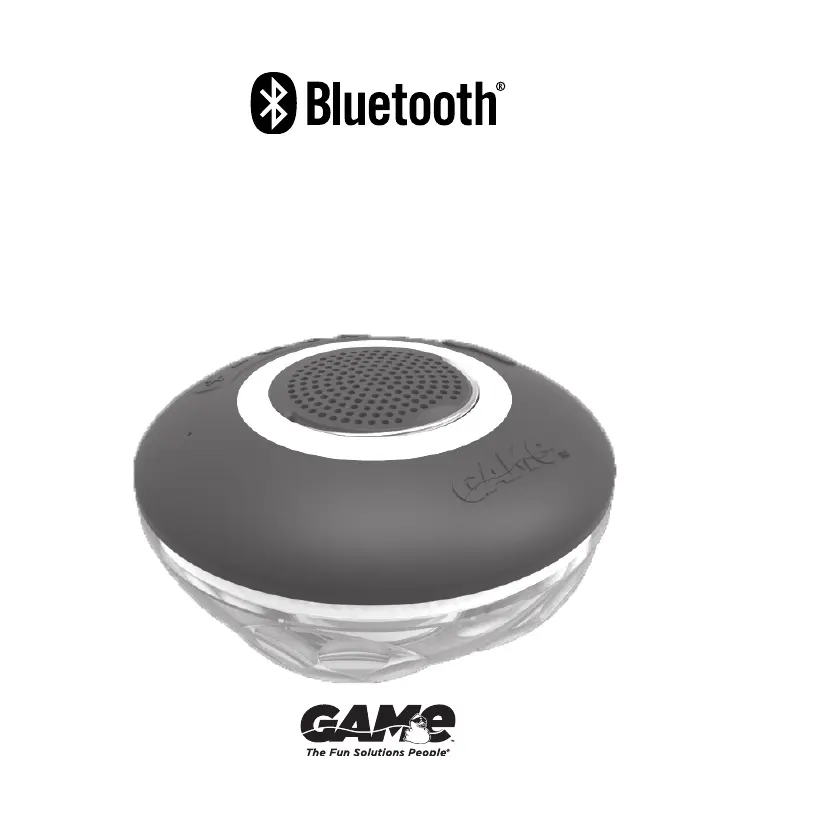
Wireless Speaker
& Light Show
Model 4312

Questions and Answers

  • J
    Joel MartinezAug 2, 2025
    Why is there no sound or the sound is low on my GAME Bluetooth speakers?
    • S
      Sean MartinezAug 2, 2025
      If you're experiencing low or no sound from your GAME Bluetooth speaker, ensure both your audio device and the speaker are adequately charged. Also, verify that the speaker isn't submerged in water and that there's no water inside it. Make sure the volume is turned up on both your audio device and the GAME Bluetooth speaker. Confirm that both units are powered on, not connected to another device, and that one unit is designated as the “parent.”
  • A
    Ashley MarquezAug 5, 2025
    What to do if I am unable to connect my GAME speaker and my Smartphone?
    • M
      mmcgeeAug 6, 2025
      If you're having trouble connecting your GAME speaker to your smartphone, first ensure that the speaker is properly paired with your smartphone and that your smartphone’s Bluetooth feature is activated. Also, make sure the speaker is within 30 feet of your Bluetooth device without obstructions like thick walls or other electronic devices. If these steps don't work, try turning off and restarting the speaker.
  • M
    Mrs. Miranda Lawson DDSAug 10, 2025
    What to do if my GAME 4312 have interference or static during playback?
    • G
      Gary DonaldsonAug 10, 2025
      To minimize interference or static during playback with your GAME speakers, avoid using the device in areas with concrete, metal, or other structures that may disrupt the signal. Ensure both the unit and the Bluetooth device have sufficient battery charge. Also, make sure your phone’s antenna is not blocked and is directed towards the speaker.
  • R
    Robert ThomasAug 14, 2025
    How to sync GAME 4312?
    • W
      wilkinsonmichelleAug 14, 2025
      To sync your GAME speakers: 1. Turn off both speakers. 2. Turn them on again, ensuring only one is set as the “parent.” 3. Wait for them to pair. If issues persist, reset the device to factory settings by pressing the light show button for 2 seconds. Also, clear the pairing history on your phone or Bluetooth device and redo the sync function.
  • A
    April JohnsonAug 18, 2025
    What to do if my GAME speaker unit doesn’t respond or power on?
    • S
      sparkAug 19, 2025
      If your GAME speaker unit is unresponsive, press and hold the power on/off key for 5 seconds to forcibly cut off the power. Then, try turning the device back on.
  • E
    eallenAug 23, 2025
    What to do if my GAME speaker has no light show?
    • A
      Ann GainesAug 23, 2025
      If your GAME speaker isn't displaying a light show, first, check to see if the product is fully charged. If it is, press the light button on the speaker to activate the light show feature.
  • J
    Jennifer GonzalesAug 28, 2025
    Why is the light show not bright on my GAME speaker on my pool floor?
    • C
      Christine WilliamsAug 28, 2025
      If the light show on your GAME speaker appears dim on your pool floor, first check if the product is fully charged. Also, be aware that if your pool floor is made of colored vinyl, “pebble tech”, or other dark materials, some colors may not be as visible.

Summary

Instructions and Warnings

Safety Warnings

Safety warnings regarding photosensitive epilepsy, operating plugged in water, and keeping away from children.

Product Notes

Product light show range, intensity variations, hanger use, and submergence limits for optimal performance.

Getting Started

Charging the Speaker

Steps to charge the speaker, including connecting the USB cable and observing the halo light indicator.

Device Operation

Powering On;Off

How to turn the wireless speaker on and off, indicated by a tone and light show.

Bluetooth Pairing

Steps to connect your Bluetooth device to the speaker, including searching and connection confirmation.

Bluetooth Disconnection

Procedure to disconnect the speaker from a paired Bluetooth device.

Music Controls

Controls for playing/pausing music, skipping tracks, and adjusting volume.

Light Show Control

Instructions on how to turn the light show feature on or off.

Phone Call Handling

How the speaker notifies of calls and how to answer or end them; call handling when paired.

Advanced Speaker Functions

Syncing Multiple Speakers

Instructions for pairing two speakers together for synchronized audio and light show.

Volume Sync

How to ensure both synced speakers play at the same volume level.

Unpairing Speakers

Procedure to unpair two previously synced speakers, returning them to independent operation.

Maintenance and Troubleshooting

Cleaning and Storage

Guidelines for cleaning the speaker with a cloth and storing it in a cool, dry place away from direct sunlight.

Troubleshooting Common Issues

Solutions for problems like the unit not responding, connectivity issues, or no sound/light.

Important Information

Battery Information

Details about permanently sealed batteries, replacement, and proper disposal methods.

FCC Compliance

Information regarding FCC rules, digital device compliance, and potential interference.

Limited Warranty

Warranty Terms and Conditions

Details of the 90-day limited warranty, coverage, exclusions, and limitations of liability.

Obtaining Warranty Service

Contact information and procedures for requesting warranty service or repairs.

GAME 4312 Specifications

General IconGeneral
BrandGAME
Model4312
CategorySpeakers
LanguageEnglish

Related product manuals