Installation Guide - Installationsanleitung - Guia de instalação - Инструкция по установке - 安装指南
C
E
D
E
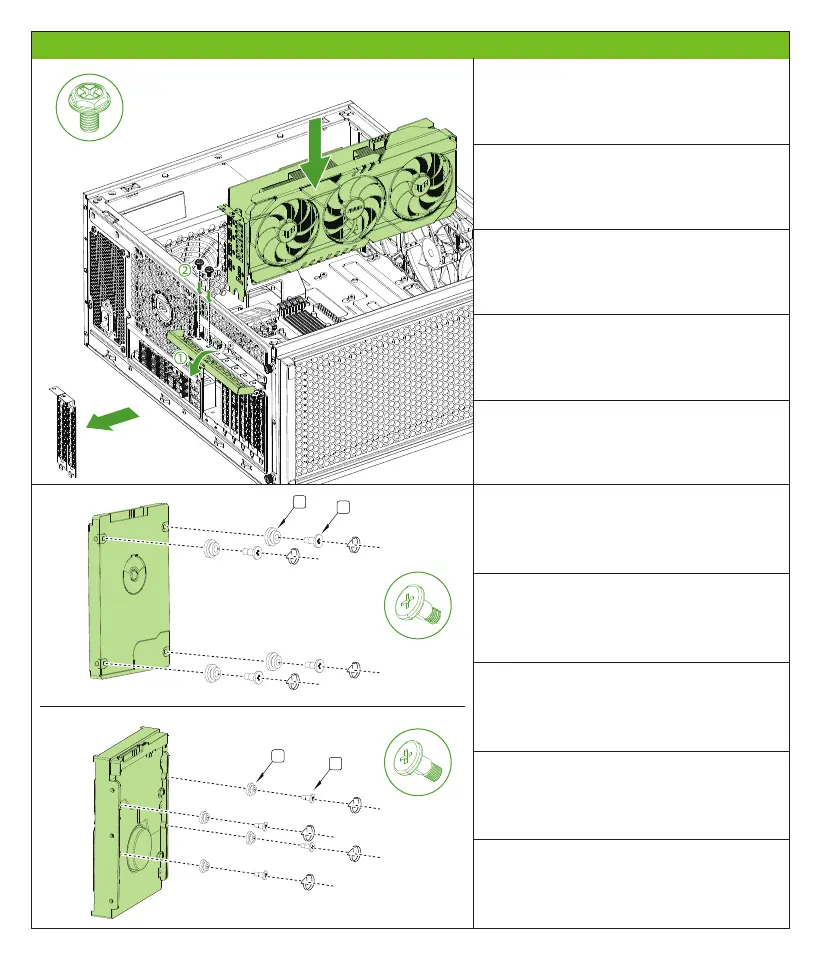
① Open the magnetic PCI-E baffle
② Remove the PCI-E interface card, put it in the
graphics card, lock the screw fixation
① Öffnen Sie die magnetische PCI-E-Schale
② Entfernen Sie die PCI-E-Schnittstellenkarte,
legen Sie sie in die Grafikkarte, sperren Sie die
Schraubfixierung
① Abra o defletor magnético PCI-E
② Remova a placa de interface PCI-E, coloque-a
na placa de gráfico, bloqueie a fixação do
parafuso
① Откройте магнитную перегородку PCI-E
② Снимите интерфейсную карту PCI-E,
поместите ее на видеокарту, заблокируйте
фиксацию винта
安装SSD和HDD免锁螺丝
①打开磁吸式PCI-E挡板
②取下PCI-E界面卡条,放入显卡,锁上螺丝固定
Install SSD and HDD lock -free screws
Installieren Sie SSD- und HDD -Sperrschrauben
Instale os parafusos sem trava SSD e HDD
Установить винты SSD и HDD -блокировки
- 6 -


 To Next Page