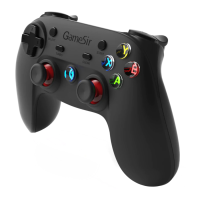
Power On / Off
Power On
Press HOME buon for 2 seconds to start.
Power Off
Long press HOME buon for 5 seconds to power off.
Battery Indication
LED1-4 lights on: Above 75% remaining baery
LED1-3 lights on: 50%-75% remaining baery
LED1-2 lights on: 25%-50% remaining baery
Only LED1 light on:10%-25% remaining baery
LED1 light flashes:Less than 10% remaining baery
Charging Tips
Charge under connecon state
When connect the charging cable, LED1-4 flashes in turn, and all lights keep on
when fully charged.
※Product Functions
Sleeping Function
1.The gamepad enters sleep state aer 1-minute disconnecon.
2.The gamepad enters sleep state aer 5-minute no acon.
Adjust / Turn off the button lights
Pressing L2+R2+R3, and then press D-Pad Up/Down buons to adjust the buon lights
brightness.
Adjust gamepad vibration strength
Pressing turbo buon, then press D-Pad Up/Down buons to adjust the vibraon
strength.


 To Next Page