Working procedure AA MTK 70_03
Ganshorn Medizin
Electronic GmbH
Working procedure for PowerCube Ergo /SSO Rev E
Revision: Rev01 30.11.2012
Ergo suction flow
Switch on suction pump and measure the flow at the patient tube incl. gas drying tube.
The suction flow is automatically controlled by the CO2 sensor.
Ergo pressure reducer outlet flow
Attention: Before starting this test check all connections being under pressure
for solid and tight mounting.
Remove the calibration gas tube from the PowerCube rear side (yellow), open the gas
bottle and check the outlet flow via flow meter (bottle pressure ≥ 10 Bar).
O
2
-cell T10/T90 time
Prepare the PowerCube like for the gas calibration and
open gas bottle.
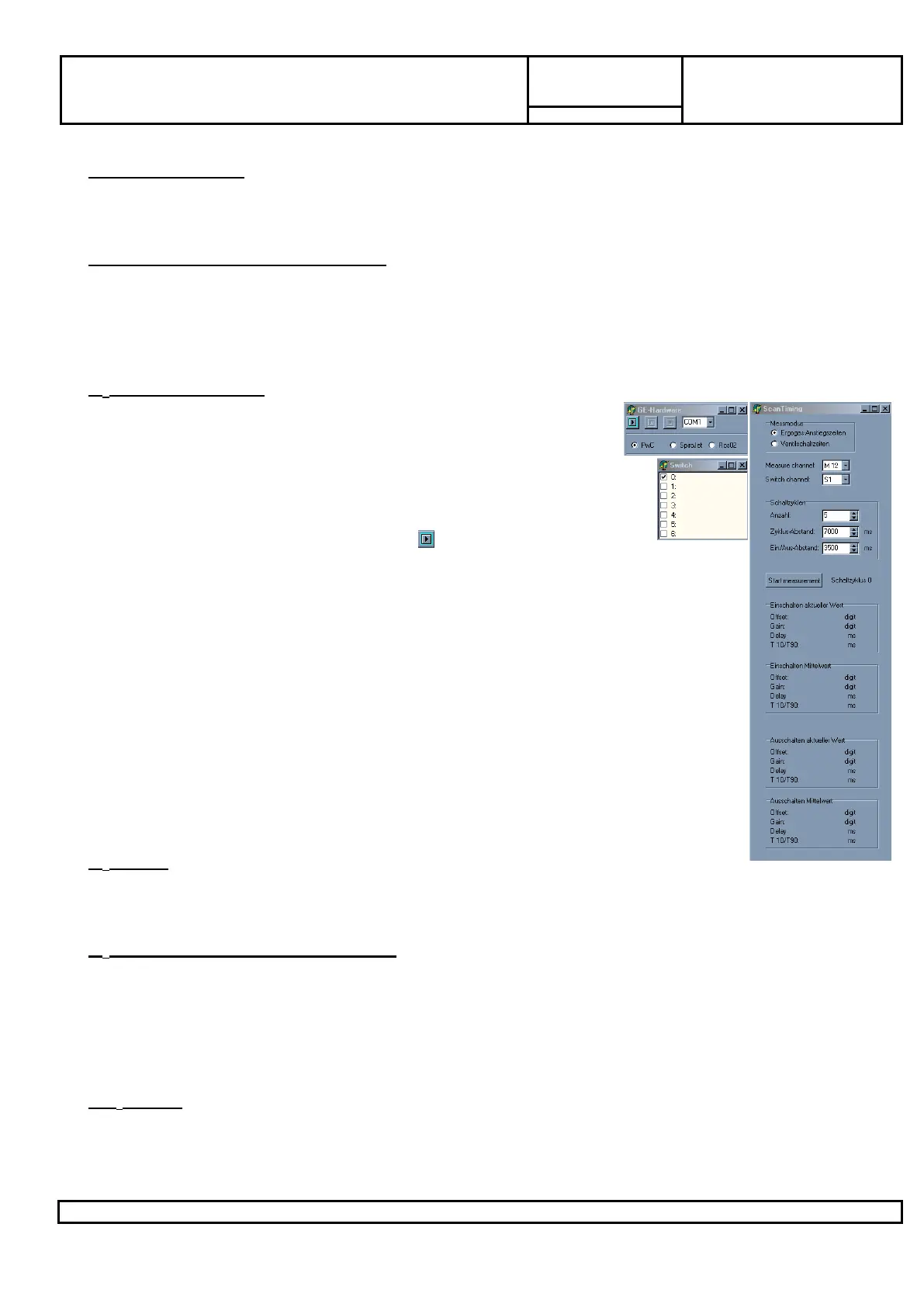
Close the LF8 or COM98IO and start PowerTool V1.3: the
windows GANSHORN-Hardware (Control), Switch (Switch)
and Scan Timing (View) must be screened.
Select in window GANSHORN-Hardware „PwC“ and the used
COM port. Start the PwC via button .
Activate in window Switch Channel 0.
Select in window „Scan Timing“ the „Messmodus“ „Ergogas-
Anstiegszeiten“ and set at Measure channel the respective measurement
channel for O
2
, Set at “Switch channel” the number for the Cal. Valve. All
the othe settings can be remained like set automatically (Schaltzyklen
Anzahl: 5; Zyklus-Abstand: 7000ms; Ein/Aus-Abstand: 3500ms). For
viewing all needed parameters sometimes the scan timing window must
be maximized.
Click the button „Start measurement“ for begin the automatically
performed test. Note the T10/T90 values from „Einschalten Mittelwert“ and
„Ausschalten Mittelwert“ in the protocol.
If one of those values is out of the allowable range then the oxygen sensor
must be replaced.
O
2
Offset
Activate the switch for suction pump and switch on the O
2
reset for 1 second. Adjust
the O
2
-Offset via R141 on the (Analog-Modul 1.3)
O
2
Gain (with Ergo-calibration gas)
Activate the switches for the suction pump Ergo and the Cal. valve and check the
indicated value in COM98IO.
Attention: The Gain depends from the used calibration gas and the O
2
-cell.
Calculation: ∆Digit(Gain)=((20,9%O
2
)-(O
2
concentration gas bottle))*125
Adjustment: Adjust the Gain via R140 on the (Analog-Modul1.3)
CO
2
Offset
Switch on the Ergo suction pump and check the value in COM98IO.
Adjustment: Set the value via potentiometer R26 (Analog-Modul 1.3) with running
suction pump.


 To Next Page
 Loading...