5
www.gantner.com
Valid as from September 27
th
2013 • Technical data subject to modifications without notice!
DB_GAT-NET-Lock7000--EN_20.indd • Art.Nr.: 573734
Mounting procedure
Note: Before mounting all locks of the locker system a test installation of
at least one lock and final function check must be performed like
described below. Only if the tests are successful the rest of the
locks may be mounted in the same way.
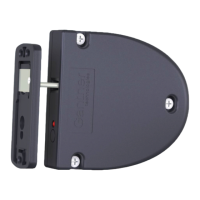
1. Drillthe3holes(3)fortheGATNET.Lock7000intothelockerwall.
2. Plug-intheconnectioncable(seepage6).
3. MounttheGATNET.Lock7000with3screws(3)ontheinsidelocker
wall.
Note: Use the right screws according to the type of locker material.
Attention:Themax. allowed tightening torque of thescrews
is 2 Nm.
4. Ontheinnerwallofthelockerdoormakethecut-out(62.6x68mm)
for the GAT NET.Lock Bolt Set 7200.
5. Ontheinnerwallofthelockerdoordrillthe4holes(6)formounting
the GAT NET.Lock Bolt Set 7200.
6. Ontheouterwallofthelockerdoormakethecut-out(67.6x93.5mm)
for the label carrier.
7. Mount the bolt set onto the inside wall of the locker door by using 4
screws as shown in the figure on the previous page.
Note:OnlyuseTorxpan-headmetalscrews,Ø3.5mm,length9.5mm.
Attention:Themax. allowed tightening torque of thescrews
is 2 Nm.
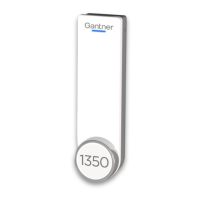
8. Push the label carrier onto the outside wall of the locker door. The
label carrier will hold in place with the lashes on the label carrier. No
screwsarerequired.
9. Stickthefrontlabel(11)ontothelabelcarrier.
Note: A customer-specific front label can be used to cover the LED
hole. A transparent field should be placed on the label to show
the LED light.
10.Closethedoortotest,ifthelockerdoorcanbeclosedeasilyandifthe
door shackle inserts into the opening of the GAT NET.Lock 7000.
123
11
7
3
3
4
5
1
Locker wall
50.0 mm
6.0 mm
94.0 mm
1.0 mm
Locker door (outside wall)
Locker door (inside wall)
Locker wall
74.0 mm
17.0 mm
17.0 - 17.5 mm
min. 18 mm
max. 26 mm
Inside of Locker
Locker Door
(Front view without lable carrier)
Locker Door
(Front view with lable carrier)
15.1 mm
32.6 mm
60.1 mm
Middle of the opening
for the door shakle
Locker wall
Locker Door
(Front view with lable carrier)

 To Next Page
 Loading...