4. Operation
DANGER! Risk of injury if the Turbotrimmer does not switch off when
you release the start button.
v Never bypass the safety devices or switches (e. g. by tying
the start button to the handle).
Risk of injury!
v Unplug the mains plug of the Turbotrimmer prior to each
adjustment of the working position, to the shaft length,
additional handle or plant guard!
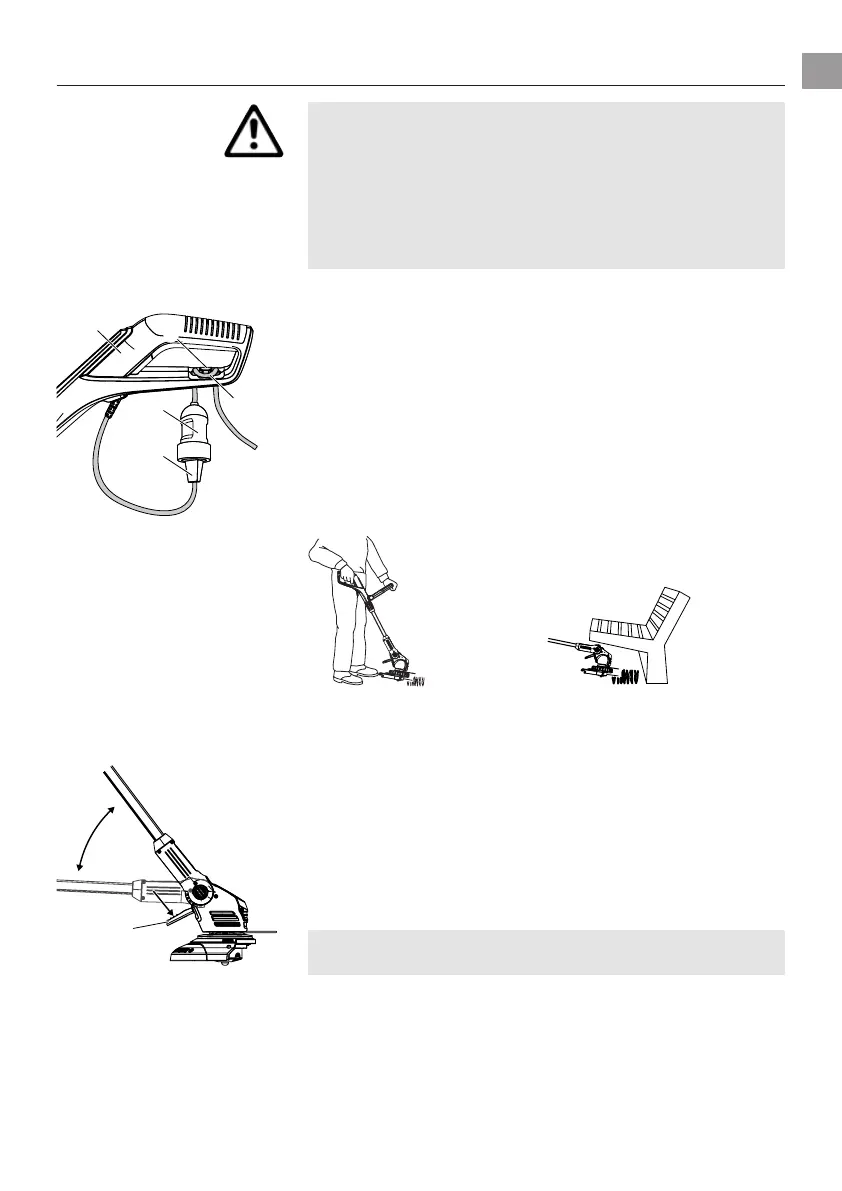
Connecting the trimmer:
q
e
t
r
1. Insert the loop of the extension cable
q
into the cable strain
relief
e
from below through the handle
w
and pull tight.
2. Plug the plug
r
of the trimmer into the socket
t
of the
extension cable
q
.
3. Plug the extension cable into a 230 V mains power supply.
Setting the working position:
z
Working position 1:
Standard trimming
Working position 2:
Trimming beneath obstacles
Working position 1:
For standard trimming.
Working position 2:
1. Press the foot pedal
z
and lower the shaft downwards into the
desired working position.
2. Release the foot pedal
z
and allow the shaft to engage.
CAUTION! Avoid contact between the ground and the trimmer
head in working position 1 + 2.
15
GB



 To Next Page