2. INITIAL OPERATION v (Fig. A – D)
4. SETTINGS v (Fig. G – Q)
Initial settings v (Fig. G):
1 Set language | 2 Set weekday | 3 Set time (hrs, min.) |
4 Ready for schedule
A video of the
commissioning
and setting
processes is
available here:
3. FUNCTION v (Fig. F)
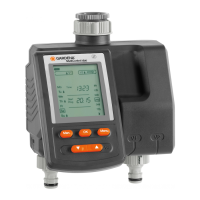
The Master Water Control offers two options
for watering your garden automatically on
a timer:
• Water 1 area of a garden with a water line
e. g. using a sprinkler, the GARDENA Micro-Drip-
System or the GARDENA Sprinklersystem
– or –
• Operate 2 ‒ 6 water lines one after another
using the GARDENA Automatic Water
Distributor, Art. 1197, see Fig. O (optionally
available). Each line can be activated up to
once a day.
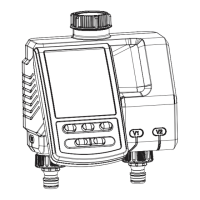
You can change the settings or move to the next
setting by turning the knob. You can confirm the
respective input by pressing the rotary knob.
Pressing the knob for longer than 3 seconds locks
or unlocks the display. If no more changes are
made to the settings, the LCD display switches off
after 5 minutes to save energy. To reactivate the
display, actuate the rotary knob. The default display
appears.
max. 1 year max. 4 weeks
min. 4 weeks
empty
*
Battery Condition *
Seasonal Run Time
Adjustment
Add / Create
a schedule
Schedule
Run Time
(max. 4 hrs)
Start Time (24 hrs)
Time
Weekday
Menu
Freqency
(7 days)
We
Sensor
Schedule 1
Active Watering
M T T F S SW
P1
ON
Schedule 1
(P1-P6)
Sensor
Schedule
on / off
dry
MENU
EN
19











 To Next Page