EasyManua.ls Logo

Gardena WT 1030 1825 - User Manual

Gardena WT 1030 1825
10 pages
Print Icon
To Next Page IconTo Next Page
Loading...
GARDENA
®
GB Operating Instructions
Water Timer electronic
S Bruksanvisning
Bevattningstimer electronic
NL Gebruiksaanwijzing
Elektronische watertimer
D Gebrauchsanweisung
Bewässerungsuhr electronic
FIN Käyttöohje
Elektroninen kasteluajastin
WT 1030
Art. 1825
Question and Answer IconNeed help?

Do you have a question about the Gardena WT 1030 1825 and is the answer not in the manual?

Summary

GARDENA Water Timer Usage Locations

Intended Use for Private Gardens

For private use in domestic and hobby gardens, outdoors, to control sprinklers/watering systems.

Usage Restrictions: Industrial and Chemical Use

Not for industrial purposes, chemicals, foodstuffs, or flammable materials.

GARDENA Water Timer Safety Guidelines

Outdoor Use Requirement

Only use the Water Timer outdoors. The water timer is not approved for indoor use.

Safety Warnings: Pressure, Filter, and Hose

Min/max operating pressure, filter maintenance, and hose strain advice.

GARDENA Water Timer Functionality

Control Knob and OK Button Operation

Explains the control knob and OK button for setting watering times, duration, and cycles.

Battery Status Indicator

Indicates low battery when Time, Start Time, and Frequency LEDs flash.

GARDENA Water Timer Setup and Connection

Battery Installation Procedure

Steps to insert the battery correctly, emphasizing polarity and timely replacement.

Connecting Water Timer to Taps

Instructions for connecting the water timer to taps with different thread sizes (G1" and G3/4").

Operating the GARDENA Water Timer

Optional Anti-Theft Protection Installation

Instructions for optional anti-theft bracket installation to prevent unit theft.

Setting the Watering Program

Step-by-step guide to setting time of day, watering start time, watering cycle, and watering time.

Setting Watering Duration (Run Time)

How to set the watering duration (Run Time Minutes) for the active program.

Adjusting Watering Time

Procedure to adjust watering time before the program starts without re-entering other settings.

Manual Watering Mode (ON)

How to activate manual watering for 30 minutes, overriding the set program.

Bad-Weather Function (OFF)

How to temporarily stop the programmed watering cycle due to rain.

GARDENA Water Timer Troubleshooting Guide

Troubleshooting: Manual Operation Failure

Possible causes and remedies for manual operation failure, including low battery or incorrect knob setting.

Troubleshooting: Watering Not Initiated

Possible causes and remedies for watering failure, including low battery, tap off, or incorrect program settings.

Troubleshooting: Premature Battery Depletion

Addresses premature battery depletion, suggesting alkaline batteries and proper data input timing.

GARDENA Water Timer Storage and Disposal

Battery Disposal Instructions

Instructions for proper disposal of used batteries at GARDENA dealers or recycling centers.

Water Timer Storage and Wintering

Guidance on storing the Water Timer in a dry place away from frost before winter.

GARDENA Water Timer Technical Specifications

GARDENA Water Timer Service and Support

Product Warranty Information

Details the GARDENA guarantee terms, conditions, and how to claim service.

Product Liability Statement

Statement on liability concerning improper repairs or use of non-original parts.

EU Certificate of Conformity

Certification of compliance with EU directives and standards for the unit.

Summary

GARDENA Water Timer Usage Locations

Intended Use for Private Gardens

For private use in domestic and hobby gardens, outdoors, to control sprinklers/watering systems.

Usage Restrictions: Industrial and Chemical Use

Not for industrial purposes, chemicals, foodstuffs, or flammable materials.

GARDENA Water Timer Safety Guidelines

Outdoor Use Requirement

Only use the Water Timer outdoors. The water timer is not approved for indoor use.

Safety Warnings: Pressure, Filter, and Hose

Min/max operating pressure, filter maintenance, and hose strain advice.

GARDENA Water Timer Functionality

Control Knob and OK Button Operation

Explains the control knob and OK button for setting watering times, duration, and cycles.

Battery Status Indicator

Indicates low battery when Time, Start Time, and Frequency LEDs flash.

GARDENA Water Timer Setup and Connection

Battery Installation Procedure

Steps to insert the battery correctly, emphasizing polarity and timely replacement.

Connecting Water Timer to Taps

Instructions for connecting the water timer to taps with different thread sizes (G1" and G3/4").

Operating the GARDENA Water Timer

Optional Anti-Theft Protection Installation

Instructions for optional anti-theft bracket installation to prevent unit theft.

Setting the Watering Program

Step-by-step guide to setting time of day, watering start time, watering cycle, and watering time.

Setting Watering Duration (Run Time)

How to set the watering duration (Run Time Minutes) for the active program.

Adjusting Watering Time

Procedure to adjust watering time before the program starts without re-entering other settings.

Manual Watering Mode (ON)

How to activate manual watering for 30 minutes, overriding the set program.

Bad-Weather Function (OFF)

How to temporarily stop the programmed watering cycle due to rain.

GARDENA Water Timer Troubleshooting Guide

Troubleshooting: Manual Operation Failure

Possible causes and remedies for manual operation failure, including low battery or incorrect knob setting.

Troubleshooting: Watering Not Initiated

Possible causes and remedies for watering failure, including low battery, tap off, or incorrect program settings.

Troubleshooting: Premature Battery Depletion

Addresses premature battery depletion, suggesting alkaline batteries and proper data input timing.

GARDENA Water Timer Storage and Disposal

Battery Disposal Instructions

Instructions for proper disposal of used batteries at GARDENA dealers or recycling centers.

Water Timer Storage and Wintering

Guidance on storing the Water Timer in a dry place away from frost before winter.

GARDENA Water Timer Technical Specifications

GARDENA Water Timer Service and Support

Product Warranty Information

Details the GARDENA guarantee terms, conditions, and how to claim service.

Product Liability Statement

Statement on liability concerning improper repairs or use of non-original parts.

EU Certificate of Conformity

Certification of compliance with EU directives and standards for the unit.

Overview

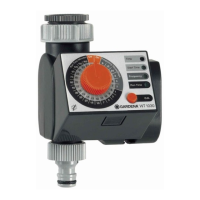
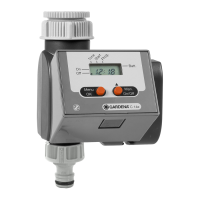
The GARDENA Water Timer electronic WT 1030 (Art. 1825) is designed for private use in domestic and hobby gardens, specifically for outdoor use, to control sprinklers and watering systems. It is not intended for industrial purposes or for use with chemicals, foodstuffs, easily flammable, or explosive materials.

Function Description:

The GARDENA Water Timer electronic allows users to set different watering cycles and times, independent of whether a sprinkler, sprinkler system, or drip-head watering system is being used. It automates garden watering according to a chosen program, enabling watering early in the morning or late at night when water evaporation is minimal, or while the user is away on holiday. Programming involves setting the time of day, watering starting time, duration, and cycle by turning a control knob pointer to the correct time and pressing an OK button. The timer will then open at the selected starting time. The device features a battery status display with three LEDs (Time, Start Time, and Frequency) that flash to indicate a flat battery, prompting replacement.

Important Technical Specifications:

  • Operating Pressure: Minimum 1 bar, maximum 12 bar.
  • Flow Medium: Clean fresh water.
  • Max. Water Temperature: 40 °C.
  • Number of Program-Controlled Watering Cycles per Day: Up to 3.
  • Watering Cycles per Week: Every day, every 2nd, 3rd, or 7th day.
  • Watering Time per Program: Selectable from 1, 3, 5, 7, 10, 15, 20, 25, 30, 45, 60, 75, 90, 120, 150, or 180 minutes.
  • Battery: 1 x 9 V alkali-manganese (alkaline) battery type IEC 6LR61.
  • Running Time (Battery): Approximately 1 year with a new alkaline battery having a nominal voltage of at least 9 V.
  • Tap Connection: Fitted with a sleeve nut for taps with a 33.3 mm (G1") thread. An adapter is supplied for connection to taps with a 26.5 mm (G3/4") thread.

Usage Features:

  • Battery Insertion: For functional safety, only a 9 V alkali-manganese (alkaline) battery type IEC 6LR61 should be used. The program is not saved when the battery is changed, requiring reprogramming. To insert the battery, the control unit is removed from the housing by pressing a release button, the battery is inserted with attention to polarity, and the control unit is re-attached. It's recommended to exchange the battery at the right time to prevent failure during long absences, ensuring the total operation time does not exceed one year.
  • Mounting: The Water Timer must be mounted in a perpendicular position with the sleeve nut pointing upwards to prevent water from entering the battery compartment.
  • Programming: The control unit can be removed for programming away from the tap. Programming involves setting the time of day, watering starting time, and watering cycle using the control knob and OK button.
  • Setting Time of Day: Turn the control knob to set the time on the inner light-grey scale and confirm with the OK button.
  • Setting Watering Starting Time: Turn the control knob to set the watering starting time on the inner light-grey scale and confirm with the OK button.
  • Setting Watering Cycle: Turn the control knob to set the watering cycle on the outer grey scale (Frequency Hours / Days) and confirm with the OK button.
  • Setting Watering Time: Turn the control knob to set the watering time on the outer black scale (Run Time Minutes) and confirm with the OK button.
  • Changing Watering Time: On hot or cooler days, the watering time can be changed without re-entering the time of day, starting time, or cycle. Select the new watering time on the outer black scale and confirm with the OK button.
  • Manual Watering (ON): For especially hot days when programmed watering is insufficient, the sprinkler or irrigation system can be turned on manually by turning the control knob to ON. The valve opens for 30 minutes, independent of the set program. To reactivate the set program, the watering time must be reset.
  • Bad-Weather Function (OFF): On rainy days, the programmed watering cycle can be stopped by turning the control knob to OFF. The valve closes and remains closed, independent of the set watering cycle. To reactivate the set program, the watering time must be reset.
  • Anti-Theft Protection (Optional): The GARDENA Anti-Theft Protection (Art. No. 1815-00.791.00) can be installed by fastening a bracket to the back of the timer with a screw, allowing a chain to be attached. The screw cannot be loosened once tightened.

Maintenance Features:

  • Filter Cleaning: The filter in the sleeve nut should be checked regularly and cleaned if necessary.
  • Battery Replacement: Replace the 9 V alkaline battery when the 3 LEDs (Time, Start Time, Frequency) flash, indicating a flat battery. Even if the battery is almost empty, the Water Timer ensures that an open valve is always closed, as less energy is required to close the valve than to open it.
  • Storage/Wintering: Store the Water Timer in a dry place away from frost before the first frost sets in.
  • Disposal of Flat Batteries: Flat batteries should be returned to a GARDENA dealer or disposed of properly at the nearest recycling centre. Only dispose of batteries when they are flat.

Troubleshooting:

  • Not able to open manually (ON/OFF): Possible causes include low battery capacity (3 LEDs flash) or the tap being turned off. Remedies are to insert a new alkaline battery or turn on the tap.
  • Watering not initiated: Possible causes include low battery capacity (3 LEDs flash), control knob turned to "Frequency" or "ON/OFF", or data input/changes made immediately before or during program start. Remedies are to insert a new alkaline battery, turn the control knob to "Run Time Minutes", or make changes before or after chosen starting times.
  • Battery flat after short working time: Possible cause is that the inserted battery is not alkaline. Remedy is to use an alkaline battery.

For any other problems, contact GARDENA Service. The product comes with a warranty covering material or manufacturing faults for one year from the purchase date, provided the unit has been handled properly, no unauthorized repairs have been attempted, and faults are not due to incorrectly installed or leaking batteries.

Gardena WT 1030 1825 Specifications

General IconGeneral
BrandGardena
ModelWT 1030 1825
CategoryLawn and Garden Equipment
LanguageEnglish

Related product manuals