EasyManua.ls Logo

Gardena C 1030 plus - User Manual

Gardena C 1030 plus
15 pages
Print Icon
To Next Page IconTo Next Page
Loading...
RUS
GARDENA
®
GB
F
NL
S
DK
C 1030 plus Art. 1862
GB Operating Instructions
Water Computer
F Mode d’emploi
Programmateur d’arrosage
NL Instructies voor gebruik
Besproeiingscomputer
S Bruksanvisning
Bevattningscomputer
DK Brugsanvisning
Vandingscomputer
RUS Инструкция по эксплуатации
Компьютер для полива
Question and Answer IconNeed help?

Do you have a question about the Gardena C 1030 plus and is the answer not in the manual?

Summary

Where to Use and Safety

Intended Use and Restrictions

For private garden use outdoors; not for industrial or chemical applications.

Battery and Setup Safety

Use correct battery type (9V alkaline); avoid indoor use and ensure proper setup.

Function and Controls

Device Controls Overview

Explanation of buttons (Rotary, OK, Menu, Man.) and their operational roles.

Display Levels Explained

Details of the 6 display levels showing current status and settings.

Display Indicators and Battery Status

Detailed Display Elements

Specific display items like time, start, duration, cycle, sensor, and Prog ON/OFF.

Battery Level Monitoring

Understanding battery levels, low power warnings, and battery replacement.

Putting into Operation

Battery Installation

Steps to insert the battery into the controller compartment correctly.

Connecting Water Computer

Instructions for attaching the device to taps using included adaptors.

Optional Sensor Connection

How to connect soil moisture or rain sensors for advanced watering control.

Programming Basics

Setting Time and Day

Procedure to set the current time and day of the week on the device.

Watering Modes Overview

Introduction to scheduled watering and sensor-controlled watering modes.

Entering Watering Programmes

Setting Start Time and Duration

Steps to define watering start times and how long each cycle runs.

Selecting Watering Frequency

Options for watering intervals: daily cycles or specific days of the week.

Advanced Watering and Sensor Control

Activating Watering Programmes

Enabling or disabling the programmed watering cycles (Prog ON/OFF).

Sensor-Controlled Watering

Setup and operation for watering based on soil moisture or rain sensor data.

Manual Operation and Programme Adjustment

Manual Valve Control

Instructions for manually opening/closing the valve and adjusting duration.

Modifying Watering Programmes

How to read and change existing programme settings without resetting.

Maintenance and Storage

Filter Cleaning

Procedure for checking and cleaning the internal water filter.

Storage and Overwintering

Guidelines for storing the unit safely, especially during winter.

Troubleshooting

Technical Data and Service

Technical Specifications

Key operating parameters like pressure, flow, temperature, and battery life.

Warranty Information

Details on the 2-year guarantee, its coverage, and limitations.

Overview

The GARDENA Water Computer C 1030 plus is an automatic watering system designed for private use in domestic and hobby gardens, exclusively for outdoor use. It controls sprinklers and watering systems, making it ideal for automatic watering during holidays. The system ensures that watering occurs at optimal times, such as early morning or late evening, to minimize evaporation and water consumption.

Function Description:

The Water Computer allows for fully automatic garden watering up to three times a day, with cycles every 8 hours. It can be used with various watering setups, including sprinklers, sprinkler systems, or drip head watering systems. The watering program is easily entered and managed using the device's controls.

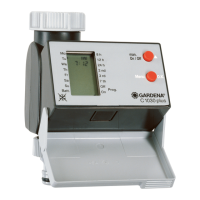
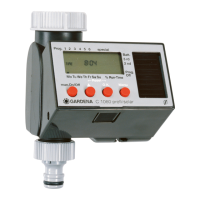
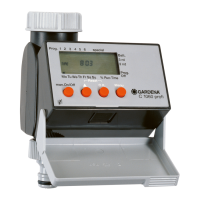
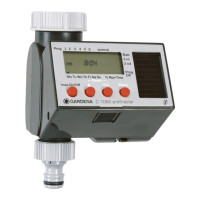
The device features a rotary button (①) for changing adjustable values, an OK button (②) to apply these values, a Menu button (③) to navigate through program levels, and a Man. button (④) for manual control of water throughput.

There are six display levels:

  • Level 1: Normal display.
  • Level 2: Current time and day of the week.
  • Level 3: Watering start time.
  • Level 4: Watering duration.
  • Level 5: Watering frequency.
  • Level 6: Switches the program on and off.

The display shows various indicators:

  • Weekdays (⑤): Current weekday or programmed watering days.
  • Time (⑥): Flashes when in input mode for current data (hours, minutes, day of the week).
  • am/pm (⑦): Display for 12-hour clock (e.g., in USA, Canada).
  • Start (⑧): Flashes when in input mode for watering start time.
  • Run Time (⑨): Watering duration (flashes when in input mode).
  • Watering cycle (⑩): Indicates watering frequency (every 8, 12, 24 hours; every 2nd, 3rd, or 7th day).
  • Prog ON/OFF (⑪): Watering program on (ON) or off (OFF).
  • Automatic mode sensor (⑫): Indicates that watering is controlled automatically via the sensor.
  • Sensor ON/OFF (⑬): Sensor ON (watering) or Sensor OFF (watering is not carried out).
  • Battery (⑭): Indicates five battery levels: 3 bars (fully charged), 2 bars (half full), 1 bar (low), 1 bar flashing (almost flat), and 0 bar (flat). If no bars are displayed, the valve will not open. If the battery becomes flat while the valve is open, it will close.

The Water Computer offers two watering modes:

  1. Scheduled watering: Uses input programs, with watering starting at a set time.
  2. Soil moisture sensor-controlled watering: Requires a GARDENA soil moisture sensor. Watering begins when the sensor registers dry soil. A previously set scheduled watering program is retained but not carried out in this mode. A two-hour watering pause is triggered after every watering cycle to allow the sensor to record soil moisture accurately.

Manual operation allows the valve to be opened or closed at any time. If a program-controlled valve is open, it can be closed early without altering the program data. The manual opening period can be adjusted from 0:00 to 0:59 minutes. If set to 0:00, the valve remains closed (child lock). If a manual watering period overlaps with a programmed start time, the programmed start time is suppressed.

Important Technical Specifications:

  • Min./max. operating pressure: 0.5 bar / 12 bar.
  • Flow medium: Clear fresh water.
  • Max. liquid temperature: 40 °C.
  • Number of program-controlled watering cycles per day: 3 x (every 8 hrs.), 2 x (every 12 hrs.), 1 x (every 24 hrs.).
  • Number of program-controlled watering cycles per week: Every day, every 2, 3 or 7 days; or individual selection of weekdays.
  • Watering duration: 1 minute to 7 hours 59 minutes.
  • Battery required: 1 x 9V alkaline manganese (alkaline) battery type IEC 6LR61.
  • Operating time of the battery: Approximately 1 year.
  • Minimum water output: 20-30 l/h for correct function.

Usage Features:

  • Setting up: Must be installed vertically with the sleeve nut at the top to prevent water from entering the battery compartment.
  • Programming: Can be done with the tap turned off to avoid getting wet. The control unit can be removed from the housing for mobile programming.
  • Battery replacement: Only a 9V alkaline manganese battery (IEC 6LR61) should be used. The battery should be replaced when the display shows only 1 bar to prevent failure during long absences.
  • Connecting to taps: Fitted with a sleeve nut (17) for G 1" (33.3 mm) threads. An adaptor (18) is supplied for G 3/4" (26.5 mm) threads.
  • Soil moisture or rain sensor (optional): Allows watering to be influenced by soil dampness or rainfall. If the soil is damp enough, the program will be stopped or prevented from starting. Manual operation is unaffected.
  • Anti-theft device (optional): GARDENA Anti-theft device (Art. No. 1815-00.791.00) can be fitted to secure the unit.
  • Emergency programme: If no sensor is inserted in sensor-controlled watering mode or if the connection cable is faulty, watering will occur every 24 hours for a maximum of 30 minutes.
  • Reset: Pressing the Man.-key and Menu-key simultaneously for 3 seconds restores factory settings, including setting all program data to zero and manual watering period to 0:30. Time and day of the week are retained.

Maintenance Features:

  • Filter cleaning: The filter (23) should be checked regularly and cleaned when necessary. This involves unscrewing the sleeve nut (17) from the tap thread, removing the adaptor (18) if present, and then removing and cleaning the filter.
  • Storage/Overwintering: To prevent frost damage, the Water Computer should be stored in a dry place after selecting "Prog. OFF" to stop the watering program.
  • Disposal: The product and flat batteries must be disposed of according to local environmental regulations, typically via municipal recycling collection centers.

Safety Instructions:

  • Not to be used by children or young people under 16, or anyone unfamiliar with the operating instructions, unless supervised or instructed by a responsible person.
  • Only for outdoor use.
  • Not for industrial purposes or in conjunction with chemicals, foodstuffs, easily flammable, or explosive materials.
  • Avoid tensile strain on the connected hose.
  • If the controller is removed while the valve is open, the valve remains open until the controller is refitted.
  • The LCD display may extinguish at high temperatures (over 60 °C) but will illuminate again when the computer cools down.

Troubleshooting:

The manual provides a comprehensive troubleshooting guide for common issues such as no display, manual watering not possible, watering program not being undertaken, the water computer not closing, and flashing watering cycle symbols. Remedies include checking battery polarity, replacing batteries, setting correct watering periods, turning on the tap, activating programs, and checking sensor connections. In case of other faults, contact GARDENA Service.

Gardena C 1030 plus Specifications

General IconGeneral
BrandGardena
ModelC 1030 plus
CategoryLawn and Garden Equipment
LanguageEnglish

Related product manuals